In a virtual call center, agents can work from anywhere. All they need is a computer, a headset and an Internet connection to access the platform and manage calls as they would in a traditional call center.
This model is based on VoIP telephony (calls made over the Internet), a cloud switchboard, supervision tools and CRM integrations that centralize all customer interactions.
The result: companies gain in flexibility, reduce infrastructure costs and can monitor team performance in real time.
In this comprehensive guide to the virtual call center, you’ll see :
- what exactly a virtual call center is
- how it works in practice
- which technologies are needed
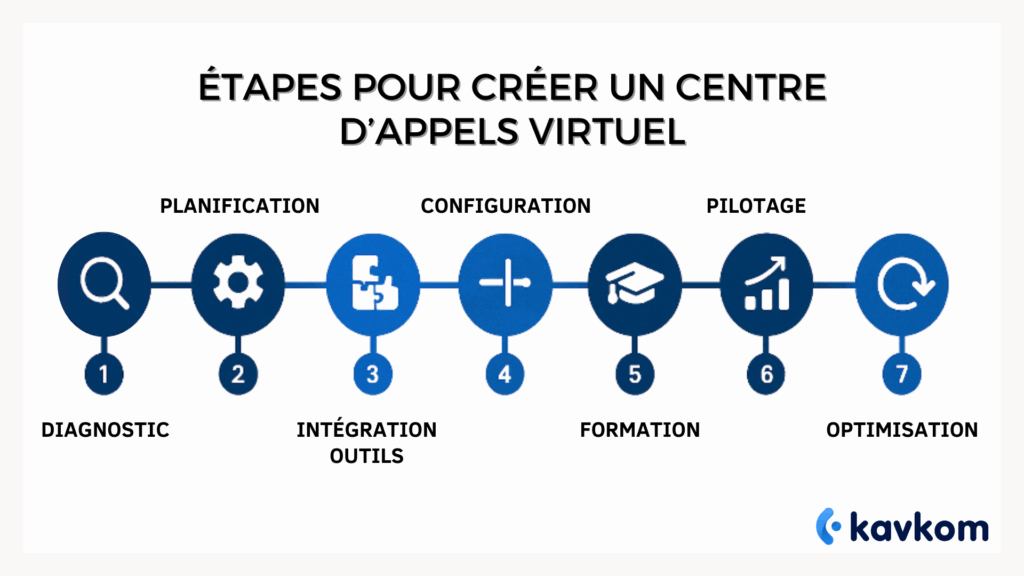
- and how to create your own virtual call center in 7 steps.
Points to remember :
- A virtual call center is a 100% cloud model: no hardware, agents connected remotely, a centralized interface to manage everything.
- Immediate flexibility: agents can be added or withdrawn in just 1 click, absorbing peaks in activity and recruiting without geographical limits.
- Reduced costs: no infrastructure to maintain, a pay-as-you-go model, automation that frees teams from repetitive tasks.
- Essential technologies: softphone, IVR, CTI, CRM integration, real-time supervision, RGPD compliance… everything is interconnected.
- 7 steps to success: diagnosis, solution selection, integration, configuration, training, management and ongoing optimization.
- With Kavkom, you save time, cut costs and improve your customer service performance right from the start.


Boostez la productivité de vos équipe commerciales grâce à Kavkom, le logiciel de téléphonie d’entreprise 100% cloud.
Planifier une démo
What is a virtual call center?
A virtual call center is a cloud-based solution for managing inbound and outbound calls remotely. Unlike traditional call centers, agents are not grouped together in the same physical location. They work from anywhere, connected to an online platform.
How it works
A virtual call center is based on a cloud telephony platform accessible via the Internet. Unlike a traditional call center, there are no switchboards set up in physical offices.
The entire infrastructure is hosted in the cloud. Agents simply connect to an online interface to manage calls.
Here’s how it works:
1. Calls arrive on a business number
Customers call a business number. Calls are received on the cloud telephony platform.
2. The system automatically routes calls
An IVR(interactive voice server) and routing rules direct the call to the right agent or team.
3. Agents answer calls via a softphone
Agents use a softphone or mobile application to answer calls.
4. Data synchronized with CRM
When the call comes in, the customer record can be displayed automatically thanks to CRM integration.
5. Supervisors monitor activity in real time
Managers can track calls, listen in on conversations and analyze performance via dashboards.
This allows a company to run a complete call center without any hardware or telephone infrastructure.
Advantages over a conventional call center
| Aspect | Classic center | Virtual center |
|---|---|---|
| Location | Single office | Remote, decentralized |
| Costs | Premises, equipment, utilities | Reduced, via cloud subscription |
| Flexibility | Fixed hours | Extended range, nomadic agents |
| Scalability | Slow | Fast, agents added in 1 click |
| Supervision | Physics | Dashboards and KPIs |
Example
A company receives a spike in calls during the holiday season. With a virtual call center, it can :
Reduce costs without sacrificing service quality.
Integrate freelance agents in just a few hours,
Train them remotely via the platform,
Step-by-step guide to creating your virtual call center
1. Assess needs and make an initial diagnosis
Before switching to a cloud call center, start with a clear diagnosis of your organization: number of inbound/outbound calls, type of requests, average handling time, customer satisfaction, friction points.
This upstream work enables you to structure the project according to your priorities: cost reduction, productivity gains, flexibility… At this stage, it’s also a good idea to examine the opportunities offered by artificial intelligence (chatbots, intelligent IVR, automation). For example, Bouygues Telecom has reduced the volume of calls handled by human agents by 30% thanks to the integration of chatbots, freeing up time for complex requests.(source)
Kavkom offers personalized support right from this stage: analysis of your current system, telecom audit, call flow simulation. This enables you to lay a solid foundation, with a configuration tailored to your objectives.
2. Solution selection and planning
Choosing the right cloud platform is decisive. You need a solution that’s scalable, secure, compatible with your business tools, and capable of keeping pace with your growth.
Planning involves structuring the deployment: number of users, integration priorities, human resources mobilized. A Forrester study revealed that a company that deployed Webex Contact Center achieved a 262% return on investment in 13 months, with a net value of $6.8 million.(source)
Kavkom facilitates this step with rapid installation, pre-established configuration templates and human support at every stage. The modular approach allows for gradual evolution without technical blockages. The modular approach allows for gradual evolution without technical blockages.
At this stage, everything hinges on the platform you choose. A cloud-based call center solution eliminates the need to purchase servers and allows you to set up a call center in just a few days.
3. Integration of technological tools
Once the solution has been chosen, the next step is to integrate the essential technological building blocks:
- Softphone for computer calls
- IVR for automatic call routing
- CTI for synchronizing telephony and CRM
- API to connect your internal tools
By 2023, 45% of companies have integrated AI into their call centers, reducing operational costs by an average of 30% thanks to the automation of repetitive tasks.(source)
With Kavkom, these integrations are ready to use: CRM connectors, script management, incoming call identification. Set-up is code-free, via an intuitive visual interface.
4. Configuration and installation
The aim here is to parameterize the solution to match your actual workflows. You define schedules, teams, routing rules, queues and user profiles. A logistics company has automated its processes using Robotic Process Automation, reducing the time spent on administrative tasks by over 50%.(source)
Kavkom simplifies this phase with a clear back-office, configurable templates and an integrated configuration wizard. You can test each scenario in real time before deployment, without having to rely on an external service provider.
5. Team training and support
Even if the tools are efficient, their effectiveness depends on how they are adopted. Training is therefore an essential lever: agents, supervisors and technicians need to master the environment. The integration of artificial intelligence in call centers has led to a 15% improvement in agent productivity, measured by the number of problems solved per hour(source).
Kavkom offers assisted onboarding, with access to interactive tutorials, responsive human support and e-learning modules. Supervisors can monitor agents’ skills development in real time via integrated coaching tools.
6. Post-deployment monitoring and follow-up
Once the call center is up and running, you need to monitor its performance: pick-up rate, average call duration, first call resolution rate, customer satisfaction. Automation via IVR has enabled a bank to significantly reduce calls requiring human intervention, increasing availability for complex requests.(source)
Thanks to its dynamic dashboards, Kavkom provides a real-time view of KPIs. Supervisors can intervene on the fly, reassign calls, listen to conversations in progress, or automate reports to adjust routes.
7. Optimization and return on investment
A cloud call center is never static. Once in place, it must evolve: adjustments to scenarios, enrichment of customer journeys, A/B testing, integration of new channels… Benchmarking has shown that transitioning to AI-powered call centers can reduce operational costs by 30-70%, while providing 24/7 coverage at no extra cost.(source)
Kavkom offers continuous optimization tools: real-time load monitoring via dashboards, configuration of alert rules according to your criteria, and voice analysis tools.
Boostez la productivité de vos équipe commerciales grâce à Kavkom, le logiciel de téléphonie d’entreprise 100% cloud.
Planifier une démoAdvantages of virtual call centers vs. traditional call centers
Migrating to a virtual call center is more than just a change of infrastructure. It’s an opportunity to reduce costs, gain agility and improve overall performance.
Here’s a clear comparison of the two models:
1. Costs
| Criteria | Traditional center | Virtual center (generic) | Virtual center with Kavkom |
|---|---|---|---|
| Infrastructure | Hardware, servers, premises required | No physical infrastructure required | No initial investment required |
| Operating costs | High fixed costs (rent, maintenance, electricity) | Significant reduction via the cloud | Cost optimization through all-in-one subscription |
| Cost per contact | Stable or rising | -27% on average thanks to automation (source) | Immediate reduction without compromising quality |
| Deployment | Long and complex | Fast, paperless | Commissioning in just a few days |
Kavkom enables companies to drastically reduce their costs, while maintaining a high quality of service.
2. Operational flexibility
| Criteria | Traditional center | Virtual center (generic) | Virtual center with Kavkom |
|---|---|---|---|
| Recruitment | Local, limited to geographical area | Remote agents, expanded recruitment | International recruitment, integration in just a few clicks |
| Activity peaks | Fixed capacity | Expandable team to meet seasonal needs | Instant scalability via the platform |
| Work organization | Attendance mandatory, fixed hours | Teleworking, extended working hours | Flexible management, intuitive control interface |
| Team integration | On site, longer lead times | Remote, accelerated process | Fast onboarding with personalized cloud access |
With Kavkom, adding or removing agents is just a few clicks away, with no logistical constraints.
3. Performance
| Criteria | Traditional center | Virtual center (generic) | Virtual center with Kavkom |
|---|---|---|---|
| Performance monitoring | KPIstracked manually, fragmented data | Real-time monitoring with dashboards | Clear interface with detailed reporting |
| Agent productivity | Average, depends on working conditions | +15% thanks to AI and automated tools(source) | Continuous optimization thanks to customizable scripts and integrated monitoring tools scripts and integrated AI |
| Request resolution | Slower, fewer unified channels | Better coordination through centralized tools | Faster resolution with integrated customer history |
| Continuous improvement | Long, compartmentalized processes | Easy-to-use data | Fine analysis for real-time adjustments |
In practice, a virtual call center enables companies to transform their call management. Teams can work remotely, supervisors monitor performance in real time, and the telephony infrastructure becomes much simpler to manage.
Companies are thus moving from a cumbersome model that is difficult to scale up to a more flexible cloud telephony platform. With a solution like Kavkom, teams have a complete call center accessible via the Internet, with call supervision, intelligent routing, CRM integration and real-time management tools.
All with no telephone infrastructure to maintain, no technical installation and no contractual commitment.
How much does a virtual call center cost?
The cost of a virtual call center depends on several factors: the number of agents, the features used and the telephony solution chosen.
But in most cases, the cloud model remains much more affordable than a traditional call center.
Here are the main cost elements.
Telephony software
Virtual call center platforms generally operate on a per-user subscription basis.
Depending on the solution, rates often vary between :
- 20 and €70 per agent per month
- depending on the features included (supervision, dialer, analytics, CRM integration)
Some solutions then add pay-as-you-go modules to activate certain advanced functions.
Telephone communications
Calls can be :
- included in subscription
- or billed by the minute, depending on destination
In some cases, incoming and outgoing calls are unlimited, depending on the country.
Infrastructure costs
Unlike traditional call centers, a virtual call center does not require :
- physical switchboard
- internal telecom server
- hardware maintenance
Agents simply use a computer, headset and Internet connection.
A concrete example
A team of 10 agents using a cloud solution can deploy a complete call center in just a few days, without heavy initial investment.
With a solution like Kavkom, companies have a VoIP cloud telephony platform with :
- cloud switchboard
- real-time supervision
- CRM integration
- productivity tools for sales teams
There’s no commitment, and billing is prorated, so you can adjust the number of lines to suit your business.
Who should use a virtual call center?
A virtual call center is not just for large companies. Today, many organizations use this model to structure their call management without heavy infrastructure.
Here are the situations where a virtual call center brings the most value.
Sales teams and prospecting
Sales teams often use virtual call centers to manage prospecting campaigns.
Agents can :
- call directly from their computer
- track their performance in real time
- record exchanges in CRM
Features such as predictive dialer and click-to-call increase the number of successful calls and save time on each interaction.
Customer support and after-sales service
Companies with a high volume of incoming calls can use a virtual call center to structure their customer service.
In particular, the system enables :
- distribute calls among agents
- reduce waiting times
- monitor performance indicators
Supervisors can also analyze calls to improve service quality.
Multi-site companies or telecommuting teams
A virtual call center is particularly well suited to companies whose teams are spread over several sites or work remotely.
As the entire infrastructure is hosted in the cloud, agents can connect from anywhere and access the same platform.
Startups and growth companies
Growing companies often need to structure their call management quickly.
With a cloud solution like Kavkom, you can set up an operational call center in just a few days, without any hardware or technical installation.
Teams then have a complete VoIP telephony platform, with call supervision, CRM integration and real-time management tools.
Boostez la productivité de vos équipe commerciales grâce à Kavkom, le logiciel de téléphonie d’entreprise 100% cloud.
Planifier une démoEssential technologies for a virtual call center
Setting up a high-performance virtual call center requires much more than just an Internet connection. Several technological building blocks are essential to guarantee call qualityoperational fluidity, data security and agent efficiency.
1. The softphone
This is the basic tool. It’s software that lets you make and receive calls directly from a computer or smartphone, via the Internet (VoIP). It replaces the traditional physical telephone.
- Intuitive agent interface
- High-quality audio calls
- Multi-channel management possible (voice, chat, SMS)
2. IVR (Interactive Voice Response)
The IVR automatically directs calls according to the customer’s choices (“press 1 for support, 2 for billing…”).
- Reduced waiting time
- Automation of simple routes
- Enhanced user experience
3. CTI (Computer Telephony Integration)
CTI connects telephony to the computer: when a call comes in, a customer record opens automatically.
- Time-saving for the agent
- Immediate personalization of the exchange
- Complete history at your fingertips
4. CRM and API integration
A modern virtual call center must be able to interface easily with CRM tools (HubSpot, Salesforce, Zoho, etc.) and other business tools via API.
- Real-time synchronization of customer data
- Task automation (ticket creation, reminders, notes, etc.)
- 360° view of the customer journey
5. Security and RGPD compliance
With sensitive data exchanged on every call, security is crucial.
- Encryption of calls and recordings
- RGPD-compliant secure hosting
- Access control, connection logging
6. Advanced features: predictive dialer, supervision, analytics
A good tool must also integrate :
Some advanced features are particularly useful for effectively managing a virtual call center.
Predictive dialer
The predictive dialer automatically dials several numbers and connects the agent only when a caller goes off-hook. This increases the number of successful calls and reduces time wasted on ringing or answering machines.
Automatic Call Distribution (ACD)
An ACD (Automatic Call Distribution) system distributes incoming calls to agents according to different rules: availability, competence, language or priority. This reduces waiting times and improves call handling quality.
Queue management
Incoming calls can be placed in intelligent queues. The system informs callers of the estimated waiting time and distributes calls as agents become available.
Real-time supervision
Supervisors can monitor agent activity live via a dashboard: calls in progress, waiting times, team availability, individual performance.
Analysis and reporting
Reports enable analysis of call center performance: call volume, pick-up rate, average call duration or first call resolution.
This data helps managers identify areas for improvement and adjust team organization.
With a solution like Kavkom, these supervision, routing and analysis tools are integrated directly into the cloud telephony platform, without any technical installation or telephone infrastructure.
The 3 best software packages for creating a virtual call center in 2025
Choosing the right software is a decisive step in successfully setting up your virtual call center. The ideal solution must combine ease of deployment, functional performance, compatibility with your business tools and the ability to grow with your needs.
Here are three reference software products for 2025 that meet these requirements.
1. Kavkom The all-in-one solution for modern teams
Kavkom stands out for its 100% integrated cloud approach, with no hardware to install. In just a few clicks, you can set up a complete call center: softphone, IVR, CTI, CRM integration, real-time supervision, recording, analytics… All in an intuitive interface designed for non-technical users.
- Flexible pricing: pro rata subscription, no commitment
- Rapid deployment: up and running in less than a week
- Out-of-the-box integrations: HubSpot, Salesforce, Zoho, Pipedrive
- Use cases: prospecting centers, customer support, multi-site sales teams
Kavkom is ideal for organizations looking for a robust, scalable tool that’s easy to manage on a day-to-day basis.
2. Aircall An intuitive platform for agile sales teams
Aircall is a popular cloud telephony solution for startups and scale-ups. It offers a user-friendly interface and connects easily to some forty CRM and business tools.
- Features: call queuing, call tags, analytics, IVR, click-to-call
- Packages from €30/month per user
- Excellent UX: quick installation, smooth operation, online support
- Ideal for: sales teams, customer support, after-sales service
Aircall is ideal for businesses that want to combine simplicity, design and connectivity without technical overload.
3. Ringover A multi-channel, international solution
Ringover combines telephony, messaging, video and SMS in a single platform. Its advanced supervision module and coaching tools make it an ideal solution for call centers with demanding performance monitoring requirements.
- Multilingual and multi-country: perfect for international teams
- Advanced features: voice analysis, supervision, omnichannel integration
- Customized pricing based on volume and options
- Target audience: structured call centers, growing customer service teams
Ringover is designed for organizations seeking total control over their telephony activities, with a strong analytical dimension.
These three solutions provide a solid foundation for creating a high-performance virtual call center. The choice will depend on your priorities: simplicity, supervision, flexibility or analytical power. Kavkom is a complete solution for companies wishing to rapidly deploy a virtual call center and manage their calls from a centralized interface.
Strategic advice to convince management
To win management support, it’s essential to present the creation of a virtual call center as a strategic decision, and not simply as a technical change. Here are a few levers to activate to build a solid argument:
1. Highlight the economic benefits
Cost reduction remains the most persuasive argument for a management committee:
- Cloud call centers eliminate the need for heavy investment (hardware, infrastructure) and offer a more flexible, scalable pay-as-you-go model.(relationclientmag.fr)
- By 2023, 60% of contact centers will have switched to CCaaS (Contact Center as a Service) solutions, gaining flexibility while reducing their operating costs.
(yelda.fr)
2. Rely on measurable productivity
Performance gains are also key:
- AI integration increases agent efficiency:+14% productivity, measured by the number of problems solved per hour(lemonde.fr).
- Real-time analysis tools enable faster, better-controlled decisions.
3. Use real-life examples
Many decision-makers have already opted for Kavkom to modernize their infrastructure. Results include:
- Full deployment in less than a week for multi-site structures
- Immediate reduction in team workload thanks to automation
- Improved resolution rate in the first few weeks
Kavkom offers an intuitive, scalable platform, interconnected with market CRMs. Its adoption is a recognized transformation lever.
FAQ – Frequently asked questions
How many agents can a virtual call center handle?
Most cloud platforms can manage anything from a few agents to several hundred.
Capacity depends above all on the solution used and the company’s internal organization.
With a cloud-based platform, agents can be added or removed quickly as business activity evolves.
How does a virtual call center work in practice?
A virtual call center operates via an online platform. Agents log in with a simple computer and headset, from anywhere.
Call management, customer tracking and statistics are centralized in cloud-based software.
Calls are routed over the Internet (VoIP), customer records open automatically on screen, and supervisors can monitor activity in real time.
How long does it take to deploy a virtual call center?
Deploying a CCaaS solution is much faster than an on-premise project. For most companies :
| Step | Lead time | This speeds up the process |
|---|---|---|
| Needs audit & planning | 1 – 3 days | Turnkey audit templates supplied by service provider |
| Platform configuration (call queues, IVR, CTI, CRM integrations) | 1 – 5 days | No-code interface, pre-configured CRM connectors |
| Internal testing & validation | 1 – 2 days | Predefined test scenarios + secure sandbox |
| Onboarding agents & going live | 1 – 2 days | Online training, interactive tutorials |
Total: 4 to 12 working days in most cases.
At Kavkom, a “standard” deployment (50 agents, CRM integration) is often up and running in less than a week, thanks to dedicated support.
How do you manage activity peaks and scalability?
The cloud model is elastic: add or remove agent licenses in 1 click, activate routing/overflow rules and monitor load in real time. You only pay for the seats you use, which means you can absorb peaks without any lasting cost overruns.
What’s the difference between a virtual call center and a contact center?
A virtual call center focuses primarily on managing inbound and outbound telephone calls. A contact center can integrate other channels such as email, chat or social networks.
Many companies choose a virtual call center when they want to improve the management of their telephone communications without complicating their infrastructure.
Conclusion
Today, a virtual call center enables companies to manage their calls much more flexibly. Teams can work from anywhere, supervisors monitor performance in real time, and call management integrates directly with business tools such as CRM. Telephony thus becomes a genuine management tool for sales and customer service teams.
This model also reduces technical constraints. No need for heavy telephone infrastructure or on-site maintenance. With a cloud solution, companies can rapidly deploy a call center, adjust the number of agents according to activity, and structure their customer relations processes.
For companies wishing to implement this type of organization quickly, Kavkom offers a VoIP cloud telephony solution designed for sales teams and in-house call centers. The platform manages calls, monitors performance and connects telephony to CRM, all with no commitment and prorated billing, making it easy to adapt the tool to changes in business activity.