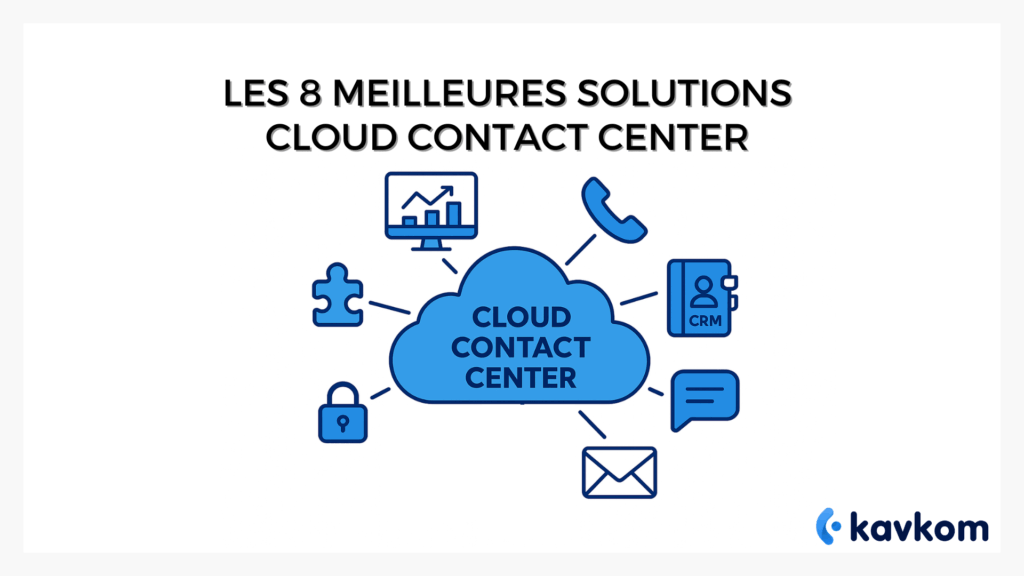
Unlike on-site call centers, a cloud contact center solution operates entirely via the Internet. There are no servers to install or complex infrastructure to maintain. Agents can make and receive calls, monitor activity and access customer data from a single interface.
In this article, we compare 8 cloud contact center solutions used by businesses to manage their contact centers and improve team productivity. We have analyzed each platform according to concrete criteria: features, integrations, pricing flexibility and ease of deployment.
Points to remember
- A cloud contact center centralizes all your channels (calls, e-mails, SMS, chat) and simplifies customer relationship management.
- With our no-commitment, pro-rated solutions, you can tailor your costs to the actual volumes of your teams.
- Key criteria for comparison include rich functionality (CRM, real-time supervision, routing), security and quality of support.
- The comparison of the best platforms shows differences in price, integration and services, which should guide your choice according to your needs.


Boostez la productivité de vos équipe commerciales grâce à Kavkom, le logiciel de téléphonie d’entreprise 100% cloud.
Planifier une démo
Understanding the cloud contact center and its challenges
A cloud contact center is software that enables call center communications to be managed directly in the cloud.
Unlike traditional on-site call centers, there are no servers or infrastructure to install.
Agents simply use a web interface or application to make and receive calls, track customer interactions and access monitoring tools. This model is often referred to as CCaaS (Contact Center as a Service).
This digitalization is not a technological coquetry. It responds to very real needs: the pressure to reduce costs, improve agent productivity and guarantee a better customer experience. With web-based contact center software, it becomes possible to manage all channels of communication channels (voice, e-mail, chat) seamlessly, without heavy infrastructure.
In addition, modernizinga contact center brings a strategic benefit: tracking the entire customer journey. When all information is grouped together, your teams can anticipate, personalize and make each exchange more human.
Cloud contact center vs. traditional call center
Before the advent of the cloud, contact centers relied on on-site infrastructures. This often involved dedicated servers, technical installations and maintenance by IT teams.
With a cloud contact center, the infrastructure is hosted online. Agents simply access the platform via the Internet, from a PC or an application.
| On-site call center | Cloud contact center |
|---|---|
| Heavy-duty technical equipment | Rapid deployment |
| Internal maintenance | Automatic updates |
| Limited capacity | Immediate scalability |
| High initial investment | Pay-as-you-go |
For companies with variable call volumes or teams spread over several sites, the cloud greatly simplifies contact center management.
The benefits of a no-obligation solution
Adopting a cloud-based model frees you from contractual and hardware constraints. With a no-commitment solution, companies can adjust their usage to the pace of their business. Contact centers with strong seasonal variations can activate more stations during peak periods, and then reduce them afterwards, without penalty. The result: you benefit from flexible, no-commitment invoicing, calculated on a pro rata basis according to your usage – a real lever for reducing costs.
Another advantage is ease of commissioning. Where a traditional system requires weeks of installation, a cloud contact center is available in a matter of days. Updates are automatic, the infrastructure invisible, and the learning curve low. Teams quickly gain in productivity and performance.
Kavkom is a perfect example of this model. Its platform enables companies tomanage their calls and prospecting campaigns directly from the cloud, without the need for hardware. Thanks to prorated billing, companies can modulate their usage according to their real needs, with human support available from the moment of installation.
Essential criteria for comparing cloud contact centers
By far, all offers are alike. To make an effective comparison, here are the criteria to examine closely:
Flexible pricing and no commitment
Choose adaptable models that allow you to adjust licenses according tocontact center activity, manage all channels and track customer requests without getting stuck in a rigid contract. A proactive supplier makes all the difference.
Comprehensive functionalities (real-time supervision, recording, CRM integration)
Check for tools such as real-time supervision, CRM integration, interactive voice response, coaching and workflow tracking. A good system should be able to manage inbound and outbound calls, work on customer data and addAI bricks where necessary.
Security, compliance and responsive technical support
Protecting customer data is central. Make sure that the supplier guarantees a high level of service, offers clear support and provides a real workspace for managing security and updates. The aim: to meet team needs without disrupting service.
| Criteria | Please check | A concrete example |
|---|---|---|
| Flexibility | No-obligation contract, pro rata billing | Activate 10 agents in high season, 5 the rest of the year |
| Features | CRM, IVR, real-time supervision | Prospecting campaign with automatic follow-up |
| Security & Support | Reactive assistance, RGPD compliance | Data in figures, support available within minutes |
Comparison of the 8 best cloud contact center solutions
Kavkom
The Kavkom platform focuses on cloud telephony and sales team performance.
It manages :
- incoming and outgoing calls
- call routing and IVR
- real-time supervision
- prospecting campaigns with predictive dialer
The solution integrates with market-leading CRMs such as Salesforce, HubSpot, Zoho and Pipedrive to synchronize calls and customer history.
Deployment is 100% in the cloud, with no hardware to install, pro rata billing and no commitment.
| Criteria | Reference |
|---|---|
| Price | Cloud Telephony: €8 / €24 excl. tax / user / month; “Pro” on quotation; Predictive Dialer: €50 / €83 excl. tax / user / month; “Pro” on quotation; Robot Dialer: €83 excl. tax / user / month, billing from €0.019/min in France. Kavkom offers a modular, no-commitment package, with pro rata billing. Rates vary according to the features activated (cloud telephony, predictive dialer, robot dialer). |
| Highlights | VoIP + dialers + CRM |
| Integrations | Zoho, Salesforce, HubSpot, Pipedrive |
| Ideal for | Prospecting, support, real-time coaching |
Boostez la productivité de vos équipe commerciales grâce à Kavkom, le logiciel de téléphonie d’entreprise 100% cloud.
Planifier une démoRingover
Positioned as an all-in-one solution, Ringover shines through its marketplace of integrations and web/mobile/desktop apps. Its strengths lie in flexible routing, usage statistics, campaigns and multi-channel messaging.
The ecosystem fits in well with modern CRM stacks and coaching tools. For teams already equipped, it’s a quick way of adding telephony to the heart of the contact center without redesigning. A good choice when the primary requirement is seamless connection to existing tools and ramping up over time.
| Criteria | Reference |
|---|---|
| Price | SMART 21 € HT / user / month (annual); BUSINESS 44 € HT / user / month (annual); ADVANCED 54 € HT / user / month (annual). |
| Highlights | 80+ integrations, routing |
| Integrations | Salesforce, HubSpot, Pipedrive, +. |
| Ideal for | Sales/Support multi-tools |
Zendesk
More than a ticketing tool, Zendesk serves as a customer service hub: e-mail, live chat, voice, help center and automations all live in the same place. Customer relationship management is strengthened via triggers, views, macros and ready-to-use reports, while the marketplace adds specialized bricks (QA, WFM, analytics).
It’s a solid foundation for unifying the customer journey and experience without dispersing data. The advantage is consistency of use for agents and managers, who control everything from a single console.
| Criteria | Reference |
|---|---|
| Price | Suite from €55 / agent |
| Highlights | Omnichannel, AI, marketplace |
| Integrations | 1,200+ apps |
| Ideal for | Structured multi-channel support |
LiveAgent
Pragmatic help desk: unified messaging, e-mail, live chat and integrated call center to manage queues, recordings and reminders. Installation is quick, the interface clear, and the team can get started without a heavy IS project. Useful for consolidating customer interactions in a single console, while keeping costs under control.
Some social integrations are optional: you’re free to expand later. It’s an effective gateway to a unified service when you start with scattered tools.
| Criteria | Reference |
|---|---|
| Price | Ticket 13 € / agent / month; Ticket+Chat 25 € / agent / month; All-inclusive 42 € / agent / month. |
| Highlights | Ticketing + voice |
| Integrations | WordPress, Shopify, Slack, CRM |
| Ideal for | Support-oriented SMEs |
CloudTalk
Voice-first approach with advanced routing, IVR, real-time wallboards, open API and CRM connectors. Teams appreciate the listen/whisper features and operational dashboards for monitoring load and ASA. International coverage in numbers facilitates distributed deployments. For sales teams focused on telephony and metrics, this is a modern telephony base, ready to be integrated into your stack thanks to native integrations and clear documentation.
| Criteria | Reference |
|---|---|
| Price | Lite €19 (annual); Starter €25 (annual); Essential €29 (annual); Expert €49 (annual). |
| Highlights | IVR, real-time analytics |
| Integrations | Salesforce, HubSpot, etc. |
| Ideal for | Sales/Support telephony first |
Talkdesk
Enterprise-oriented CCaaS with AI, omnichannel and verticalized bricks by sector (banking, healthcare, retail…). The publisher is betting on a visual orchestration studio, quality (WEM/QA) and a rich AppStore to add security, bots and WFM. The promise: industrialize your flows and customer data without losing control of your KPIs.
If you’re looking for a platform that scales, is ready for governance and heavy integrations, Talkdesk ticks a lot of boxes.
| Criteria | Reference |
|---|---|
| Price | CX Cloud Digital Essentials €73 / user / month; CX Cloud Voice Essentials €90 / user / month; CX Cloud Elite €142 / user / month. |
| Highlights | AI, omnichannel, reporting |
| Integrations | Salesforce, Zendesk, MS 365 |
| Ideal for | Large-scale centers |
RingCX
AI-first omnichannel solution: voice, SMS, e-mail, chat and over 20 digital channels in a unified agent space. AI summarizes, suggests and coaches during and after the call. Major CRM integrations streamline the customer view, and ACD/IVR accelerates routing.
Preferred if your strategy targets a broad digital mix as well as voice, with a focus on agent productivity and conversation continuity.
| Criteria | Reference |
|---|---|
| Price | From €56 / user / month |
| Highlights | Omnichannel, AI |
| Integrations | Salesforce, Zendesk, Dynamics |
| Ideal for | Digital-oriented teams |
Dialpad AI Contact Centre
Strong AI identity: real-time transcription, sentiment analysis, help cards and coaching during the call. The agent stays focused, context is captured, and the manager has actionable insights. The ecosystem (Google Workspace, Microsoft 365, Salesforce, Zendesk) facilitates adoption.
This positioning is ideal for teams who want to accelerate agent resolution and support through live assistance, while maintaining rapid cloud deployment.
| Criteria | Reference |
|---|---|
| Price | Standard €13 / user / month; Pro €21 / user / month; CCaaS on request. |
| Highlights | Transcription, coaching |
| Integrations | Salesforce, HubSpot, Zendesk |
| Ideal for | Teams who want live AI |
Boostez la productivité de vos équipe commerciales grâce à Kavkom, le logiciel de téléphonie d’entreprise 100% cloud.
Planifier une démoTips for choosing the right solution
Choosing a cloud contact center isn’t just a matter of selecting a catalog of features. Above all, it’s a question of matching your customers’ needs, your performance objectives and the day-to-day reality of your teams. A contact center that promises everything, but doesn’t integrate with your business tools, risks slowing down the customer journey rather than making it smoother.
A good starting point is to map out your priorities: do you want to reduce infrastructure costs first and foremost? Improve agent productivity with real-time dashboards? Or boost your ability to communicate with customers across all channels (telephone, e-mail, chat, social networks)? Each answer leads to a different solution.
For many companies, flexibility makes the difference. A solution that adapts quickly to seasonal peaks, that allows certain lines to be paused and then resumed without technical hassle, offers a real lever for agility.
Boostez la productivité de vos équipe commerciales grâce à Kavkom, le logiciel de téléphonie d’entreprise 100% cloud.
Planifier une démoWith Kavkom, deployment is rapid, CRM integration seamless, and support available from the very first contact. It’s a solid option for call center managers who not only want to meet today’s needs, but also have room to grow tomorrow.
Integrations
When should you use a cloud contact center?
Beyond functionality, it’s also useful to understand the contexts in which these platforms are used.
Customer service
Support teams can manage incoming calls, track requests and access customer history from a single interface.
Commercial prospecting
Sales teams use tools like automatic dialers to increase the number of contacts per day.
Distributed call centers
Agents can work from different locations or from home, while remaining connected to the same system.
Technical support
Supervisors can use dashboards to monitor call quality and support agents.
FAQ – Frequently asked questions
What is a cloud contact center, and what benefits does it bring?
A cloud contact center is a cloud-hosted platform for managing customer communications, mainly calls. Some solutions can also integrate other channels such as e-mail or chat. Unlike an on-premise solution, it doesn’t require a heavy infrastructure, and easily grows with your needs. This model is often referred to as Contact Center as a Service (CCaaS).
Why opt for a commitment-free contact center solution?
The no-commitment formula gives companies flexibility. They can test a solution without constraints, adjust the number of agents according to activity, and take advantage of pro rata billing. As a result, contact centers can absorb seasonal call peaks without increasing their budget.
What criteria are essential when comparing cloud contact center solutions?
Key points include functionalities ( CRM integration, call recording, real-time supervision), routing quality to direct requests to the right agent, compatibility with your business tools and support responsiveness.
How do you assess a solution’s pricing flexibility and pro rata billing?
Look to see if the solution charges only for what is used, and if you can easily activate or deactivate lines. A good indicator is the ability to adapt the service to incoming or outgoing call volumes without penalty.
What safety and technical support elements need to be checked?
Data protection, compliance (RGPD in particular), frequency of updates, as well as the availability of reactive human support are decisive criteria. Also check whether the platform can integrate with other communication tools such as chat or e-mail.
How do you choose the ideal solution to boost your teams’ operational efficiency?
Combine your objectives with the advantages of each offer. A VoIP/IP telephony-oriented company will prefer seamless integration with its CRM systems and real-time dashboards. The choice depends on your size, your productivity priorities and the quality ofcustomer experience you want to deliver.
Conclusion
Cloud contact centers enable companies to manage their customer communications without heavy infrastructure. Cloud-hosted platforms offer greater flexibility, rapid deployment and monitoring tools to track team activity in real time.
Depending on requirements, some solutions focus on omnichannel, while others concentrate more on call management and agent productivity. The choice therefore depends on call volume, the tools used by the company and the level of supervision expected.
Kavkom offers a cloud telephony solution designed for sales teams and in-house call centers. The platform operates 100% in the cloud, with no hardware, pro rata billing and no commitment, making it easy to adapt the contact center to changing business needs.