If you manage the call center for a city hall, an intermunicipal association, or a public institution, you’re probably familiar with this scenario: the lines are jammed on Monday mornings, manual transfers come one after another, and no one knows how many callers hung up before speaking to someone.
The problem stems mainly from an infrastructure that limits your agents.
And with the planned phase-out of the copper network, the question is no longer whether your business phone system needs to evolve, but how to migrate without interrupting service, without a rigid contractual commitment, and without any hardware installation work. Here is a decision-making guide designed for local governments: assessment, comparison of architectures, actual budget, and a checklist to help you choose.
The End of the Copper Network and Network Saturation: Why Should Your Local Government Modernize Its Switchboard?
You probably notice it every Monday morning: the lines are jammed, callers are waiting, and your agents are juggling manual transfers and Post-it notes. The infrastructure often ends up causing congestion, even with agents on the job.
And there’s an urgent issue you can no longer ignore: the planned phase-out of the copper network. Orange has confirmed the gradual shutdown of the PSTN across the entire country, with technical shutdowns already underway in some municipalities. If your organization’s telephone system still relies on an analog line or an aging PBX, the question is no longer “Should we migrate?” but “When?”
On the ground, the numbers speak for themselves. The DITP’s Telephone Plan sets a target of an 85% answer rate for public services. In 2023, the average rate observed peaked at 78%. And only 7 out of 30 services met the target.
For a city hall or an intermunicipal authority, every missed call means a user who makes a wasted trip, calls back (and clogs up the line), or loses confidence in local public services.
Here’s what it means in concrete terms:
- Manual transfers between departments take up time that your agents don’t have during peak hours
- Missed calls are neither tracked nor returned, due to a lack of tracking tools
- Static welcome messages do not account for unscheduled closures or on-call duty
- Maintaining older equipment costs more each year, without improving the service provided
The digital modernization of local public services hinges on a simple foundation: a cloud-based VoIP system capable of automatically routing calls, managing schedules, and providing you with visibility into your call volume. No hardware installation required. No rigid contractual commitments.
Okay, let’s be clear: modernizing doesn’t mean tearing everything down. It means replacing a system that’s holding you back with a tool that adapts to your organization. And that’s exactly what the following sections will help you decide.
City Hall, CCAS, Technical Services: Mapping a Unified Call Center
You manage a town hall with a CCAS located 500 meters away, a planning department in an annex building, and technical services that can only be reached via a personal cell phone. Three locations, three different call systems, and zero consistency for users who are simply trying to reach the right person.
This is the reality for most local governments. And that’s where a cloud-based local government phone system makes all the difference.
With a cloud-based phone system for local governments, all your locations share the same system. When a user dials the town hall’s main number, the IVR (interactive voice response) system routes them to the correct department, whether it’s located at the main town hall, the CCAS, or a remote office. No manual transfers. No “I’ll put you back on the line.”
What about on-call duty? Let’s say your municipal police or technical services need to be reachable on weekends. With time-based call routing, calls are automatically forwarded to the on-call agent—on their webphone or IP phone—without having to adjust the configuration every Friday night.
There is also the issue of remote work. A remote receptionist can receive and make calls exactly as if they were at their desk, with the same local government landline number displayed. The user doesn’t notice any difference. Service continuity is ensured, even during holidays or exceptional closures.
With Kavkom, you can centralize the management of municipal services across multiple sites from a single administrative interface. You can create call groups by department, set up schedules, welcome messages, and call overflow rules. All this without having to install any hardware at each location, with no long-term commitment, and with prorated billing that fits your budget.

Boost the productivity of your sales teams with Kavkom, the 100% cloud-based business telephony software.
Schedule a demo
Are you wondering if this also applies to schools or affiliated sports facilities?
Yes. Each location is assigned its own virtual geographic number, while remaining connected to the main switchboard. The user calls the school’s local number, but if no one answers, the call is routed to the town hall’s central reception desk. No more unanswered calls.
Essential features for streamlining the user onboarding process
You’ve mapped your locations, consolidated your phone numbers, and centralized your administration. But without the right call-flow management tools, your municipal switchboard remains a passive system: it receives calls, but it doesn’t manage them.
Three features make the difference between a haphazard reception process and a well-managed one. These are the cornerstones of a local government phone system that truly works in day-to-day operations.
Interactive Voice Response (IVR) for Quick Guidance
You know the scenario: a member of the public calls city hall with a question about urban planning. The receptionist answers the phone, listens, and manually transfers the call. The caller has to wait again. Sometimes, they end up with the wrong department and have to start all over.
The Interactive Voice Response (IVR) system solves this problem at its source.
In practice, when a user calls, they hear a personalized voice menu: “For civil registration, press 1. For urban planning, press 2. For technical services, press 3.” The call is routed automatically and immediately, without requiring an agent to screen the call.
And it’s not just a matter of convenience. The IVR also lets you play informative welcome messages even before the call is answered: changes to business hours, temporary closures, and guidelines during election season. You can update the message with just a few clicks from your admin interface, without having to call a service provider.
At Kavkom, the IVR is included as a standard feature in all our plans. No modules to unlock, no extra costs. You configure your voice menus, operating hours, and messages, and users are connected to the right department in just a few seconds.
Intelligent Routing and Overflow Management
Directing the user to the right department is the first step. But what happens when the agent in that department is already on the line? Or on a break? Or away from their desk?
Without intelligent call routing, the call goes unanswered. The user hangs up. And then they call back, which further overloads the queue.
Here’s what properly configured routing makes a difference:
- Skill-based call groups distribute calls among multiple agents within the same department, not to a single extension
- Automatic call forwarding transfers the call to another agent or another location when the line is busy
- Overflow management redirects excess calls to the central reception desk or a voicemail message, rather than letting them go unanswered
Let’s look at a specific example. Your civil registry office receives 40 calls per hour on Monday mornings. Two agents are available. The call routing system distributes the calls between the two stations. When both are busy, the call is placed in a queue with an informational message, then transferred to a third agent from another department who is trained in first-level support.
Kavkom integrates this intelligent routing with rules that can be customized by department, time of day, and skill level. You define your overflow scenarios once, and the system applies them without manual intervention.
👉 Kavkom is compatible with all your sales team’s tools. You can learn how the SIP trunk works for local governments by checking out our list of integrations
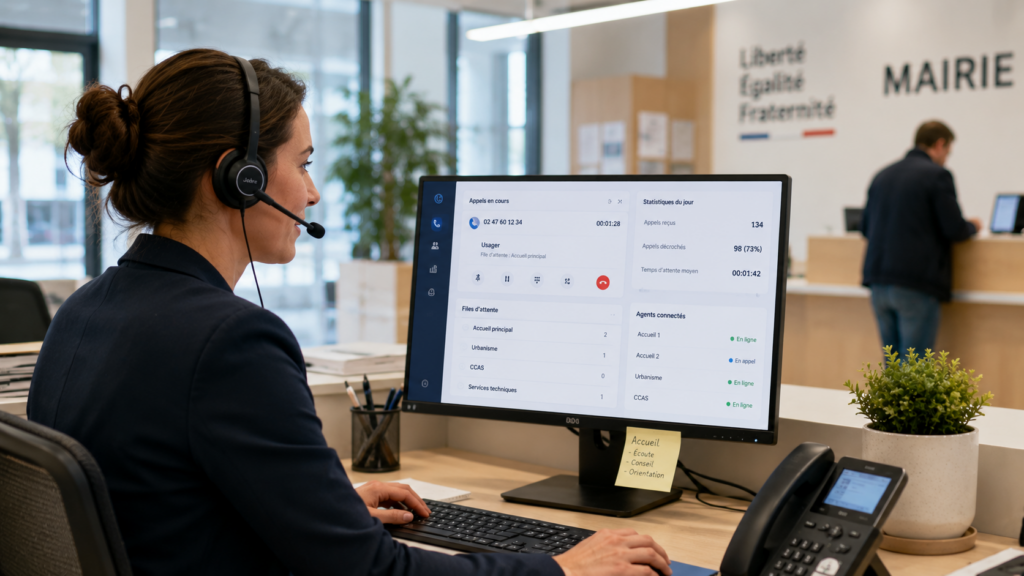
Real-time monitoring and dashboards
You can’t improve what you don’t measure. And in most communities, no one knows how many calls are missed each day. Or at what time call volumes peak. Or which department answers the fewest calls.
That’s where dashboards make all the difference.
A good monitoring tool gives you real-time access to three key metrics:
- The dropout rate by department and by agent
- Average wait time before receiving care
- The call abandonment rate (calls where the caller hangs up before speaking to someone)
With this data, your reception manager can adjust staffing levels to accommodate peak times. Let’s say Tuesday afternoons are consistently quiet, but Thursday mornings are extremely busy: you can reassign a representative accordingly. This is no longer a matter of intuition; it’s managing call volume using metrics.
At Kavkom, all these monitoring features are included out of the box, at no extra cost. There’s no premium plan you need to unlock to access advanced statistics. You get your KPIs from day one, and you can export them as CSV files for your internal reports.
Boost the productivity of your sales teams with Kavkom, the 100% cloud-based business telephony software.
Schedule a demo
On-premises PBX, IP PBX, or cloud-based telephony: How do you choose the right architecture?
You have three options. And the choice you make now will determine your budget, your flexibility, and the quality of service you provide to your users for the next five years. So let’s be clear about this.
| Criteria | Local PBX (private branch exchange) | Hosted IP PBX | 100% Cloud-Based Telephony |
|---|---|---|---|
| Infrastructure | On-site physical server | Server at a service provider | No equipment required |
| Deployment | Weeks (wiring, installation) | Days (remote configuration) | Minutes (immediate activation) |
| Maintenance | On-site Technician, Annual Contract | External service provider, variable turnaround times | Zero maintenance for the municipality |
| Commitment | 3 to 5 years (equipment depreciation) | 12 to 24 months (often required) | No commitment, prorated billing |
| Scalability | Limited by the installed hardware | Varies by service provider | Adding or Deleting Rows in Real Time |
| Physical IP phone | Included (proprietary hardware) | Often an optional paid feature | Compatible at no extra cost (Kavkom) |
The local PBX is the system that many local governments still use. A PBX in a utility closet, cables everywhere, and a maintenance contract that gets more expensive every year. When it breaks down on a Friday at 4 p.m., you have to wait until Monday morning for the technician. So do the users.
Hosted IP PBX systems seem more modern. However, some plans require a 12- or 24-month contract, charge extra for advanced features, and leave you dependent on a service provider for every change. You gain more flexibility compared to a PBX, but you’re still locked into a rigid contract.
And then there’s cloud-based telephony for local governments. No servers to host. No wiring. Your agents can connect using a webphone, a softphone, or a physical IP phone of their choice.
That’s where Kavkom stands out. Your municipality can use physical IP phones at no extra cost, whereas other cloud solutions charge for this compatibility as an optional feature. An agent who prefers a physical IP phone can stick with their usual setup. Another agent working remotely uses the webphone. Same local landline number, same system, same quality.
And when it comes to the budget, the logic is simple: no long-term commitment, prorated billing, and all features included from day one. If you shut down a site during the summer, you can suspend the relevant lines and pay only for what you use.
For a community-based phone system, this is a paradigm shift. You’re moving from a major capital investment to a service that you manage on a month-to-month basis, with no surprises on your bill.
Boost the productivity of your sales teams with Kavkom, the 100% cloud-based business telephony software.
Schedule a demo
Security, GDPR, and Call Recording in the Public Sector
Are you considering moving to the cloud, but one question is holding you back: Is it compatible with a local government’s legal obligations? The cloud can meet a local government’s obligations, provided that user information, access rights, data retention periods, and data deletion are properly managed.
Let’s start with the sensitive issue:call recording. The CNIL strictly regulates this practice. The user must be informed that the call is being recorded, the purpose must be specified (training, quality assurance, compliance), and the retention of audio recordings must be limited to a maximum of one year for business conversations, according to the CNIL. The exact duration depends on the stated purpose and must be documented. Beyond that period, deletion or anonymization is mandatory.
With Kavkom,call recording is built right in. Each recording is archived in a secure cloud with encrypted communications, and access to, export of, and deletion of data are all managed through the platform.
Another critical issue: access rights. In a local government, a front-desk clerk does not need access to overall statistics. An elected official does not need to listen to recordings of calls from a department they do not oversee. Kavkom manages this with user profiles that have granular permissions. Each role sees only what is relevant to it.
What about GDPR compliance in day-to-day operations? Kavkom allows you to export and delete data upon request, provides full traceability of data processing, and manages consent. These are essential components for documenting your GDPR compliance regarding user calls.
I recommend without hesitation
With Kavkom, I was able to easily resolve the issue of communication costs to my regular customers. My agents, too, were no longer restricted in their mobility, because even when on the move, communications are managed.

How about you?
Request a demo nowManage your municipality’s telecom budget with no commitment and no hidden fees
You know the challenge: every euro spent on telecommunications must be justified to the city council. And 24-month contracts with installation fees, cancellation fees, and additional charges for modules—those are exactly the kinds of expenses no one wants to defend in the budget committee.
Except that most public VoIP phone service plans still operate on this model: long-term contracts, opaque pricing, and unexpected charges on the bill.
Kavkom is approaching the problem from the wrong angle.
No commitment. No setup fees. No cancellation fees. No minimum number of lines. And best of all: prorated billing. In practical terms, if your city hall is closed for three weeks in August and you suspend 10 lines during that period, you only pay for the days you actually use the service. Compare that to a provider that offers you a 25% summer discount on a package that you still have to pay for in full.
For a municipal telephone system, this flexibility changes the budgeting approach. You shift from a fixed, multi-year investment to an operating cost that can be adjusted month by month—which is easier to justify in a public budget: the cost is based on actual usage, without tying up funds in a multi-year telecom investment.
And all features (IVR, routing, monitoring, recording, dashboards) are included from day one. No premium modules to unlock. The price listed on Kavkom’s pricing tables is the price you pay. Nothing more.
Boost the productivity of your sales teams with Kavkom, the 100% cloud-based business telephony software.
Schedule a demo
The 4 Steps to Migrating to VoIP Without Disrupting Public Service
You’re sold on the cloud, the budget is in order, and security is taken care of. That leaves the one question that often holds everything up: how do we make the switch without interrupting phone service for users?
Good news: With cloud-based phone service for local governments, the migration takes just a few days, not a few months. Here’s the step-by-step process.

Step 1: Audit landline numbers and current traffic
Before you make any changes, take stock of the situation. How many landline numbers does your community currently use? Which departments have their own lines? Which extensions receive the most calls, and at what times?
This phone audit is nothing complicated. All you have to do is list three things:
- Active phone numbers by location and department (City Hall, CCAS, Technical Services, Schools)
- Existing call groups or those to be created for each department
- Opening hours and welcome messages in place, including on-call scenarios
This diagnostic provides you with a detailed map of your current community phone system. It serves as the foundation for all subsequent configuration.
Step 2: Set up the cloud-based switchboard remotely
This is where the difference from a traditional PBX becomes immediately apparent. No on-site technician. No wiring. No construction work.
Fromthe Kavkomadministration interface, you can create user accounts for each agent, configure the IVR with your voice menus, and define call routing rules by department, time of day, and skill level. Remote deployment takes just a few minutes per workstation.
In practical terms, your IT manager can set up 15 workstations on a Tuesday morning from his or her office without interrupting ongoing customer service. Agents can log in using a webphone, a softphone, or a physical IP phone of their choice—all of which are compatible at no additional cost.
Step 3: Ensure the portability of existing numbers
Your customers know the city hall number by heart. Changing it means losing calls for months. Number portability solves this problem.
The process is transparent: Kavkom handles the transfer of your existing geographic numbers from your previous carrier. The porting process is planned to minimize downtime and ensure uninterrupted service during the switchover.
For the user, nothing changes. They dial the same number as before. The difference is that behind the scenes, the call is routed through a cloud-based system that directs it more effectively and quickly.
Step 4: Provide agents with personal support
Even a simple tool won’t be adopted on its own. Your receptionists need hands-on training: how to answer a call on the webphone, how to transfer a call, and how to view the call history.
And that’s wherechange management support makes all the difference. Kavkom doesn’t just leave you with an FAQ and a chatbot. You can reach our support team by phone, email, or WhatsApp. And if an agent gets stuck on a configuration, the team can step in directly on their computer via AnyDesk during a remote session.
You have a knowledgeable contact person who can answer your questions, show you how to use the system, and help you resolve any issues. For a local government where staff members are not technicians, this responsiveness is crucial.
Boost the productivity of your sales teams with Kavkom, the 100% cloud-based business telephony software.
Schedule a demo
Things to remember
- The end of the copper network makes migrating to the cloud essential for securing your communications.
- IVR and intelligent routing transform the reception process at city hall into a seamless experience for users.
- A 100% cloud solution eliminates the need for cabling projects and costly hardware maintenance contracts.
- Pro-rata billing and the lack of a commitment provide unprecedented flexibility for public budgets.
Modernizing your customer service center directly improves access to local public services and helps your staff better handle peak call volumes.
By freeing your agents from manual transfers, you make public services more accessible. If you’d like to explore other aspects, take a look at how an agile business phone system can integrate with your everyday tools. You can also explore ways to structure performance-driven customer service software.
Just ask yourself this: How many users lose patience every week because there’s no call center to guide them? If you’d like to try out the platform, you can see Kavkom in action during a personalized conversation with our advisors.