

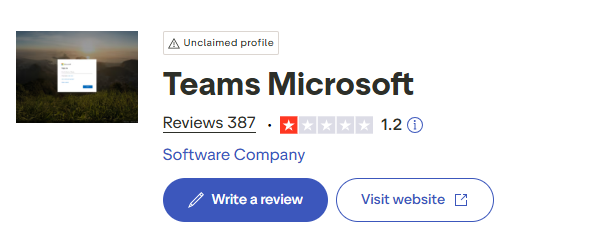

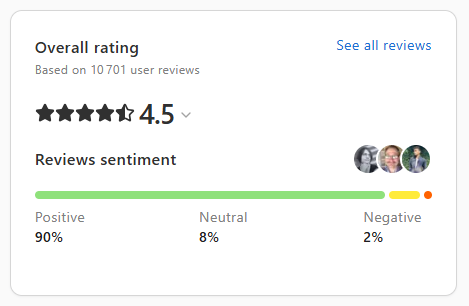

Imagine you manage a multi-site sales team or customer service department. You’re looking for a simple tool for day-to-day collaboration and frictionless calling. Microsoft Teams looks solid on paper, but you want to know what users are really experiencing. We’ve analyzed reviews published on Google, Trustpilot and Capterra. Here, point by point, is what emerges.
Feedback has been mixed. On the one hand, users praise the integration with the Microsoft ecosystem and remote collaboration. On the other, critics point to slowness, bugs and an interface considered cumbersome by some.
“Microsoft Teams offers full integration with other Microsoft tools, making it easy to collaborate even remotely.” – Capterra

“The app crashes, messages won’t send and the speed is very slow, making the tool unusable.” – Google
“Comprehensive tool but cumbersome and unintuitive interface.” – Trustpilot
Operationally, this means that Teams can fit well into a Microsoft environment and support the exchanges of a distributed team. But for a team focused on calls and sales productivity, instability and slowness can waste hours in a busy week, with a direct risk to contact rates and quality of service.
Comparison with Kavkom. Reviews of Teams focus on collaboration and application performance. Kavkom, on the other hand, focuses on cloud telephony and productivity for sales teams and call centers, with a lightweight webphone and dedicated mobile application. For intensive telephone use, a lightweight, stable interface is a real plus on a daily basis.
The reviews collected do not detail Microsoft Teams prices or subscription levels. On the other hand, administrative irritants are mentioned, including subscription cancellation without notification and difficulties reaching human support.
“After paying for a Teams subscription, I can’t take advantage of it because it was cancelled without notification. Support only responds with AI, very frustrating.” – Trustpilot
In concrete terms, for an SME that often adjusts the number of licenses according to the season or growth, a billing or subscription management incident can stop users in the middle of their activity. Without an easy-to-reach human contact, resolution can take a long time.
Comparison with Kavkom on this point. Reviews of Teams do not mention volume discounts or set-up fees. On the Kavkom side, the terms and conditions are known and public on the cloud telephony and dialer side, with no commitment and pro rata billing. For a rapidly expanding or shrinking team, contractual flexibility reduces dormant costs. It’s up to you to check whether the Teams license structure reflects your real needs, as the opinions analyzed do not make this clear.
Reviews focus on collaboration and Microsoft integration, not advanced VoIP features. The positive points cited concern teamwork and remote use. Negative points include application stability, slowness and an interface considered unintuitive by some.
“Microsoft Teams is feature-rich, but the interface can be cumbersome and unintuitive.” – Trustpilot
Impacts for a manager. If your priority is visiocollaboration and documented work under Microsoft 365, the experience may be smooth. But for demanding phone operations, reported bugs and slowness can impact pickup, messaging and call cadence. A sales team needs a rapid flow of interactions, otherwise the pipe chokes.
Comparison with Kavkom. Teams reviews don’t mention predictive dialer, IVR, supervisor listening or call analytics. Kavkom covers these telephony needs natively, with recording, supervision, IVR, and a predictive dialer to speed up campaigns. For an outbound team, the absence of a dedicated dialer slows down prospecting. If your use is more collaborative, this point is less critical.
The reviews analyzed give no indication of the security of Microsoft Teams, neither incidents, nor MFA, nor encryption. The topic is simply not mentioned by the users consulted. The reviews focus on performance and support.
“The app crashes, messages won’t send and the speed is very slow.” – Google

Operational translation. Without an opinion on security, it’s impossible to judge here. On the other hand, perceived performance problems can have an impact on communications continuity. For telephony-oriented teams, it is prudent to test the load in real-life conditions before widespread deployment.
Comparison with Kavkom. The reviews don’t compare security. Kavkom communicates on call encryption and RGPD compliance in its offering, but no customer review data here puts Teams and Kavkom on an equal footing on this point. To be treated as a subject to be audited directly.
No reviews mention dashboards, export, real-time reporting or the API on the Microsoft Teams side. Silence may mean that it’s not a topic for these users, or that the feature hasn’t left its mark on the experience.
“Microsoft Teams offers full integration with other Microsoft tools.” – Capterra
Consequences for management. Without user feedback on KPIs, it’s difficult to rely on Teams as a call center management console. For a sales team tracking call pick-up, call duration or conversion rate, you’ll need to check the reporting chain before committing yourself.
Comparison with Kavkom. Reviews don’t cover Team KPIs. Kavkom, on the other hand, offers dashboards, live listening and CSV export to track performance. If your day-to-day decisions are based on call metrics, opt for a structured test with your indicators to decide.
The reviews we’ve collected don’t talk about number availability, countries, porting or Microsoft Teams number types. No customer feedback on these subjects.
“Comprehensive tool but cumbersome and unintuitive interface.” – Trustpilot
For a company needing local numbers in several countries, the absence of feedback makes it impossible to plan ahead. You’ll need to ask for a detailed list and test a pilot portage.
Comparison with Kavkom. The reviews don’t shed any light on Teams coverage. Kavkom, on the other hand, offers national and international numbers in a 100 percent cloud model. If local presence per number is strategic, validate the actual Teams coverage in advance, as the reviews don’t mention it.
Experiences are mixed. Some feedbacks praise responsive and competent support. Others describe a stalled relationship, with support perceived as automated by AI and difficult to reach, particularly on subscription issues.
“Responsive and knowledgeable support, always ready to help and resolve issues quickly.” – Trustpilot
“Support only responds with AI, very frustrating.” – Trustpilot

For a production team, this creates uncertainty. A critical ticket that drags on can cost a whole day’s activity, especially if agents are disconnected or the subscription is suspended without a clear explanation.
Comparison with Kavkom. Reviews of Teams sometimes point to responsiveness, sometimes to the difficulty of reaching a human. Kavkom emphasizes human French-speaking support by phone, email and ticket. If your main risk is line downtime, the availability of a direct contact is key. Check this out with a real-life support test.
Reviews value integration with the Microsoft ecosystem. This means that for companies already equipped with Microsoft applications, collaboration can be seamless, with less friction on a day-to-day basis.
“Full integration with other Microsoft tools, easy collaboration.” – Capterra
Concrete impact. Fewer tool changes, less time wasted, especially for teams that live in Outlook, SharePoint or other Microsoft apps. For telephone workflows anchored in a third-party CRM, this point is not clear-cut in the opinions.
Comparison with Kavkom. The reviews don’t mention Teams’ API openness. Kavkom offers native integrations with Zoho, Salesforce, HubSpot, Pipedrive, Zendesk, plus an API for customized connections. For a CRM-driven sales process, telephony-CRM integration with pop-up form and call logs is a productivity lever. Reviews of Teams neither confirm nor deny this depth of integration outside the Microsoft ecosystem.
In short, Microsoft Teams users appreciate Microsoft collaboration and integration, but report performance, interface and support irritants on a case-by-case basis. For telephony-first use with cadence, recording and supervision requirements, there are still blind spots in these reviews. A targeted test, on your call perimeter, with verification of support and metrics, is recommended before widespread deployment.