The phone rings for the Lyon store, for customer service, and for a delayed order. And everything comes flooding in at the same switchboard.
The result: the customer waits, gets transferred, and hangs up. In a multi-store network, every misrouted call means a sale that goes to a competitor.
Do you manage multiple stores and an online store? The key question isn’t “what’s the best VoIP service on the market?”—it’s: which system centralizes your call flow and routes each call to the right place?
Here’s how to choose between different solution families, configure your routing and IVR, set up a CRM integration that displays customer context as soon as the phone rings, and implement a pricing structure that accounts for seasonal fluctuations.
Why E-commerce Call Management Requires a Dedicated Multi-Store Approach
You manage multiple stores and an e-commerce site, and the phone is ringing off the hook everywhere at once. One customer wants to track their order, another wants to return a product, and a third is looking for information that only the Lyon store can provide.
Let’s be clear: a traditional switchboard isn’t going to solve this.
The real problem is call routing. Your calls come in all over the place, when they should be directed to the right location. Customer service handles complaints, sales processing manages orders, and retail locations handle local calls. Without a multi-store phone system designed for this, every call becomes a gamble. The customer waits, gets transferred, and hangs up.
And waiting is costly. According to industry studies, about 18% of customers become frustrated after waiting 10 minutes, and a significant proportion do not return after a bad experience. Add to that an average shopping cart abandonment rate of 70.19% (reasons for cart abandonment), and you can see what’s at stake. A missed call often means a lost sale.
That’s why an e-commerce telephony solution must be based on a cloud-based e-commerce platform capable of centralizing all your call flows. Not one system per store. A single system that knows which call goes where.
Now, how do you determine whether your infrastructure is up to the task? Put two numbers on the table.
- Your answer rate by department: if more than one in five calls goes unanswered, you’re losing money.
- Your call volume by store and by time period: a peak in December is nothing like a Tuesday in April.
These two KPIs form the basis of your decision-making. In our experience, this is where most networks realize they’ve been sizing their systems blindly.
Managing multi-site e-commerce calls is not just a technical detail. It’s what separates a customer who completes their order from one who goes to a competitor. The rest of this guide shows you how to build this system, step by step.
Virtual switchboard, IPBX, or cloud PBX: which e-commerce phone system should you choose?
There are three main categories. And not all of them are equally suitable when you’re managing multiple stores.
The right choice depends on your size, your seasonal workload, and your need for centralization. Here’s how to decide.
| Criterion | Virtual Standard | Cloud PBX (IP Centrex) | Traditional IPBX |
|---|---|---|---|
| On-premises hardware | None | None | Physical server required |
| Deployment | A few minutes | A few minutes | Days or weeks |
| Multi-site routing | Limited | Advanced (IVR, groups, schedules) | Complex to configure |
| Ideal profile | Small, agile organization | Multi-store network | Single location with dedicated IT |
Based on these criteria, the cloud PBX clearly stands out for multi-site e-commerce. We’ll get to that.
The Virtual PBX: For Agile Businesses
Are you starting out with just one store and a small team? The virtual PBX already checks off quite a few boxes.
Everything is software-based. Your agents make and receive calls using a softphone installed on their computer or directly through a webphone in their browser. No hardware to set up, no SIM card. Just an internet connection and login credentials.
Setup is immediate. With Kavkom, you assign a virtual number to your team, and everyone can call using the same business number in just a few minutes. It’s convenient when you need to move quickly.
But this approach quickly reveals its limitations. As soon as you add multiple locations, different business hours for each site, and detailed call routing by department, basic VoIP call management is no longer sufficient. You need an orchestration layer on top of it. That’s where the centralized cloud PBX comes in.
The Cloud PBX (IP Centrex): Multi-Site Centralization Without Hardware
This is the architecture tailored to your needs. The cloud PBX, also known as IP Centrex, hosts your entire calling system in the cloud and centralizes incoming and outgoing call traffic from all your stores in one place.
No more separate systems per store. A single system determines which calls to send to customer service, which to forward to sales administration, and which to route to the Lyon retail location. The greeting is automated, and after 6 p.m., calls are automatically redirected to a personalized message without human intervention.
In terms of management, everything is handled through a web interface. You can create a new site, add agents, and modify routing—all without needing a technician or waiting for hardware to be delivered. The Kavkom cloud-based phone system natively includes IVR, call groups, and time-based rules—with no additional paid modules required.
And for a multi-store chain, this changes everything: your teams can respond from the store, the office, or while working remotely—all with the same high level of service. This flexibility holds true even when December brings a surge in volume.

Learn how to centralize your multi-store calls with Kavkom, the 100% cloud-based business phone system.
Schedule a demo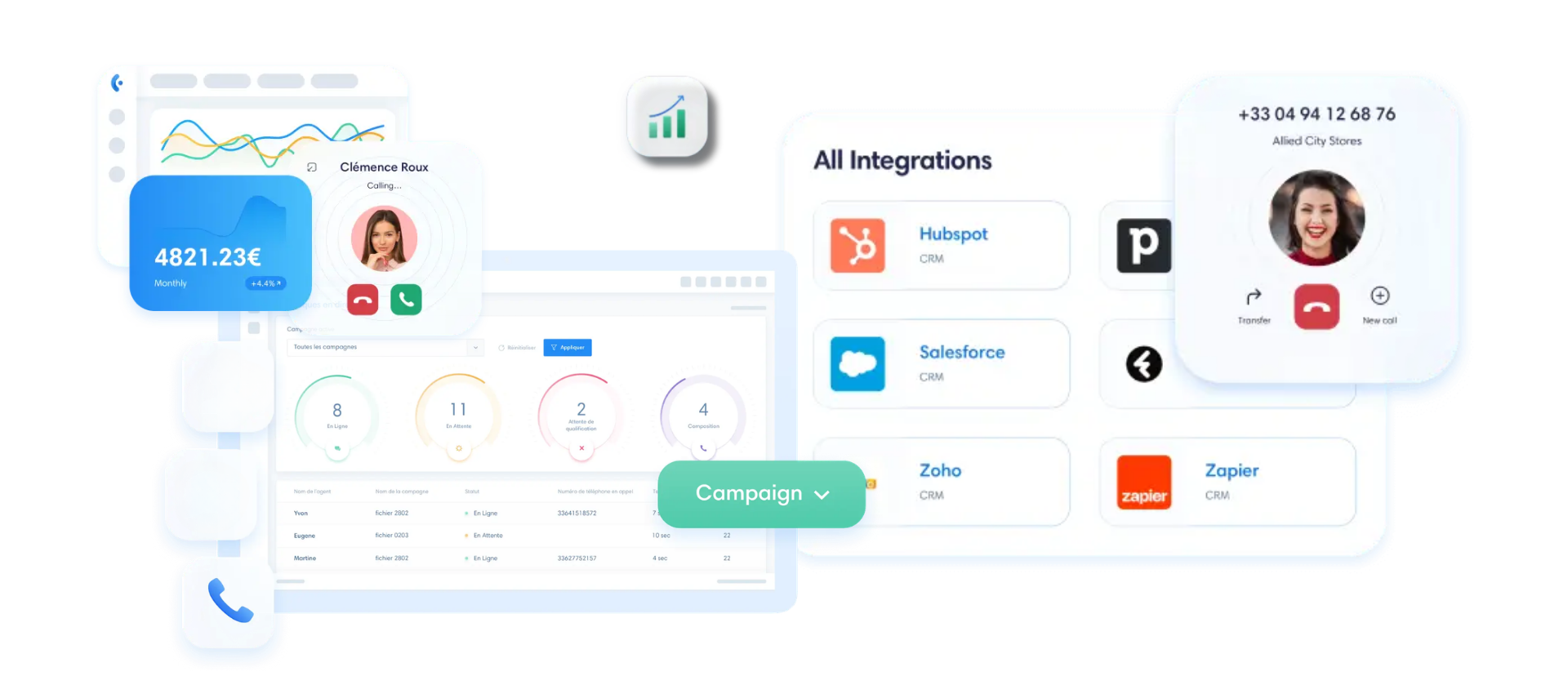
The Traditional IPBX: An Outdated Physical Infrastructure
Then there’s the old-school approach:the on-premisesIPBX. On paper, it gets the job done. In practice, it’s a poor fit for modern e-commerce.
Reason number one: installation costs. You buy a physical server, pay for the cabling, and hire a technician to set it up. Multiply that by the number of stores, and the bill skyrockets before the first call is even placed.
Second reason: maintenance. Physical equipment breaks down, requires updates, and becomes outdated. Every change requires on-site intervention. For a network that opens a new store every six months, this burden becomes unmanageable.
And then there’s remote work. An agent who wants to take calls from home quickly runs into issues with an infrastructure designed for fixed workstations in the office. Service continuity suffers as a result.
For a multi-store e-commerce business, a 100% cloud-based e-commerce phone solution helps you avoid these roadblocks. No heavy investment, no reliance on hardware, and scalability that keeps pace with your growth.
IVR and intelligent routing: how to centralize customer service for your online stores
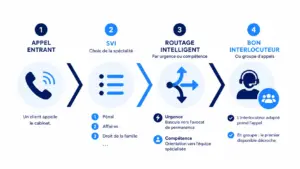
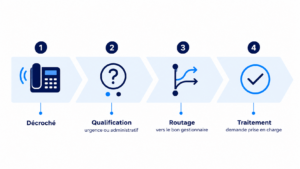
When a call comes in, there’s an unspoken question: Who should answer it? Proper call routing is simply about answering that question before the customer gets impatient.
Three routing strategies cover most e-commerce scenarios. Let’s review them, highlighting the practical benefits of each.
Routing by store: preserving each brand’s identity
Do you manage multiple brands under one roof? Each one deserves its own customer service experience. A customer calling for Store A shouldn’t be greeted by a generic message that lumps everything together.
The logic is simple. You assign a virtual number to each store—either a local or international number, depending on your location. The customer dials the brand’s number, and the system identifies them immediately. With Kavkom, you can get virtual numbers in over 50 countries, creating a local presence without needing a physical office on-site.
For each number, you can set up its own greeting message—including the brand name, tone, and dedicated hold music. Callers feel as though they’re reaching the specific store directly, not an anonymous, shared switchboard.
In terms of customer experience, this changes perceptions. A customer loyal to your premium brand doesn’t want to hear the same jingle as the one used for your discount brand. Store-based routing preserves this brand consistency while maintaining a single system behind the scenes.
Service-based routing: pooling after-sales service and customer support
Now, the other side of the issue: too many numbers hinder efficiency. You can’t dedicate an entire team to each store. You need to pool resources intelligently.
That’s where call groups come into play. You create pools based on skill: customer service, orders, returns. An e-commerce customer service call is routed to agents trained in handling complaints, regardless of the original store. Skill-based routing sends each request to the right person, not just the first available agent.
And when call volumes spike in December? You set up automatic call overflow. If the customer service team is overwhelmed, the call is routed to a shared pool that’s been reinforced for the season. No one has to wait ten minutes just because a single team was overwhelmed.
Call transfers between agents are also seamless. An agent who detects a dispute simply transfers the call to customer service without any interruption or additional wait time for the customer. And all of this comes at no extra cost: at Kavkom, these features are included as part of the standard package.
👉 Learn how to choose the business phone solution that best fits your needs.
Automated Call Handling (IVR): Managing Calls Outside Business Hours and During Peak Times
Then there’s the first point of contact: the IVR (Interactive Voice Response), sometimes abbreviated as IVR in English. It’s the system that qualifies the caller from the very first second and routes them without human intervention.
The golden rule for voice menus: keep it short. Three to five options at most. Any more than that, and the customer gets lost and hangs up. “Press 1 for order tracking, 2 for a return, 3 to speak with a representative.” That’s all it takes.
The real benefit comes from the after-hours system. After 6 p.m. or on weekends, you set up an after-hours message and an automatic transfer. The customer hears your business hours, can leave a message, or is directed to an FAQ. They know what to expect.
Impact on the drop-off rate: A customer who is left hanging up the phone in frustration. A customer who hears a clear automated greeting will wait or call back. A well-configured e-commerce phone solution turns a lost sale into a simple postponement: the customer calls back instead of leaving. The Kavkom IVR is included in all plans, with no commitment and at no extra cost.
CTI and CRM Integration: Display the customer’s context from the very first ring
A customer calls about their order. While they’re explaining their problem, your agent types in their name, searches for their record, and opens their history. The customer has to repeat themselves. And time slips away.
This wasted time is exactly what computer-telephony integration eliminates.
CTI (Computer Telephony Integration) is the bridge between your e-commerce call center and your business tools. It connects the phone system to the CRM—and sometimes to the ERP—so that both systems finally speak the same language. The call comes in, and the customer data follows instantly.
Here’s how it changes what the agent sees on their screen.
As soon as the phone rings, the customer record automatically displays the caller’s profile: their name, current orders, and most recent service tickets. No more manual data entry, no more “Could you please give me your order number again?” The agent sees everything right away.
This approach has two direct effects. The average call handling time decreases, because the agent no longer wastes 30 seconds searching for information. And customer satisfaction increases, because the response is quick and personalized. A customer who feels recognized is more likely to complete their order rather than abandon their shopping cart.
When it comes to productivity, click-to-call closes the loop. When your sales representative sees a number in the CRM or on a web page, they click it, and the call starts. No manual entry, no dialing errors. For a sales team that calls back 80 customers a day, this small detail saves dozens of minutes.
With Kavkom, these connectors are built-in. The platform integrates directly with the leading CRMs on the market (Salesforce, HubSpot, Pipedrive, Zoho, Zendesk), andthe platform’s CRM integration synchronizes calls, records, and notes automatically. Kavkom’s click-to-call extension makes every number clickable, even from within your business application.
To determine if an e-commerce telephony solution is right for you, ask yourself one simple question: Does the agent’s screen display the order context as soon as the call rings? If so, you’ve found the right tool.
👉Learn more aboutthe Kavkom CRM integration by requesting a personalized demo.
Deployment and Features: The Checklist for Your E-Commerce Site
You have the right tool. Now you just need to deploy it without interrupting service for even a single day.
Here are the three key points that make the difference between a smooth migration and a week of stress.
First, monitoring. To manage a call center for an e-commerce site, you need to see what’s happening in real time. Real-time monitoring gives you a dynamic dashboard: calls in progress, available agents, and queues that are growing. A surge in customer service calls on a Monday during a sale? You’ll see it instantly and can staff up the team before customers hang up. And at Kavkom, these real-time statistics are included at no extra cost.
Call recording serves two purposes. From a compliance perspective, it protects you under the GDPR: traceability, consent management, and secure cloud archiving. From a quality perspective, a manager can listen back to a call to coach a new agent. At Kavkom,built-in call recording is included at no extra cost and without needing to upgrade to a premium plan.
Next, there’s device compatibility. Your agents don’t all work the same way—and that’s a good thing.
- The webphone runs in the browser, which is convenient for a sales agent working remotely.
- The softphone is installed on a computer for a landline in the store.
- The physical IP phone is ideal for those who prefer a handset; at Kavkom, it’s included at no extra cost, whereas elsewhere it’s often a paid option.
A sales representative switches from a desk phone to a cell phone without interrupting the call. Service continuity is maintained, whether the team is on-site or on the go.
Finally, the migration. This is the step that can be daunting, and this is precisely where number portability makes all the difference. Your existing numbers remain yours—the ones your customers know by heart. No lines are disconnected during the transfer.
Just work through your checklist in order: portability initiated in advance, IVR and groups configured, agents set up, KPIs enabled. With immediate activation and prorated billing with no commitment, you can test the system under real-world conditions before switching over the entire network.
👉 Schedule a personalized Kavkom demo with an expert.
VoIP Contracts and Billing: How to Adjust Your Costs to E-commerce Seasonality
Your business operates in tune with the seasons. December is booming, while August slows down. Yet many VoIP pricing plans charge you as if every month were the same.
First, let’s start with the obvious: it all begins with reading the service agreement carefully.
The first thing to check is the scope of the calling plan. An entry-level plan often covers only incoming calls, billed annually. This is the case with Kavkom, at €8 per month on an annual plan, for a store that primarily wants to receive calls. But as soon as your sales teams start calling customers, you’ll need outbound calling coverage as well.
With this plan, you get unlimited incoming and outgoing calls—for €30 per month, with no contract—to cell phones and landlines in France. This plan is sufficient for a small or medium-sized business that calls its customers and does a bit of prospecting. For a call center that makes calls all day long (up to 500 minutes per day per user), the Call Center plan at €50 per month takes over. And the Kavkom Unlimited plan is truly unlimited, billed at the start of the month, with no hidden “fair use” policies.
Now, the real game-changer for e-commerce: flexibility.
No long-term commitment and prorated billing—that’s a game-changer when it comes to seasonality. You can suspend lines in August when the office is running at a slower pace; you only pay for what you use. Compared to another solution that offers a 25% discount in the summer, you come out ahead: you pay nothing for suspended lines. Then you reactivate them before the November rush—in just a few minutes.
That leaves the usual pitfalls to avoid. A reliable e-commerce phone solution shows the actual price, with no surprises on the bill.
- No setup fees, even when you add a store to the network.
- No cancellation fees: you can stop at any time, instantly.
- No minimum number of lines required to get started.
The listed price is the price you pay. You base your costs on your actual volumes, not on a rigid contract.
Boost your sales teams’ productivity with Kavkom, the 100% cloud-based business phone system.
Schedule a demo
Key Takeaways for Your Cloud PBX
- Centralize all your multi-store call flows in a single cloud-based system to prevent missed calls and improve your answer rate.
- Use intelligent routing that combines IVR and call groups to direct each request to the appropriate department without human intervention.
- Prioritize native integration between your phone system and your CRM to automate the retrieval of customer records and save valuable time on every interaction.
- Opt for a no-commitment solution with prorated billing to adapt your costs and infrastructure to the seasonal nature of your e-commerce business.
Choosing the right solution means, above all, implementing a tool that simplifies the complexity of your multi-site network for both your agents and your customers. Once routing is configured and your business tools are connected, you transform your phone system from a mere cost center into a driver of conversions.
To take your infrastructure management to the next level, feel free to check out our comprehensive guide on selecting a business phone solution tailored to your industry. If you’d like to see how Kavkom can simplify the real-time centralization of your stores, you can request a personalized demo today.