Call group configuration directly influences a company’s ability to handle incoming calls. When a call goes unanswered several times a day, the cause is often the routing configuration rather than the teams.
The real cause is often a poorly configured call group: wrong distribution mode, ringing time too long, no overflow rules.
You manage a team of 4 to 30 people and you want every incoming call to be answered, without transforming your call routing into a gas factory? This guide gives you concrete scenarios, recommended initial settings, and indicators to monitor so you never miss another call.


Boost the productivity of your sales teams with Kavkom, the 100% cloud-based business telephony software.
Schedule a demo
Call group, queue and IVR: what are the differences for your business switchboard?
Three concepts that are often confused. And yet, they don’t do the same thing in your business switchboard.
Here’s the simple, jargon-free distinction.
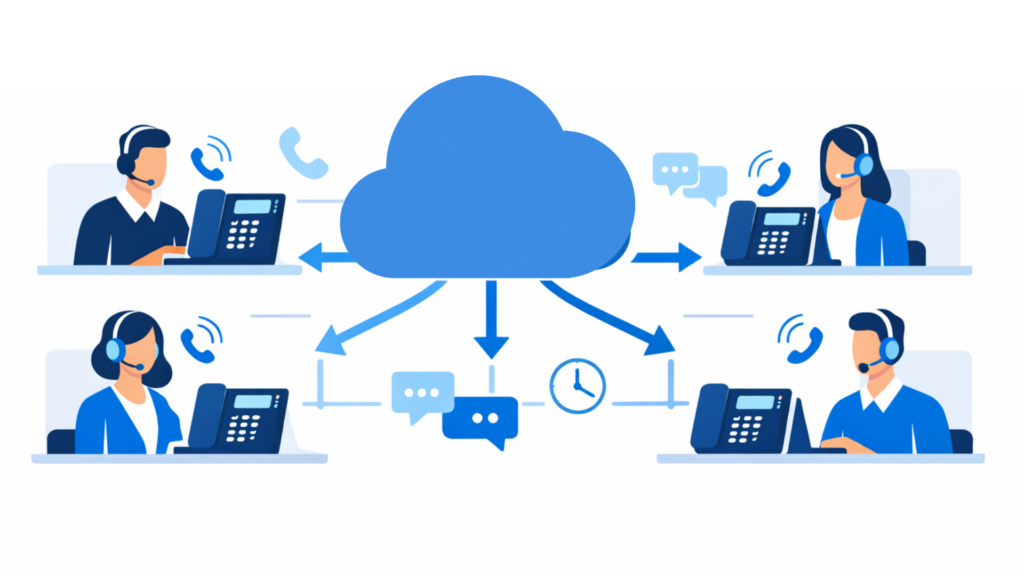
A call group defines how incoming calls are distributed among several agents according to configurable rules (simultaneous, sequential or rotating ringing).
In concrete terms: a customer calls your number at 10am. Thanks to the call group, Marie, Paul and Léa’s phones ring simultaneously. The first one to pick up takes the call. Simple.
The queueis different. It comes into play when no-one is available to answer the call. The caller is put on hold with music or a message, and waits until an agent becomes available. This is how we manage the flow when the group is saturated.
The interactive voice response (IVR), on the other hand, does more than that. It’s the voice menu that greets the caller: “Type 1 for sales, type 2 for support”. It directs the call to the right group even before an agent is called.
Here’s how these three elements work together in your call routing:
- IVR: directs the call to a service
- Call group: distributes calls between agents according to defined rules
- Queue: handles calls when all agents are busy.
These are not synonyms. They are three distinct layers of the same system. Understanding this is the basis for configuring your telephony without missing a single incoming call.
Simultaneous, sequential or circular: choosing the right distribution for incoming calls
The choice of distribution method depends directly on the size of your team and the volume of incoming calls.
Three routing strategies are available. Each responds to a specific context and has a direct impact on the workload of your available agents.
Simultaneous ringing: for maximum responsiveness
All group phones ring at the same time. The first agent to pick up takes the call. Simple, fast, efficient.
Ideal case: a small team of 3 to 5 people, or an emergency situation where every second counts.
Simultaneous ringing generally works well with small, responsive teams. In larger teams, however, it can lead to a dilution of responsibilities.
To be used with a close-knit team, where care is a culture, not a constraint.
Sequential (cascade) distribution: to prioritize your agents
The call first rings on the first agent’s extension. No answer after X seconds? He moves on to the next, then the next.
This is the logic of call cascading: you define an order of priority according to skills or seniority.
Advantage: your best agents handle calls first. Risk: if the first agent is often busy, the ringing time increases and the caller waits.
Redirect to the right profile, yes. But keep an eye on the time to overflow.
Circular routing (rotation): for load balancing
Here, each call goes to the agent who has been inactive the longest. Rotating call distribution assigns each new call to the agent who has been inactive the longest.
Circular distribution prevents one part of the team from handling the majority of calls, while others remain under-utilized. The workload is balanced, and burn-out avoided. It’s ideal for a support team or a customer service department that receives a regular volume of calls.
4 ready-to-configure routing scenarios for your pro number
Each team has its own constraints. A small business reception, technical support, a sales team canvassing, a night shift: these are not the same settings.
Here are 4 directly applicable scenarios, with recommended starting parameters. With Kavkom, these scenarios can be configured directly from the platform interface.
Boost the productivity of your sales teams with Kavkom, the 100% cloud-based business telephony software.
Schedule a demo
Scenario 1: General reception for an SME
Objective: pick up quickly. Very quickly.
Recommended mode : simultaneous ringing on 2 or 3 reception phones. As soon as an incoming call arrives, everyone rings at the same time.
Start setting: overflow to voicemail after 20 seconds. If nobody picks up, the caller leaves a message, and you don’t miss a thing.
Scenario 2: Customer service or technical support
Here, call volume is regular. The priority: fairness between agents and a meticulous customer experience.
Recommended mode: circular rotation. Each call goes to the agent who has been inactive the longest. Circular distribution avoids one part of the team handling the majority of calls while others are less busy.
Add a queue with music on hold before distribution. If all agents are busy, the caller waits instead of hanging up.
In the event of saturation: overflow to a second support group.
Scenario 3: The sales team in full prospecting mode
Incoming calls here are often a hot prospect. Every second counts towards conversion.
Recommended mode: sequential distribution. Your best closers ring first. If the first is unavailable, the call cascades to the next.
The real plus: couple your call group withKavkom CRM integration. Each time a call comes in, the contact record is automatically updated. Your sales rep knows who’s calling before they even pick up the phone.
Scenario 4: On-call and emergency management
Outside business hours, your pro number must not fall into the void.
Recommended mode: cascade to on-call agents’ mobiles. The call rings first on the mobile of the first manager. No answer after 15 seconds? He switches to the next one.
Set strict time slots: this scenario can only be activated outside office hours. As a last resort, forward to an emergency answering machine with personalized message.
To take call forwarding to mobile further, Kavkom manages all this natively, without any complex technical configuration.
Ringing time, overflow and voicemail: key settings
You’ve chosen your distribution method. That’s fine. But without the right timing settings, even the best call group will let calls through.
Here are the three parameters that really make the difference.
The ringing time before switching is the first setting to be calibrated. Too short, and the agent doesn’t have time to pick up. Too long, and the caller hangs up before being answered.
Practical recommendation: 15 to 20 seconds per station in sequential mode. With simultaneous ringing, 20 seconds is enough to trigger overflow. Beyond that, the abandonment rate climbs.
Overflow is the safety net. When no one in the main group answers, the call has to go somewhere, not into the void.
Two options to suit your organization:
- Overflow to a second group: ideal if you have a backup team or a manager available as a last resort.
- Overflow to an external number: useful for on-call situations, when the call has to reach an out-of-office mobile.
With Kavkom, these overflow rules are configured directly in the interface, without any technical intervention. You can define the delay before overflow and the destination in just a few clicks, from your enterprise cloud telephony solution.
Voicemail is used as a last resort. Not as a wastebasket for calls, but as a real traceability tool.
Configure a personalized message according to the context: closing times, peak activity, on-call duty. And above all, make sure messages are notified by email or fed back into your CRM.
An unanswered call with a well-managed message is an opportunity preserved. An unanswered call without a configured message is an opportunity lost for good. To go a step further, it’s useful to compare the different telephony solutions used by sales and support teams.
Indicators to monitor the performance of your call groups
Call group performance is measured by activity indicators. Analysis of call indicators enables routing configuration to be adjusted.
Vital KPIs: Pick-up rate and waiting time
Three metrics to monitor every day, without exception.
- Pick-up rate The percentage of incoming calls answered. A low pick-up rate usually indicates a problem with routing configuration or team sizing.
- Abandonment rate: callers who hang up before being answered. A high abandonment rate may indicate a waiting time that is too long, or a lack of available agents.
- Average waiting time: Long waiting times generally degrade the caller experience.
These three numbers together tell the real story of your missed calls.
Manage your business with a real-time dashboard
Traditional solutions give you static exports at the end of the day. Too late to act.
A real-time dashboard changes everything: you see live which agents are available, which calls are on hold, which peaks are forming. You adjust immediately, not the next morning.
With Kavkom, statistics and real-time supervision are accessible directly from the platform’s dashboard.
Things to remember
To avoid missing a single call, the key is to choose the right distribution mode. Simultaneous ringing for maximum responsiveness, sequential to prioritize your experts, or circular to balance the workload among your agents.
Your real safety net then rests on three settings: a ringing time of 15 to 20 seconds before any action is taken, a clear overflow rule and tracking of your off-hook rate.
These settings can significantly improve your incoming call management. Once you’ve optimized your call reception, you’ll be able to focus your teams on call handling and customer relations.