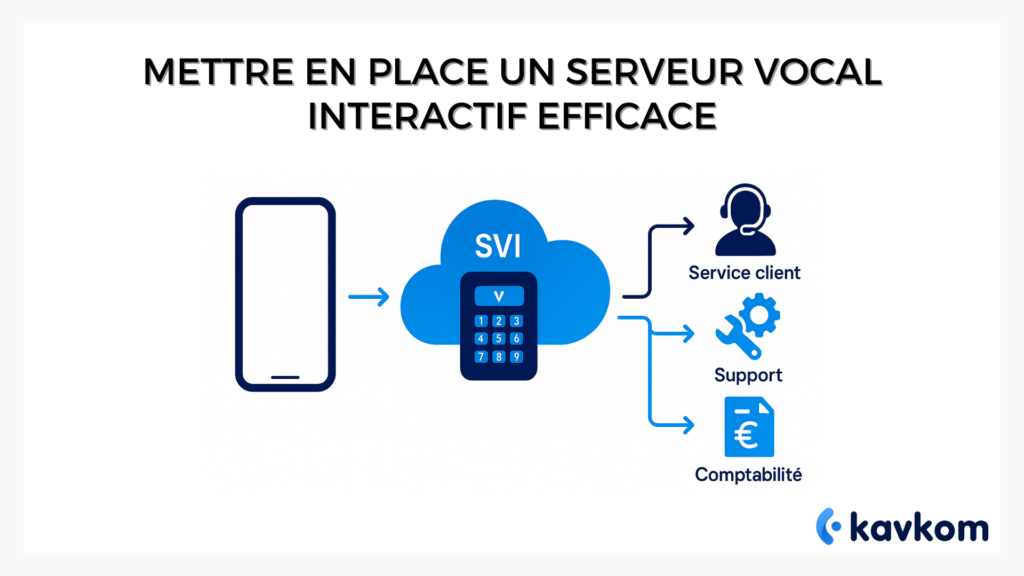
This system has a name: the interactive voice server, or IVR.
This step-by-step guide will help you to structure an effective call flow, configure your IVR methodically and measure its results. You’ll find best practices from successful centers. The aim is to help you build an IVR that supports your teams and delivers a natural, straightforward telephone experience.
Points to remember :
– An interactive voice server organizes your call intake by automating the greeting, menu and caller orientation.
– The quality of an IVR depends above all on the simplicity of the menu and the routing logic implemented.
– An effective IVR reduces internal transfers, streamlines processes and frees up agent time.
– Common errors are caused by menus that are too long, messages that are too technical, or routing that is misaligned with real needs.
– Indicators such as abandonment rate, DTMF errors or time spent in the menu enable continuous improvement of the IVR structure.


Boostez la productivité de vos équipe commerciales grâce à Kavkom, le logiciel de téléphonie d’entreprise 100% cloud.
Planifier une démo
What is an interactive voice server?
The interactive voice server is a telephony feature that automates the initial handling of incoming calls. It answers, presents a voice menu, collects the caller’s input via voice recognition or DTMF (telephone keys) and directs the call to the right destination. This is a device that most users regularly encounter in customer service departments. It suggests that you press 1 for customer service, 2 for sales, or say a key word to move on.
It’s part of the voice server family, but interactive voice servers add a layer of intelligence. They don’t just broadcast a message. They interact. This interaction reduces unnecessary transfers and improves call flow.
In brief
An interactive voice server:
– automatically answers calls
– proposes a voice menu
– collects input (DTMF or voice)
– directs to a service, agent or queue
– automates initial handling
How an interactive voice server works
An IVR is based on a few easy-to-understand technical blocks. The call arrives, the voice greeting is triggered, a menu is played, the caller chooses an option, then the routing takes place. The whole thing has to be simple for both you and your users.
Handling the call
When a caller dials your landline or IP number, the IVR is the first interface. The caller picks up automatically, freeing agents from repetitive greeting tasks. This step can also include an information message or a legal disclaimer, depending on your company’s needs.
Voice menu
The server broadcasts a list of options. Each option corresponds to a destination: queue, service, agent group or specific action. The menu is the heart of the system. The shorter and more structured it is, the better the experience.
Voice recognition or DTMF keys
Modern IVR systems offer two navigation modes:
– DTMF (touching the telephone keys)
– voice recognition (saying a word or phrase)
Speech recognition is becoming increasingly robust thanks to advances in signal processing and machine learning. According to an analysis published by Siècle Digital, speech recognition solutions are improving rapidly thanks to advances in speech AI, boosting the accuracy of interactive systems.
Routing
Once the option has been detected, the server forwards the call. This can be a group of agents, a queue, messaging, forwarding or an automated service. Routing can include advanced rules: skills, languages, schedules, or real-time load.
Steps in IVR operation
| Step | Role | Profit |
|---|---|---|
| Home | Automatic response | Reduces agent workload |
| Menu | Show options | Quickly directs the caller |
| Input | Retrieve order | Intuitive navigation |
| Routing | Direct the call | Improves satisfaction |
| Follow-up | Measures performance | Optimize routes |
Why implement an IVR in your call center?
A high-performance IVR brings immediate benefits: productivity, consistency and comfort for teams and callers alike.
Reduce waiting times and streamline calls
By filtering requests upstream, a voice server distributes volumes more efficiently. Callers go straight to the right department. Agents handle qualified calls, reducing internal transfers.
Free teams from repetitive tasks
Answering the phone often represents dozens of minutes a day for each agent. The IVR takes care of these simple tasks. Your teams can concentrate on high-value interactions.
Improving the customer experience
The major advantage of the voice menu is that users can choose their own route. They feel guided, accompanied and not lost. An IVR can even anticipate needs by analyzing call flows.
Standardize call handling
An interactive voice server provides a consistent telephone greeting. It doesn’t tire, it doesn’t vary and it always respects the defined rules.
Easy IVR activation with modern cloud telephony
With a cloud telephony platform, activating an interactive voice server becomes a simple operation.
Kavkom offers an all-in-one environment where you create your IVR, define your options and adjust routing without complex technical manipulation. The interface allows you to test your menus, record your announcements and track calls in real time, making it easy to set up a professional greeting from day one.
Boostez la productivité de vos équipe commerciales grâce à Kavkom, le logiciel de téléphonie d’entreprise 100% cloud.
Planifier une démoHow to set up an effective IVR: the step-by-step method
Here’s a method you can apply to build a high-performance, easy-to-use interactive voice server. This model adapts to most IP or VoIP telephony environments.
Step 1. Identify real needs
Observe your flows. What are the most frequent requests? Where do calls get lost? Which department handles the highest volume. The goal is to align your IVR with your usage, not the other way around.
Step 2. Structuring the menu
An effective IVR is based on a clear architecture. No more than three or four options on the first level. You can add sub-menus, but only if the navigation remains comprehensible.
Step 3. Writing voice messages
The welcome message should be clear, concise and action-oriented. The voice menu must be dynamic and precise. Voice servers aren’t there to tell a story. They guide.
Step 4. Set up voice recognition and DTMF
Depending on your technology, you can activate both. Voice recognition must be carefully calibrated to avoid errors. DTMF keys are a useful safety net.
Step 5. Define routing rules
You can route according to:
– competence
– language
– availability
– schedule
– service
– commercial value of the correspondent
– real time (load, peaks, priorities)
Step 6. Provide an escape route for the user
A good IVR always gives you the option of speaking to an agent if you get stuck. This avoids frustration and call abandonment.
Tip
When you’re creating a menu, ask yourself this simple question: could a tired caller at 6pm make it? If the answer is no, simplify.
Examples of successful IVR journeys
Simple route with three options
Welcome message
Menu:
1 Customer service
2 Technical support
3 Accounting
This model works for most companies. It provides a quick entry point, with clearly identified services.
Competency-based advanced path
Welcome message
Menu:
1 Invoice help
2 Technical problems
3 Order tracking
4 Sales information
Each option leads to a dedicated queue, with routing by skill. Ideal for segmented contact centers.
Speech recognition-based course
Welcome message
Free voice menu: “Say what you’re calling about in a few words”
The IVR interprets intent and directs to the right service. This approach reduces menu overload for high volumes.
Comparison of three IVR logics
| Logic | Atout | Limit |
|---|---|---|
| Simple options | Quick navigation | Low granularity |
| By skill | Very precise | Requires rigorous organization |
| By intention | Maximum fluidity | Requires a good vocal motor |
Common mistakes when setting up an IVR
Menus far too long
Users mentally give up after four options. An endless menu increases abandonment.
No referral to a human
An effective IVR is never a wall. It must offer an exit to an advisor.
Messages too technical
Your voice server should speak the caller’s language, not that of your in-house teams.
Approximate routing
Poor routing leads to a cascade of internal transfers and exhausts teams.
Absolutely avoid
– endless Vocal menus
– hidden options
– no exit to an agent
– hastily recorded messages
– no statistical tracking
Measure the performance of your interactive voice server
To improve your IVR, you need to measure. Voice servers generate valuable metrics.
Abandonment rate
The higher it is, the more you need to review your menu.
DTMF or voice error rate
A high error rate indicates a recognition problem or a confused message.
Time spent in the menu
Too long. Your route is too busy. Too short. Users find their way immediately or leave without choosing.
Internal transfer rate
A high rate is often the result of imperfect routing.
FAQs
Does an interactive voice server replace a human team?
No. The IVR automates the entry point, but complex interactions rely on agents. Voice servers are a filter, not a replacement.
How many options should a voice menu contain?
Between three and four options at the first level. It’s a benchmark that works in over 80% of the routes studied.
Are interactive voice servers compatible with VoIP?
Yes. Modern IVR systems are designed to operate over VoIP or IP, making them easy to integrate into existing telephone infrastructures.
Can IVR updates be automated?
Yes. Some environments allow you to modify menus and messages in real time, without technical intervention.
Conclusion
You now have a solid method for imagining an effective menu, configuring an IVR adapted to your needs and analyzing the indicators that will help you improve it over time. The key is to transform these principles into a simple, useful voice path that supports your teams and users alike.
When it’s backed up by a reliable, easy-to-administer solution, your call center gains in consistency. Callers reach the right service more quickly, your teams manage better-directed requests, and your organization moves forward more smoothly. A well thought-out IVR becomes a lasting asset for your telephone relations.