Microsoft Teams has become the central collaboration platform within many companies. Even Disney abandoned Slack in 2024 to migrate to Microsoft Teams after a major cyberattack.
Teams is solid and easy to use. That said, as soon as it comes to connecting the tool to an existing business telephony system, things get complicated. The official documentation remains dense, the steps are scattered, and every technical decision influences the stability of the whole.
Direct Routing is the answer. It enables Teams to use a telephone operator via a Session Border Controller, without having to overhaul the entire architecture. But you need to know how to approach it.
This guide will help you get started. It explains the precise role of the SBC, the prerequisites, the essential configuration steps, the possible architecture models and the points to watch to maintain a reliable, scalable environment. You’ll have a solid foundation on which to deploy Direct Routing with confidence.
Points to remember :
– Direct Routing enables Teams to be used with an existing telephone operator via a certified SBC, without having to modify the entire architecture.
– Careful preparation of licenses, network, certificates and SBC avoids the majority of deployment failures.
– Joint supervision of the Teams logs and the SBC is essential for diagnosing quality and signaling problems.
– Companies that want an immediately operational business phone environment can consider unified cloud solutions as an alternative to the SBC model.


Boostez la productivité de vos équipe commerciales grâce à Kavkom, le logiciel de téléphonie d’entreprise 100% cloud.
Planifier une démo
Understanding Direct Routing in Teams
What is Direct Routing
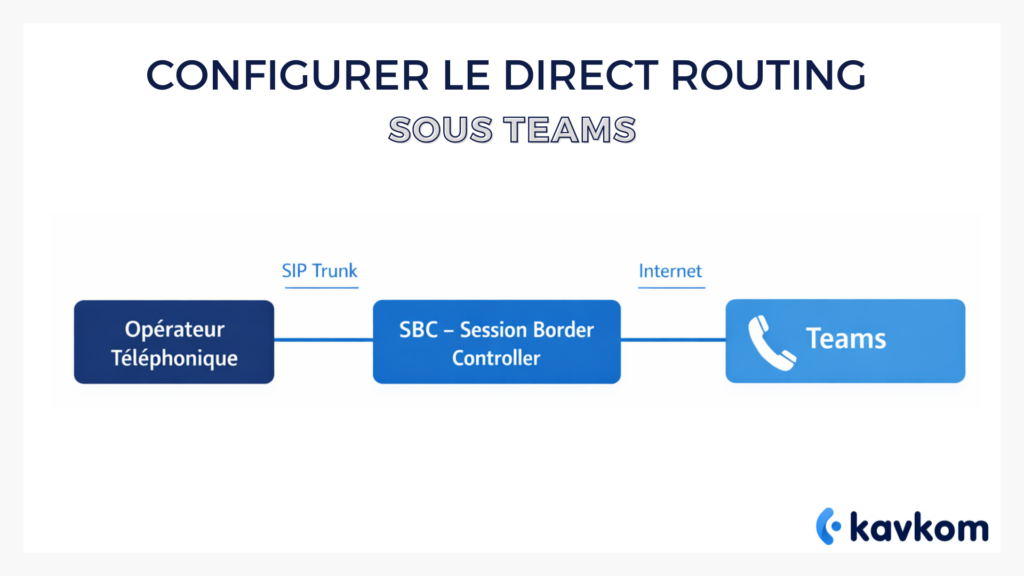
Direct Routing is based on a direct principle. Teams is not intended to communicate directly with a telephone operator. It delegates this responsibility to the Session Border Controller, which becomes the gateway between Microsoft services and the public telephone network.
The SBC ensures security, protocol compatibility and routing control between Teams and the operator. It applies dialing rules, manages call forwarding, filters certain call reasons, and is an indispensable control point in complex environments.
In other words, Teams provides the user layer. The SBC provides the infrastructure layer. The operator manages telephone connectivity. Direct Routing orchestrates collaboration between these three levels.
Why this architecture is used in business
Seamless migration
In environments where an IPBX is still in service, an abrupt transition is unrealistic. Direct Routing enables an orderly coexistence, with Teams gradually taking over from voice services.
Multi-site unification
International organizations often manage different numbers, operators and rules in different countries. Direct Routing consolidates these environments under a single model.
Total mastery of numbering
Some environments require advanced rules: internal prefixes, specific behavior according to services, segmentation by country. Direct Routing offers a level of granularity not possible with pre-configured call plans.
Technical requirements for Teams Direct Routing
Prerequisites
| Element | Function | Risk of forgetting |
|---|---|---|
| Telephony licenses | Enable calls in Teams | Telephony unusable |
| Certified SBC | Interface between Teams and operator | Unstable calls |
| Public certificate | Authenticate the SBC | Connection refused |
| Network QoS | Putting voice first | Audio mutes |
| Correct DNS | Resolving Teams services | Blocked calls |
Microsoft licenses required
Teams cannot handle phone calls until licenses are activated. The telephony module is integrated in Microsoft 365 E5. For Microsoft 365 E3, it must be added.
This detail is often underestimated. One missing license is enough to completely block a well-prepared deployment. Before touching the architecture, check that the users concerned have the right configuration.
Network infrastructure
Direct Routing imposes strict network conditions. Without them, the environment runs half-heartedly or becomes unstable.
Service quality
Voice is sensitive. If it is not prioritized, it degrades as soon as the network is called upon. Good QoS management considerably reduces user complaints.
Security and encryption
Communications between Teams and the SBC must be protected. Encryption is not optional. It prevents interception and ensures that Teams recognizes the SBC as a valid partner.
Firewall and DNS
An overly restrictive firewall or incomplete DNS records prevent Teams from communicating with the SBC. This is one of the main causes of one-way calls.
Choosing the right SBC
The SBC is the heart of Direct Routing. Choosing one requires a clear vision of your architecture.
Teams Certification
Certified SBCs guarantee compatibility with Microsoft cloud requirements. They reduce the risk of incompatibility during upgrades.
Hosted or on-site
A hosted SBC is ideal for teams who want to limit maintenance. An on-premises SBC is suitable for environments that are sensitive to data localization or have complex network requirements.
Preparing the Teams environment for Direct Routing
Domain names and certificates
Teams must recognize the SBC as a trusted partner. This requires a certificate corresponding to a validated domain in your Microsoft 365 tenant.
If the certificate doesn’t exactly match Teams’ requirements, calls won’t go through or the connection will be refused. Many of the problems encountered during initial configuration attempts are due to an incorrect certificate.
Understanding routing objects
Routing in Teams is based on three structuring objects.
The PSTN gateway
The gateway is the identity of the SBC in Teams. It tells Teams where to send outgoing calls.
PSTN uses
Uses are used to group routes together. For example: Usage-Europe, Usage-International, Usage-Support. A good usage structure ensures readable and extensible routing.
Voice policies
Policies group uses together and determine which calls each user is authorized to make.
Step-by-step Direct Routing configuration
Preparing the SBC
Before Teams can be configured, the SBC must be operational. It must accept incoming connections from Microsoft and be able to join the SIP trunk.
Declaring the gateway
The gateway is the element that links Teams to the SBC. It defines the SBC address and associated parameters. It is the basis of routing.
Creating uses
Uses structure your routes. They separate dialing by country, service or call type. Good structuring improves the legibility of your environment.
Define routes
Routes determine where Teams sends a call. They associate a dialing pattern with a usage. A route can be specific to a country, an internal service or a call type.
Creating policies
Policies group uses and determine users’ telephone capabilities. They enable you to apply your dialing rules on a large scale.
Assign policies to users
Each user should receive a policy adapted to his or her call profile. Without this step, Teams doesn’t know how to handle outgoing calls.
Testing the environment
The tests should cover several scenarios: internal, external, international, forwarding and simultaneous calls. The aim is to verify the stability and behavior of the SBC.
Supervise, troubleshoot and optimize your Teams environment
What to look out for
- Failed call rate by period.
- Audio quality by site.
- Recent configuration changes.
- Recurring SBC incidents.
- Simultaneous call behavior.
Analysis from Teams
Teams offers two essential tools for understanding the health of your voice environment: detailed call analysis and the quality chart.
Call analysis provides an overview of each call. You can see latency, packet loss, call duration and the type of device used. This tool enables you to quickly identify problems affecting users, whether they’re related to their local network, headset or Wi-Fi environment.
The quality table offers a broader perspective. It groups data by site, device or connection type. It shows how quality evolves over time, and highlights sensitive periods or areas.
Analysis from SBC
The SBC remains the richest source of information. It traces incoming and outgoing flows and routing decisions. It’s the ideal place to understand why a call hasn’t reached its destination, or why a specific dialing pattern isn’t working.
Some useful examples:
– A route mistakenly chosen for a neighboring country.
– A prefix automatically added by another system.
– An expired certificate preventing secure signaling.
– A saturated SIP trunk during peak activity.
In complex environments, SBC analysis can also identify unusual behavior, such as repeated call attempts or atypical patterns.
Common problems and solutions
One-way calls
This classic problem arises when audio streams pass through a firewall that has not been configured to let all the necessary ports through. In this case, the user hears the other party, but the reverse is not true.
The solution is to check that the ports associated with the audio streams are open and that the intermediate equipment is not modifying the packets.
Incomplete routes
If a number doesn’t go through, it’s often because there’s no route that corresponds to the numbering reason. For example, a foreign number that has not been provided for in the rules.
Simply add the corresponding route or extend an existing route to include a larger pattern.
International calls blocked
Voice policies can deliberately restrict certain types of call. When a user cannot dial an international number, you need to check whether the associated usage actually exists in the policy.
DNS problems
An obsolete DNS record or an incorrectly configured name in the SBC certificate is enough to prevent signaling between Teams and your equipment.
Optimizing architecture
A Direct Routing architecture doesn’t have to remain static. Needs evolve, teams change, sites grow. A regular review of policies helps avoid an accumulation of redundant rules.
Multi-site environments benefit from grouping similar policies together to reduce complexity. High-growth environments will benefit from documenting each modification to avoid losing the initial logic of the deployment.
Finally, scheduling quarterly audits improves system resilience. These audits involve testing key numbers, analyzing statistics, verifying certificates and ensuring that the SBC is operating as intended.
Cloud telephony: an alternative for companies looking for a business tool rather than a complex architecture
Connecting Teams to telephony via teams direct routing remains a relevant option when you want to keep your operator or integrate voice into an existing infrastructure. This model corresponds to organizations that favor fine-grained technical control and are willing to manage several components, including the SBC.
But when a department needs, above all, a business tool, the logic changes. Support, sales, call centers: these teams need a ready-to-use environment, capable of structuring calls, tracking performance and adapting quickly to variations in activity. In these situations, a cloud telephony solution like Kavkom becomes a natural alternative.
When a cloud solution like Kavkom becomes the natural choice
- You prefer to avoid managing an SBC or a multi-brick architecture.
- You’re looking for business telephony that’s immediately operational for your support and sales teams.
- You need numbers in several countries without going through several operators.
- You’ll be supporting teams working from home or spread over several sites.
- You prefer a 100 percent cloud solution, with no commitment and adjustable on a pro rata basis.
Kavkom replaces the technical layers with a simple platform featuring virtual numbers, supervision, recording, statistics and predictive dialer.
Boostez la productivité de vos équipe commerciales grâce à Kavkom, le logiciel de téléphonie d’entreprise 100% cloud.
Planifier une démoFAQs
What is Microsoft Teams Direct Routing?
A method for connecting Teams to a telephone operator via a certified SBC.
Is a certified SBC absolutely essential?
Yes, to guarantee lasting compatibility and avoid errors that are difficult to diagnose.
Can Direct Routing and Calling Plans be combined?
Yes, but the architecture must be structured to avoid conflicts between rules.
How do I check that a number has been correctly routed?
By consulting the call analysis in Teams and examining the SBC logs.
How do you manage high availability?
Using two redundantly configured SBCs and routing designed to withstand failure.
Conclusion
Direct Routing offers a robust and flexible way of integrating Teams with corporate telephony. Its adoption requires method, rigor and a global vision. By understanding the prerequisites, structuring routing and monitoring the environment with the right tools, you build a system capable of supporting your organization’s growth and requirements.
If you’re looking for a more unified environment that’s easy to operate on a day-to-day basis, a cloud solution like Kavkom could be an effective alternative.