
Those days are gone: cloud telephony has made these solutions accessible to all companies (whether they have three or three hundred employees).
But you still need to understand the technologies available. Between PBX, PABX, IPBX and Cloud PBX, confusion is common.
In this guide, you’ll discover what makes these systems different, why more and more companies are migrating to the cloud, and how to choose the solution best suited to your needs so you can evolve with peace of mind.
Points to remember :
- A PBX is a historic internal switchboard based on PSTN and local hardware, while an IPBX uses VoIP and a Cloud PBX moves telephony entirely into the cloud, making it accessible from anywhere.
- Traditional PABX/PBX systems remain costly to maintain, difficult to upgrade, incompatible with modern business tools and unable to provide useful data for performance management.
- The spread of VoIP and the gradual closure of the copper/PSTN network are naturally driving companies towards IP and cloud architectures.
- Cloud telephony is no longer just about making calls: it provides real-time reporting, recording, supervision and CRM integrations that help to better track activity and customer satisfaction.
- To choose the right solution, you need to look first and foremost at security (European hosting, encryption), the ability to integrate with your tools, contractual flexibility and the ability to easily add or suspend lines.

What is a PBX? (Private Automatic Branch Exchange)
Before the digital age, the PBX was the heart of internal corporate communications. The acronym stands for Private Automatic Branch Exchange .
In practical terms, the PBX enabled a company’s internal extensions to be connected to external lines. An employee would dial a short number to reach a colleague, or a prefix to make an external call. Everything went through a central cabinet, the “switch”, physically installed on the premises.
This system was based on the switched telephone network (PSTN). Each line required its own cable, and internal extensions were configured manually. At the time, this architecture represented a technical feat. It offered companies invaluable autonomy from public operators.
But this feat came at a price. The PBX required expensive equipment, regular maintenance and a technical team capable of managing configurations. Despite this, it has long symbolized modernity and professionalism.
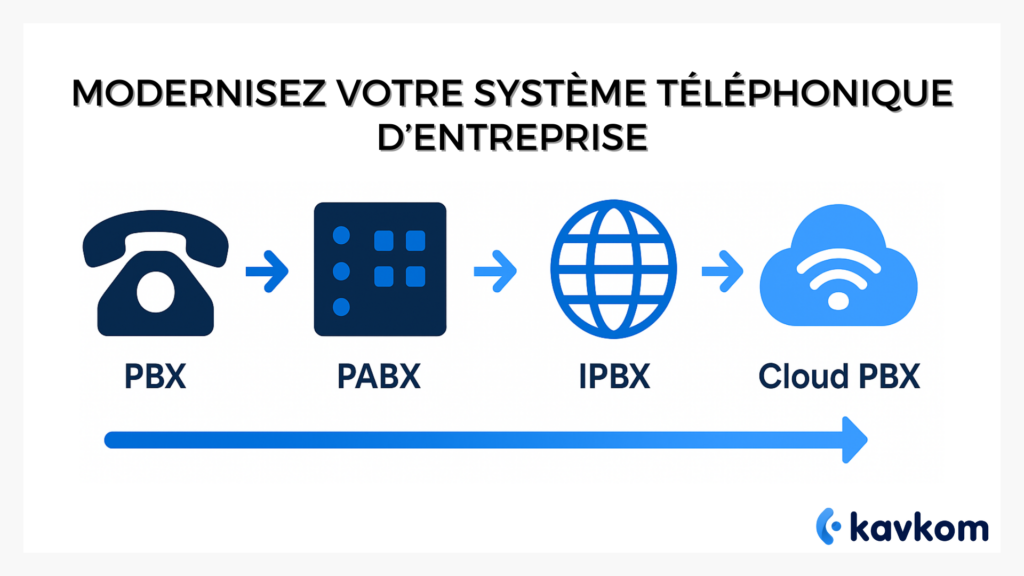
With the arrival of digital technologies, the PBX evolved into more automated versions: first the PABX, then theIPBX. The principle remains the same – to centralize and distribute calls – but the way in which this is done has changed radically.
The limits of the traditional PBX
The PABX, or Private Automatic Branch Exchange, automated the analog switchboard. There was no need for a human operator: calls were automatically routed to the right extensions. A major advance for its time.
But in the age of mobility and connected tools, the PABX quickly shows its limitations.
1. High costs and complex maintenance
Each installation required specific hardware: internal cabling, expansion cards, power modules. The slightest failure could interrupt activity, and each update required technical intervention.
2. Virtually no flexibility
With a PABX, it was impossible to add an extension without laying new cables. Telecommuting, mobility and multi-site offices were unthinkable. Companies remained locked into a rigid, costly “on-site” logic.
3. Limited digital integration
Modern tools (CRM, messaging, helpdesks) remained isolated: no synchronization with telephony was possible. Calls were not recorded, nor associated with customer files. The result: loss of information, lack of follow-up and frustration for sales and support teams.
4. No data to drive performance
A PBX works like a black box: it manages calls but provides no statistics. No pick-up rate, no average call duration, no visibility on activity peaks. In a data-driven world, this opacity becomes a handicap.
PABX yesterday vs. today’s needs
Here’s an overview of the main gaps between traditional PBX infrastructures and the needs of modern businesses.
| Criteria | Traditional PBX | Today’s companies |
|---|---|---|
| Mobility | Fixed-line only | Hybrid working and teleworking |
| Maintenance | On-site equipment | Remote management |
| Data | No visibility | Real-time reporting and supervision |
| Scalability | Complex addition | Instant user addition |
| Integration | Isolated | Connected to business tools |
IPBX evolution: telephony moves into the Internet age
With the spread of broadband Internet, a new generation of switchboards was born: theIPBX. The principle is simple: voice is no longer transmitted over physical telephone lines, but via IP protocol, the same as that used for e-mail or web browsing.
1. VoIP, a technological turning point
VoIP (Voice over IP) converts voice into digital data. These packets travel over the Internet before being converted back into sound on arrival. This change has paved the way for telephony that is more agile, less costly and easier to maintain.
2. Modern features
The IPBX does everything a PABX couldn’t do:
- Interactive Voice Response (IVR) to direct calls according to customer needs;
- Conferences and intelligent transfers between sites ;
- Voicemail by email;
- Recording of training and quality calls.
Teams have access to supervision, statistics and reporting tools previously reserved for large call centers.
3. Better cost control
No more proprietary hardware. An IPBX is based on a simple server connected to the Internet. Installation is faster, maintenance less costly.
4. Limits in spite of everything
An IPBX remains a local system: the server must be hosted and maintained. Security updates and supervision still depend on the IT department. In the event of failure, the entire internal network may be affected.
This is where the industry’s latest development comes into play: Cloud PBX, a 100% hosted standard, with no servers to maintain and no on-site infrastructure.
The evolution of business telephony
| Key year | Dominant technology | Main feature |
|---|---|---|
| 1980s | Analog PBX | Manual or semi-automatic internal standard |
| 1990s | PABX | Automated call routing |
| 2000s | IPBX | Voice over IP, software integration |
| Years 2010-2020 | Cloud PBX | Hosted telephony, accessible anywhere |
PBX, IPBX, Cloud PBX: the complete comparison
To put it simply: the PBX is analog, the IPBX is connected to the Internet, and the Cloud PBX is hosted entirely online. Let’s take a look at what this means in practice.
Operation and architecture
A classic PBX relies on hardware installed on your premises. It connects your internal and external lines via the switched telephone network. This system therefore depends on physical wiring and regular maintenance.
TheIPBX works on the same principle, but uses the Internet to transmit voice via VoIP(Voice over IP). This provides greater flexibility, but the server remains internal to the company.
Finally, Cloud PBX eliminates all hardware constraints. Calls pass through secure remote servers, accessible from any device: computer, smartphone or IP phone. Updates and maintenance are handled automatically by the provider.
Installation and maintenance
Installing a traditional PBX requires cabling, dedicated hardware and sometimes several days of technical intervention. In contrast, a Cloud PBX can be configured in just a few minutes via a web interface.
The IPBX represents an intermediate stage: it requires a server and network skills, but is simpler to upgrade than a conventional PBX.
The cloud brings a decisive advantage: maintenance is entirely managed by the supplier, without any in-house intervention. The company can focus on its core business, without worrying about hardware failures or missed updates.
Cost and scalability
An analog PBX represents a heavy initial investment: purchase of equipment, cabling, maintenance. The IPBX reduces these costs, but still requires an internal server.
The Cloud PBX, on the other hand, works on a subscription basis. You pay only for the lines you use, and can suspend or add them at any time. This is what’s known as pro rata billing, which is more flexible and better adapted to variations in activity.
PBX, IPBX, Cloud PBX
| Criteria | PBX | IPBX | Cloud PBX |
|---|---|---|---|
| Hosting | Local | Internal (server) | 100% online |
| Installation | Long and technical | Average | Immediate |
| Maintenance | On-site technician | Internal IT | Managed by the supplier |
| Costs | Raised | Moderate | Adjustable |
| Mobility | No | Partial | Total |
Why companies are migrating to cloud telephony
The move to Cloud PBX is a logical and strategic evolution. Since copper networks are gradually disappearing in Europe, companies are adopting VoIP as the new communications standard.
1. Total flexibility
The cloud eliminates physical constraints. You can work from anywhere: in the office, at home or on the road. Employees keep the same business number, whatever their device.
This mobility directly improves team productivity and responsiveness. An SME can open a secondary office at the click of a button, without the need for complex infrastructure or installation.
2. Seamless integration with business tools
Modern companies already use business tools (CRM, Helpdesk, ERP). Cloud PBX integrates seamlessly with these tools, streamlining exchanges and customer care.
A sales rep can consult a prospect’s complete history before picking up the phone, while a support agent can automatically retrieve previous exchanges.
The result: greater responsiveness, fewer errors and a complete view of customer relations.
3. Data to drive performance
With a conventional PABX, calls disappear once they’re finished. With cloud telephony, every interaction generates usable exploitable data duration, waiting time, pick-up rate, productivity per agent.
These statistics help managers to understand trends and adjust their teams in real time.
According to Deloitte, 72% of companies believe that analytical data from calls significantly improves customer satisfaction.
Where analog telephony simply connected, cloud telephony continuously measures, learns and improves.
4. Real savings
Initial costs disappear: no more equipment to buy, no more technical maintenance.
A cloud subscription is less expensive than an on-premise system, while offering more included services (registration, statistics, integrations).
The cloud doesn’t just reduce costs: it also frees up time and space, two precious resources for businesses.
How to choose the right PBX solution for your business
Faced with such a wide range of solutions, choosing the right one can seem complex. But a few simple criteria can help you make an informed choice.
1. Analyze your real needs
Start by assessing call volume, number of users and supervision requirements. A small team won’t have the same priorities as a call center with thirty agents.
Ask yourself: do you need CRM integrations, automatic recording or detailed reporting? These elements immediately point towards a modern Cloud PBX rather than an on-premise system.
2. Check software compatibility
If you’re already working with business tools such as Salesforce, HubSpot or Zoho, check that the PBX platform connects naturally with them. Good integration avoids double entry and improves data consistency.
3. Consider safety and compliance
The provider must comply with European data protection standards. Give preference to hosts located in the European Union, with call encryption and secure authentication.
4. Measure the added value of reporting
A good PBX system doesn’t just handle calls: it helps you manage your performance. Real-time dashboards, recordings and detailed statistics become management tools in their own right.
5. Contractual flexibility
Today, cloud telephony enables prorated billing. You only pay for what you use, with no time commitment. This flexibility is ideal for seasonal or fast-growing businesses.
Some platforms combine these functions in a single interface. Kavkom, a 100% cloud-based enterprise telephony solution, offers real-time supervision, call recording and CRM integration.
You can manage your communications from any device, track your performance indicators and add new lines in seconds.
All tools are included, with no extra costs or complex installation.
Checklist – 5 criteria before choosing your PBX
- Do you need mobility or fixed positions?
- Do your business tools need to be connected to the telephone system?
- What importance do you attach to reporting and supervision?
- Can your IT department maintain an internal server?
- Would you like a flexible, no-obligation solution?
FAQs on PBX and IP telephony
What’s the difference between PBX, PABX and IPBX?
The PBX is the original analog switchboard. It centralizes internal and external calls using a physical switch.
The PABX is an automated version: no need for an operator to transfer calls.
Finally, theIPBX relies on the Internet and VoIP to transmit voice as digital data. It offers modern functionalities such as recording, IVR, supervision and CRM integration.
Today, most companies migrate directly to Cloud PBX, the hosted version of the IPBX.
How does a PBX work with VoIP?
An analog PBX cannot use VoIP without an adapter. Conversely, an IPBX or Cloud PBX is natively compatible: it converts voice into IP data packets.
Result: better call quality and instant communication between sites or remote collaborators.
What happens to my old PABX when the PSTN comes to an end?
The gradual closure of the switched telephone network is making PBXs obsolete. They can continue to operate locally, but no longer allow new external connections.
Companies are therefore replacing their PBXs with VoIP or Cloud PBX systems, which are simpler and more durable.
Is a Cloud PBX compatible with a physical IP phone?
Yes. You can use a VoIP-compatible IP phone or simply a softphone on your computer or smartphone. The number remains the same on all devices: practical for telecommuting or mobile teams.
How does a Cloud PBX facilitate analysis and supervision?
Each call is recorded in a centralized dashboard: duration, quality, waiting time, productivity per agent. This data can be used to adjust staffing levels, improve customer satisfaction and boost sales performance.
This is the difference between “suffered” telephony and data-driven telephony.
Conclusion
PBX systems have come a long way: from the analog cabinet to the cloud standard accessible to all. Today, corporate telephony is no longer a technical constraint, but a genuine lever for collaboration and performance.
With a hosted solution like Kavkom, you centralize your communications, measure performance and remain free to evolve at your own pace. No hardware, no commitment, and always with human support available.