
In contrast, traditional systems often involve physical hardware, high fixed costs and limited flexibility for growth or teleworking.
For a company, the challenge is not just technical. It’s about team productivity, call supervision, CRM integration and cost control.
In this guide, we will define cloud telephony precisely, explain how it works, detail its key features and analyze the criteria for choosing the right solution for business use.

What is cloud telephony?
Cloud telephony is an enterprise telephony system hosted on remote servers and accessible via the Internet.
In concrete terms, calls are made via VoIP, i.e. Voice over IP, instead of using the traditional telephone network.
In a traditional model, the company installs a physical switchboard on site, often called a PABX. This hardware handles incoming and outgoing calls via cables and dedicated lines.
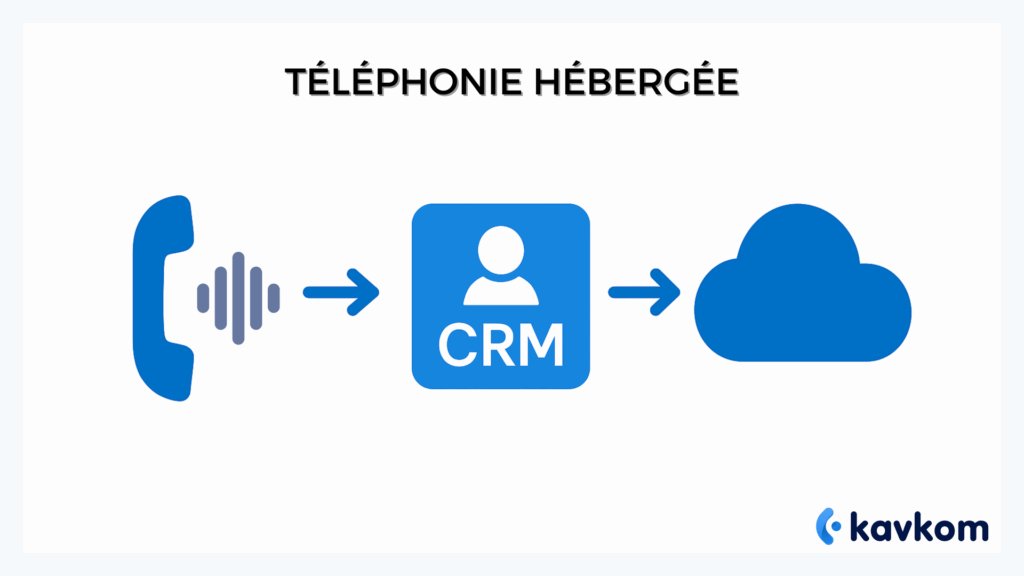
With cloud telephony, this switchboard becomes a cloud PBX. This means that the call management system is hosted online, and can be administered via a web interface.
The difference is not just technical. It impacts flexibility, costs and the ability to evolve.
Traditional telephony vs. cloud telephony
Here are the main differences.
| Criteria | Traditional telephony | Cloud telephony |
|---|---|---|
| Infrastructure | On-site physical switchboard | Remote hosted cloud PBX |
| Installation | On-site technical support | Remote activation |
| Scalability | Complex and costly line additions | Add users in just a few clicks |
| Teleworking | Limited configuration | Access from web, mobile or IP phone |
| Maintenance | In-house management or external service provider | Maintenance provided by host |
| Costs | High initial investment | Subscription model |
How does VoIP and cloud PBX work?
VoIP transforms voice into digital data that travels over the Internet, much like an e-mail or a file. This data is then converted back into sound on arrival.
The cloud PBX acts as a switchboard. It manages :
- Routing calls to the right person
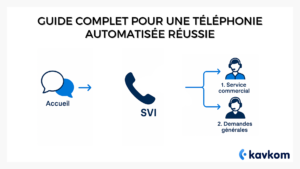
- Voice menus (IVR, interactive voice server)
- The queues
- Time rules
Everything is controlled from an online interface, with no on-site hardware required.
In short, cloud telephony replaces the physical infrastructure with a software architecture that can be accessed anywhere, profoundly changing the way a company manages its communications.
How does cloud telephony work?
The principle is based on VoIP, or Voice over IP.
Instead of using the traditional telephone network, voice is converted into digital data and transmitted via the Internet.
1. Voice-to-data conversion
When a user speaks into a microphone or IP phone, his or her voice is converted into small packets of data.
This conversion is managed by a codec, i.e. a program that compresses and decompresses the voice so that it circulates rapidly without losing quality.
The codec reduces the weight of the data, then reconstructs it on arrival so that the speaker hears a clear voice.
2. Internet routing
These data packets then travel over the Internet, like any other digital stream.
They are sent to the provider’s servers, which ensure the stability and quality of the communication.
Unlike a traditional telephone line, there’s no specific cabling dedicated to calls. Everything goes through the company’s Internet connection.
3. Role of the cloud PBX
The cloud PBX, or hosted switchboard, replaces the physical switchboard installed in offices.
It automatically manages :
- Routing calls to a department or agent
- Voice menus (IVR, interactive voice server)
- The queues
- Call transfers
- Time rules
Everything is configured remotely.
4. Supplier’s role
The cloud telephony provider hosts the technical infrastructure.
It guarantees server availability, data security and system maintenance.
This means the company doesn’t have to manage any on-site infrastructure. It uses a ready-to-use platform.
5. Administration via web interface
Daily management is done via an online interface.
An administrator can :
- Add or delete users
- Modify routing rules
- Create a voice menu
- View statistics
- Manage access rights
Everything is controlled from a browser, with no need for complex technical intervention.
In practice, cloud telephony transforms the telephone system into a software service. The infrastructure remains with the supplier. The company retains operational control via a simple, centralized interface.
Key features of a cloud telephony solution
A cloud telephony solution does more than just make calls.
It structures communications management and provides management tools adapted to professional teams.
Inbound and outbound call management
The basis remains the seamless management of incoming and outgoing calls.
Calls can be made from a webphone, mobile application or compatible IP phone.
On the inbound side, the solution centralizes fixed geographical numbers and distributes calls to the right teams.
On the outbound side, users call the company’s business number, even when teleworking.
IVR / IVR (Interactive Voice Response)
The IVR, or interactive voice server, corresponds to menus such as:
“Press 1 for sales, 2 for support.”
This system screens and directs calls as soon as they are received.
It reduces unnecessary transfers and improves the customer experience.
Scenarios can be customized according to schedules or services.
Intelligent routing
Intelligent routing automatically directs calls to the right person according to defined rules:
- Agent availability
- Skill or language
- Customer priority
- Queue
This prevents a call from going unanswered when an agent is available in another team.
Call recording
Recording keeps track of conversations.
Files are stored in the cloud and can be accessed according to the rights defined.
Useful for :
- Quality control
- Team training
- Claims management
- Regulatory requirements
Real-time supervision
Dashboards display key indicators live:
- Number of calls in progress
- Waiting time
- Pick-up rate
- Agent availability
A supervisor can listen in on a live call or intervene if necessary.
Supervision becomes a management tool, not just a monthly report.
CRM integration
A modern solution that integrates with existing CRM systems.
When a call comes in, the contact sheet can be displayed automatically.
Calls, notes and recordings are synchronized with the customer’s history.
Telephony no longer operates in silos, but is connected to the sales system.
API
An API (programming interface) enables telephony to be connected to other business tools.
For example:
- ERP
- In-house software
- Ticketing tool
The API opens up the possibility of automating certain actions, such as creating a ticket after a call.
Teleworking and multi-sites
Cloud telephony works via the Internet.
An employee can work from the office, home or another location, all using the same business number.
For multi-site companies, management remains centralized.
Calls can be distributed between several cities without complex local installation.
In short, these functions transform telephony into an operational management tool, integrated into the company’s overall operation.
Concrete benefits for companies
Cloud telephony doesn’t just change technology.
It changes the way a company manages its costs, its teams and its performance.
- Cost reduction
With a hosted system, there’s no investment in a physical switchboard, and no on-site hardware maintenance.
The model is generally based on a per-user subscription.
Costs become more predictable.
The company avoids the expense of hardware upgrades or complex line extensions.
- Flexibility
Users can be added or removed via a web interface.
There is no need for physical intervention on the premises.
This makes it possible to quickly adapt the telephone structure in the event of recruitment, seasonality or internal reorganization.
- Scalability
A company that grows from 5 to 30 employees doesn’t need to change its infrastructure.
The cloud system absorbs growth without hardware replacement.
Scalability also applies to functionality.
New modules can be activated according to operational needs.
- Commercial productivity
For a sales team or an in-house call center, telephony becomes a performance tool.
Features such as intelligent routing, real-time supervision and CRM integration reduce manual tasks.
Agents spend more time on useful conversations and less time on technical handling.
Monitoring indicators enables us to adjust our working methods on an ongoing basis.
- Teleworking
Cloud telephony works via the Internet.
An employee can answer business calls from home or another location, while using the company number.
Business continuity is maintained even in the event of occasional office closures.
- Centralization
All calls are managed from a single system, even if the company has several sites.
Statistics, records and parameters are accessible from a single dashboard.
Management has a global view of telephone activity.
- Security
Communications are encrypted, i.e. protected against unauthorized interception.
Access rights can be defined according to roles: agent, supervisor, administrator.
Data is hosted in secure environments that comply with regulatory requirements, particularly in terms of data protection.
Ultimately, cloud telephony becomes an operational lever. It goes beyond simple call management to become an integral part of a company’s performance strategy.
Safety and compliance
Cloud telephony is based on an infrastructure hosted in secure environments.
Servers are managed by the provider, with ongoing monitoring and maintenance mechanisms.
Secure cloud hosting
Call data and system parameters are stored in protected data centers.
Access is controlled and logged, enabling actions carried out on the platform to be traced.
The company doesn’t have to physically manage the infrastructure, but retains control over access rights.
Communication encryption
Calls are encrypted to prevent unauthorized interception.
Encryption protects voice as it travels over the Internet.
This reduces the risk of eavesdropping or external intrusions.
RGPD Compliance
Professional solutions integrate mechanisms that comply with the General Data Protection Regulation.
This includes :
- Access traceability
- The ability to export or delete data
- Managing shelf life
The aim is to guarantee the protection of personal data processed during calls.
Data protection
Recordings, call histories and related information are stored in secure areas.
Separate roles can be defined to restrict access to authorized persons only.
This segmentation reduces the internal risks associated with data mishandling.
Service continuity
A cloud infrastructure enables services to be distributed across several servers.
In the event of an isolated technical incident, the system can be switched to another environment.
This limits business interruptions and ensures availability tailored to business needs.
In short, the security of a cloud telephony solution relies on a combination of secure hosting, encryption, regulatory compliance and service continuity mechanisms tailored to business requirements.
How much does a cloud telephony solution cost?
The cost of a cloud telephony solution is generally based on a subscription model.
The company pays a monthly or annual fee per user, rather than an initial hardware investment.
Subscription model
This model includes access to the platform, management of the cloud PBX and infrastructure maintenance.
Depending on the offer chosen, certain features may be included or offered as optional extras.
Payment becomes recurrent and predictable.
It replaces the major expense of purchasing a physical switchboard.
Factors influencing price
Several factors can influence the cost:
- Number of users
- Outgoing call volume
- Countries covered
- Enabled features
- Need for specific integrations
A company with intensive sales activity will not have the same needs as a structure receiving mainly incoming calls.
Difference from traditional telephony
With a traditional system, the company often supports :
- Purchase and installation of equipment
- Maintenance costs
- Physical extensions for growth
Cloud telephony transforms these fixed costs into operating expenses spread over time.
There are no physical standards to replace or upgrade.
Transparent pricing
A key point remains the legibility of prices.
Companies should check :
- What’s included in the subscription
- Any activation fees
- Terms of engagement
- Costs related to international numbers or calls
A clear pricing structure allows you to anticipate your budget and avoid unexpected deviations.
In practice, the cost of a cloud telephony solution depends on the functional scope and volume of usage. The subscription model offers a more flexible approach than traditional telephony infrastructures.
How do you choose your cloud telephony solution?
The choice shouldn’t be limited to price.
The right solution depends on the company’s actual use, organization and objectives.
Here’s a decision checklist to structure your analysis.
CRM integration
- Does the solution integrate with your existing CRM?
- Are calls, notes and recordings automatically synchronized?
- Is the customer file displayed when a call is received?
If your sales teams work permanently in a CRM, integration must be seamless and native.
Support
- Is support human or purely automated?
- Are our teams easy to contact in the event of a stoppage?
- Does support include initial configuration?
A tool may be complete on paper. But in the event of an incident, support responsiveness makes all the difference.
Security
- Are communications encrypted?
- Is the solution RGPD-compliant?
- Can you define specific roles and access rights?
Telephony processes sensitive data. Security should not be a secondary option.
Audio quality
- Does the solution offer stable audio quality?
- Are the codecs used suitable for professional environments?
- Are there mechanisms to limit interruptions or latencies?
Poor call quality has a direct impact on a company’s image.
Flexibility
- Is it easy to add or remove users?
- Is there a long-term contractual commitment?
- Does billing adapt to off-peak or seasonal periods?
Flexibility is particularly important for growing companies or those with variable activity.
Scalability
- Can the solution support a team doubling in size?
- Can advanced features be activated later?
- Does the architecture support multi-site use?
A solution chosen today must still be relevant in two or three years’ time.
In practice, a good decision is based on the alignment between your current operational needs and the solution’s ability to support your development.
Why choose Kavkom for your cloud telephony?
Kavkom offers a 100% cloud-based, hardware-free VoIP telephony solution, accessible via web, mobile or compatible IP phone. Set-up is quick and requires no on-site installation. Activation can be carried out remotely, and teams can get to grips with the system immediately.
The platform is designed for companies that manage their sales activities or customer relations internally. Real-time supervision, call recording, native CRM integration and APIs help structure daily work. The model is non-binding, with invoicing on a pro rata basis, making it easy to adapt in the event of seasonality or changes in headcount.
If your priority is to have business-oriented cloud telephony, with human support and a flexible contractual framework, you can schedule a personalized demo to assess the fit with your organization.
FAQs
What’s the difference between cloud telephony and VoIP?
VoIP is the technology used to transmit voice over the Internet.
Cloud telephony uses this technology in a complete system hosted remotely.
In other words, VoIP is the way voice is transported.
Cloud telephony refers to the entire solution: cloud PBX switchboard, call management, supervision and administration.
How reliable is cloud telephony during Internet outages?
The solution depends on the company’s Internet connection.
In the event of a total power cut, calls cannot be routed via the IP network.
However, some configurations allow calls to be temporarily redirected to another number or site.
Reliability is therefore largely dependent on the quality and redundancy of the Internet connection.
Can I keep my current number?
Yes, in the majority of cases, it is possible to request portability of an existing number.
This makes it possible to keep a fixed geographical number without changing customer habits.
Feasibility depends on the country and operator of origin.
Prior verification is generally required before migration.
Is it suitable for SMEs?
Yes, cloud telephony is ideal for SMEs that want to centralize their calls without investing in a physical switchboard.
It makes it easy to add or remove users.
Features such as call routing and CRM integration can structure customer relationships right from the early stages of growth.
Is it suitable for an in-house call center?
Yes, as long as the solution includes real-time supervision, recording and statistics tools.
These elements are necessary to manage a team of agents.
With the right configuration, you can handle high call volumes, both inbound and outbound. Instead of installing a PBX on your premises, you rent a solution managed remotely by your operator. This is a shared switchboard in the cloud, accessible from IP phones or softphones, with all the professional features (messaging, transfer, IVR, supervision), but without having to manage the infrastructure.
Conclusion
Cloud telephony transforms the telephone system into a software service accessible via the Internet.
It is based on VoIP, a cloud PBX and centralized administration, replacing traditional physical switchboards.
For a company, the challenge goes beyond simply managing calls.
It’s a question of controlling costs, structuring customer relations, supporting telecommuting and providing supervision tools adapted to the realities of the field.
The choice of a solution should be based on actual use: CRM integration, audio quality, security, contractual flexibility and the ability to grow with the team.
If you’d like to see for yourself how cloud telephony can fit into your organization, you can schedule a personalized demonstration and analyze how it fits in with your business needs.