
This is where call transfer applications come in. These tools automate the redirection of incoming calls, distribute communications between several employees and ensure continuity of service, even when teams are working remotely or on several sites.
Most of these applications are integrated into VoIP cloud telephony solutions. They enable calls to be managed from a browser, mobile application or softphone, without any hardware installation. In this guide, we’ll take a look at how these applications work, how to configure call forwarding and which solutions can meet a company’s needs.
Points to remember :
- Call forwarding is a key tool for never missing a call: it automatically redirects incoming calls to another number or department according to your rules (times, availability, teams…).
- Configuration takes place in 3 stages: preparation (scenarios, teams), parameterization (transfer types, time slots), then personalization (voice messages, tests, CRM automations).
- Security and reliability are essential: communications encryption, RGPD compliance, and responsive human support are indispensable for a professional solution.
- Applications like Kavkom make it easy: Kavkom is a 100% cloud-based enterprise telephony platform, accessible via web, softphone and mobile applications.

What is a call transfer application?
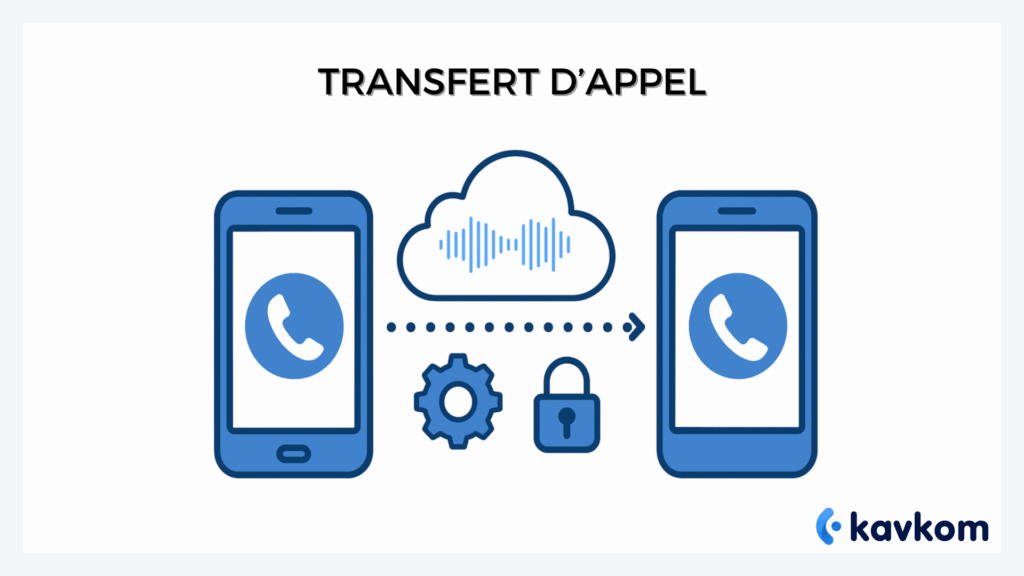
A call forwarding application is a tool that automatically manages the redirection of incoming calls.
On a conventional phone, call forwarding is often limited to a few simple settings. For example, calls can be redirected to another number if the line is busy or if nobody picks up.
A call transfer application goes much further. It lets you create more advanced redirection rules to organize a team’s communications.
For example, a company can :
- transfer a call to an available colleague
- redirect calls to a specific service
- send calls to a mobile when the office is closed
- distribute calls among several agents
Most of these applications are integrated into VoIP cloud telephony solutions. All call management is done from an online interface, accessible from a computer or smartphone.
Platforms like Kavkom operate on precisely this principle. Telephony is managed in the cloud, enabling call transfers to be configured from a web interface, softphone or mobile app, without the need for on-site hardware installation.
Key features :
- Conditional forwarding (if line busy, no answer…)
- Immediate transfer
- Transfer to a cell phone, colleague or dedicated service
- Parameterization by time slots or customized rules
Tangible benefits :
- Improved productivity: less time lost, better call distribution
- Enhanced customer service: more call-outs, fewer missed call-backs
- Mobility assured: employees can respond even outside the office
Without transfer solution :
- Lost calls = missed opportunities
- Over-solicitation of certain teams
- Inconsistent customer experience
In a nutshell: a call transfer application organizes and automates the management of corporate communications. Coupled with a cloud telephony solution, it facilitates call distribution and improves team responsiveness.
Why use an enterprise call transfer application?
In a small organization, call forwarding can be set up directly on a telephone. But when several employees have to manage calls, this method quickly reaches its limits.
A call transfer application centralizes communications management and automates the redirection of incoming calls. Companies can thus organize calls according to their teams, schedules or employee availability.
These applications are usually integrated into VoIP cloud telephony solutions. Calls are managed from an online interface, making it easy to configure transfer rules.
For example, a company can :
- redirect calls to a specific service
- transfer calls to a cell phone outside office hours
- automatically distribute calls among several agents
- monitor telephone activity from a dashboard
Some platforms go even further, integrating directly with business tools.
CRM integration :
When a call transfer application is connected to a CRM, calls can be automatically associated with customer records. Teams then have access to the interaction history as soon as a call comes in.
This synchronization facilitates sales follow-up and improves the quality of exchanges with customers.
A solution like Kavkom works on this principle. The platform lets you manage calls, configure transfers and synchronize interactions with the most widely used CRMs, directly from a cloud interface accessible on computer or mobile.
How to configure call forwarding with a VoIP application
Setting up a call transfer with a VoIP telephony application is generally much simpler than with a conventional phone. Settings are made directly from an online interface, accessible from a computer or mobile application.
Here are the most common steps for setting up call forwarding with an application.
Step 1: Preparation and installation
Before configuring call forwarding, it is useful to define how calls are to be distributed throughout the company.
For example:
- which departments should receive calls
- which employees can take over communications
- which time slots need to be taken into account
A sales team, for example, can receive incoming calls during the day, while a switchboard or mobile hotline can take over after hours.
This preparation enables transfers to be configured consistently. commissioning in just a few minutes, with human support at every stage.
Step 2: Configure call forwarding parameters
Once the organization has been defined, the application lets you configure the redirection rules.
The most common options are :
- transfer to an available employee
- referral to an agent group
- out-of-hours redirection to a mobile
- transfer after several rings
Some platforms also allow you to create more advanced scenarios, based on agent availability or call type, for example.
Step 3: Application customization and testing
Once the configuration is in place, we recommend making a few test calls.
This allows you to check :
- that calls arrive on the right line
- transfer times are appropriate
- that the experience is fluid for the caller
These tests are important to avoid a call being redirected to an unavailable line or a full mailbox.
Ensure the reliability and security of your call forwarding
A call transfer application must be able to redirect communications without interruption. If the system is unreliable, calls may be lost or redirected to the wrong person.
That’s why the stability and security of the solution used play such an important role in meeting regulatory requirements.
Communication security
Business calls can contain sensitive information. VoIP cloud telephony solutions generally incorporate security mechanisms to protect communications.
These protections include, for example:
- call encryption
- user access management
- secure storage of recordings
- compliance with data protection rules
These elements enable companies to manage their communications while complying with regulatory obligations.
Service continuity
A good call transfer application must also guarantee continuity of service.
This means that calls must be redirected even if :
- an employee is already online
- a position is unavailable
- a team is absent
Cloud telephony solutions make it possible to configure backup scenarios. For example, a call can be automatically redirected to another agent or to a mobile if no one picks up.
Call supervision
Some platforms also track telephone activity in real time.
For example, managers can see :
- number of calls in progress
- available agents
- missed calls
This visibility makes it possible to quickly adjust transfer rules if call volumes increase. With a solution like Kavkom, companies can configure their call transfers from a secure cloud interface. Communications are encrypted, and forwarding rules can be adjusted at any time from the dashboard.
Compare existing call transfer applications
Today, there are several applications for managing call transfer from a smartphone or cloud telephony platform. The choice generally depends on the size of the team, the volume of calls and the tools used in the company.
Before choosing an application, certain criteria can help you compare the available solutions.
Criteria to be observed
When evaluating a call transfer application, several factors can make all the difference:
- ease of configuration
- user interface quality
- mobile compatibility (Android and iOS)
- CRM integration
- call supervision functions
A solution that’s easy to configure generally enables teams to adopt the tool more quickly.
Application comparison table
| Application | Solution type | Ideal for |
|---|---|---|
| Kavkom | VoIP cloud telephony | sales teams and call centers |
| CloudTalk | VoIP cloud telephony | sales teams |
| Aircall | Cloud switchboard | customer support |
| RingCentral | Unified communications platform | multi-site companies |
Quick overview of solutions
Kavkom
Kavkom is a VoIP cloud telephony solution for sales teams and in-house call centers. The platform makes it easy to manage call transfers, distribute communications between employees and monitor telephone activity in real time.
Companies can configure redirection rules from a simple interface, accessible on PC or mobile. The solution also integrates with leading CRM systems to automatically associate calls with customer records and centralize exchanges with prospects and customers.
CloudTalk
CloudTalk is a VoIP cloud telephony solution that enables companies to manage their calls from a web interface or mobile application. The platform offers call transfer, routing and performance monitoring features, often used by sales teams and support centers to organize their communications and analyze their telephone activity.
Aircall
Aircall is a VoIP cloud telephony solution used by sales and customer service teams. The platform enables calls to be managed, call transfers to be configured and communications to be distributed between agents from an interface accessible on a PC or cell phone.
The solution also offers integrations with several CRMs to centralize interactions with prospects and customers, and track team telephone activity.
RingCentral
RingCentral is a cloud communications platform that enables companies to manage their business calls from an online interface or mobile app. The solution includes VoIP telephony features such as call forwarding, inbound call management and the distribution of communications between several employees.
The platform also offers integrations with various business tools, and enables teams to monitor their telephone activity from a centralized dashboard.
FAQ – Frequently asked questions
What is a call transfer application?
A call transfer application is a tool that automatically redirects incoming calls to another number or another employee. These applications are often integrated into VoIP cloud telephony solutions, and enable transfers to be managed from a web or mobile interface.
Can I transfer a call from a smartphone?
Yes. Most cloud telephony applications offer mobile apps for Android and iOS. Users can manage their calls, transfer a call or modify redirection rules directly from their smartphone.
What’s the difference between classic call forwarding and a call forwarding application?
A classic call transfer is configured directly on a telephone or via an operator. A call transfer application allows you to go even further, adding automatic rules, transfers to teams, schedules or integrations with CRM tools.
Do call forwarding applications work with VoIP?
Yes. Most call transfer applications are integrated into VoIP cloud telephony solutions. Calls are then managed via the Internet, enabling transfer configuration and team activity to be monitored from an online interface.
Conclusion
Call forwarding enables companies to stay in touch and prevent important calls from being lost. When a member of staff is unavailable, calls can be redirected to another team member to ensure continuity in communications.
Call transfer applications facilitate this organization by allowing redirections to be managed from a simple interface. Companies can divide calls between several employees, define rules according to agents’ schedules or availability, and monitor telephone activity more easily.
VoIP cloud telephony solutions now make it possible to centralize call management. Platforms like Kavkom, for example, let you configure call transfers, track team activity and connect telephony to major CRMs.