



3CX: customer reviews and testimonials, is this the right business telephony solution for you?

You’re looking for a clear review of 3CX for your business telephony. Here, we take a look at what 3CX does well and what it doesn’t do well: stability, support, interface.

We’ll analyze customer reviews, plans/prices, cloud or self-hosted deployment, CRM integration, call quality and reporting, to find out whether 3CX fits your priorities or whether a simpler approach like Kavkom serves your teams better.

Un homme souriant portant un casque avec micro, travaillant dans un environnement de bureau

What exactly is 3CX?

3CX is a software PBX for businesses, deployable as self-hosted or in the cloud. It targets SMEs through to large accounts that want to centralize telephony, chat and videoconferencing, with iOS and Android apps and Microsoft 365, Google Workspace or CRM integrations.

Features include VoIP basics (IVR, transfers, voicemail with transcription), a complete contact center (queues, supervision, recording, skill-based routing) and an AI component for transcription, summarization and sentiment analysis. 3CX also offers lightweight omnichannel (web chat, SMS, WhatsApp) and customizable dashboards. Encrypted security in transit (TLS, SRTP) and RGPD compliance.

Wide telecom coverage with fixed, mobile and toll-free numbers in many countries. Advertised HD voice quality with integrated SBC. Recent reviews have been mixed: many praise the functional richness and CRM integration, while others mention occasional bugs and instabilities, or support that is sometimes difficult to reach.

3CX Pricing (excluding tax, per system per year, with no per-user pricing), as listed on 3cx.com/pricing on October 17, 2026 (amounts in dollars)

  • Fixed annual license for the entire system, based on the number of concurrent calls and the selected edition.
  • For 8 simultaneous calls: Basic $300/year, Pro $395/year, AI $575/year.
  • A free version is available (see terms and conditions at 3cx.fr). Hosting by 3CX is a paid option.


Quick comparison. 3CX stands out for its self-hosting capabilities, native AI, and integrated omnichannel functionality. Kavkom is 100% cloud-based, focused on sales performance with a predictive dialer, real-time monitoring, and out-of-the-box CRM integrations. In terms of pricing, Kavkom starts at €10 per user (excluding tax) for cloud telephony, with unlimited France/US/CA plans available for €30, whereas 3CX charges an annual license fee per system and reserves AI capabilities for the AI edition.

In short, 3CX suits IT teams who want a flexible, rich PBX. For those looking for greater flexibility or more human support, solutions like Kavkom are clearly worth considering.

Kavkom, the best alternative to Ringover for SMEs and multi-site structures

Our opinion on 3CX

In use, 3CX seduces with its flexible PBX (cloud or self-hosted), mobile apps, and 365/CRM integrations. The contact center is complete, voice is stable in HD, and AI helps with transcriptions and summaries.

But we’ve also seen, and read about, bugs and instabilities, support that’s sometimes hard to reach, and an interface that needs modernizing. Self-hosting requires IT time. Some teams prefer a simpler solution, such as Kavkom, to avoid these issues.

To clarify matters, here’s our table of advantages and limitations.

Benefits

✅ Flexible cloud or self-hosted deployment, where Kavkom is 100% cloud

✅ Complete contact center (routing by skill, supervision), comparable to Kavkom call center scope

✅ Solid Microsoft 365, Google Workspace and CRM integrations, like Kavkom

✅ Integrated AI for call transcription and summaries, while Kavkom focuses on predictive dialer

✅ Native mobile apps and plugin-free videoconferencing, Kavkom focuses on voice and sales productivity

Disadvantages

❌ Bugs and instability issues reported in production, where Kavkom aims for a more seamless voice experience

❌ Support can sometimes be hard to reach and has no public SLA; Kavkom offers more direct French-speaking support

❌ The interface needs to be updated, and the admin workflow is less straightforward than Kavkom’s plug-and-play approach

❌ Pricing is based on the system and per year (starting at $300/year for 8 concurrent calls), with the more expensive Pro ($395) and AI ($575) editions; Kavkom charges per user, starting at €10–30 for unlimited calls

❌ Self-hosting requires significant IT resources and maintenance, but Kavkom requires no infrastructure

❌ Room for improvement in security for public communications: no encryption at rest or listed certifications; Kavkom provides information on GDPR and secure hosting

Image illustrant le soutien aux entreprises de taille moyenne

We've got the solution you need!

Kavkom fixes the issues holding you back with 3CX. 100% cloud-based—no self-hosting to maintain. A plug-and-play interface for deployment in minutes. Responsive French-speaking support whenever you need it. Pricing starts at €10–30 per user with unlimited features, whereas 3CX charges an annual license fee per system (from $300 to $575/year for 8 concurrent calls, depending on the edition) for AI and the call center. And for peace of mind, encrypted calls and GDPR compliance.

✅ 100% cloud-resilient, no infrastructure to maintain

✅ Plug-and-play interface, simplified administration

✅ French-speaking support staff, available

✅ €10–30 per user with unlimited features, no annual per-system license fee (3CX: starting at $300/year for 8 concurrent calls)

✅ Encrypted calls, GDPR compliance

No credit card

No obligation

Custom demo

What do reviews and testimonials say about 3CX ?

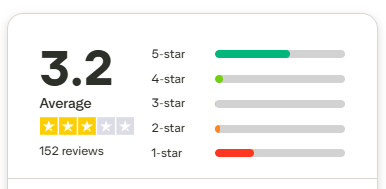
Trustpilot 3CX
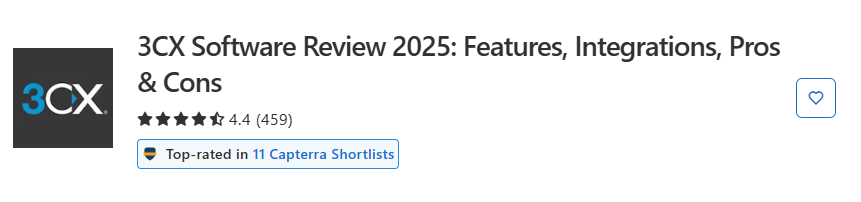
Capterra 3CX
capterra

Imagine you manage a sales team or a multi-site support center. You need stable calls, clean routing, and clear performance tracking. 3CX seems a good choice. In this section, we sift through user testimonials published on Capterra, Trustpilot and Google, to understand what works, what doesn’t, and what concrete changes it makes on a daily basis.


Overall opinion

The picture is mixed. Positive reviews point to very good call quality, advanced features such as recording and routing, appreciated CRM integration, and sometimes responsive support. Negative reviews point to recurring bugs, instability during calls, and support that is difficult to reach in some cases.

In concrete terms, for a production team, this means two things. When everything is stable, productivity follows, thanks to clean routing, crisp audio quality and useful dashboards. But in the event of bugs or slowness, activity can be slowed down, especially if support is delayed. The operational impact translates into call interruptions, processing delays, and agent frustration.

“3CX offers a highly reliable VoIP solution, with excellent call quality and advanced features like recording and custom routing.” – Capterra

“Customer support is very responsive and the interface is intuitive, making it easy to get to grips with and manage on a daily basis.” – Trustpilot

“We encountered frequent problems, with little customer service support to resolve them effectively.” – Trustpilot

On a large scale or in a multi-site context, the key will be to secure stability, and to test support on real cases before mass deployment. For a growing team, the notion of a scalable tool is a positive one, but the variability of stability and support calls for vigilant IT governance.


Pricing & evolution

The testimonials analyzed say little about rates, discounts or fees. No precise prices are quoted, and no cases of user increases or reductions during the course of the contract are documented in these reviews. There is, however, one comment about good value for money, but without any quantified details.

In practice, for a decision-maker, this means that the budget analysis still has to be documented directly with the publisher or a partner. Opinions confirm neither hidden surcharges nor volume discounts. Nor do they mention any cancellation fees. Only the ability to evolve was cited positively, which is encouraging for teams scaling up.

“A complete, scalable solution that perfectly meets our company’s growing needs.” – Trustpilot

Operational point of attention: in the absence of strong pricing signals in notices, you need to plan for prior cost control by actual usage scenario, including recordings, integrations and advanced supervision requirements. This avoids surprises on the functional perimeter.


VoIP features

In terms of features, feedback is overwhelmingly positive. Users cite call quality, recording, personalized routing, CRM integration, useful dashboards and simple installation. These bricks cover the key expectations of modern cloud telephony for sales and support, with immediate gains in traceability and customer orientation.

Nevertheless, some areas of friction remain. Some talk about a perfectible or not modern enough interface, bugs and occasional slowness. For a manager, this means allowing a little time for training and workaround procedures in the event of an occasional slowdown. In a sales team context, a bug during the qualification phase can reduce the contact rate or cause a hot lead to be lost. You need to be aware of this.

“3CX integrates perfectly with our CRM, the dashboards are effective for tracking KPIs.” – Capterra

“The functionality is there, but the interface could be more intuitive and modern.” – Trustpilot

In routine terms, call recording supports training, technical escalation and quality control. Accurate routing reduces waiting times, secures processing by skill, and improves the customer experience. CRM integration streamlines information capture and interaction memory, resulting in tangible time savings for agents.


VoIP security

The reviews don’t talk directly about authentication, encryption or SSO. The perceived security issue comes from another angle: call stability. Several testimonials report interruptions or bugs. This does not describe a security flaw, but a real operational risk for teams in the middle of a campaign or during peak call periods.

“Stability leaves much to be desired, with frequent interruptions during calls.” – Google

In practice, this means preparing a continuity plan. For example, a rapid recovery process in the event of an incident, and active monitoring of call quality indicators. The reviews don’t explicitly call for network redundancy, but the reported outages are an incentive to test the platform in real-life conditions before generalizing.


Steering & KPIs

On this point, the feedback is clear. Dashboards are judged to be effective for monitoring KPIs. For a team manager, this means a clear view of volumes, waiting times, and performance by segment. This facilitates coaching and arbitration in real time.

“Dashboards are effective for tracking KPIs.” – Capterra

Operationally, the ability to read the queue, spot an overload, then reallocate agents is a direct lever on SLA and customer satisfaction. The reviews don’t mention the API or CSV export, so these subjects remain to be validated if your data needs are advanced.


Phone number availability

None of the reviews analyzed mentioned country coverage, type of numbers available, choice of city or porting. Nor are there any reports of coverage gaps. As it stands, this subject is not documented by the testimonials collected.

Operationally, if your strategy requires local numbers in several markets, or massive porting, you’ll need to plan a dedicated audit. Reviews won’t help you here, so you need to ask the publisher or an integrator about your precise use cases.


Support & responsiveness

Opinions are divided. Some users praise the responsive support and ease-of-use, which helps a great deal with start-up and internal adoption. Others describe hard-to-reach support and unresolved bugs, with clear frustration.

“Customer support is very responsive and the interface is intuitive.” – Trustpilot

“Support difficult to contact and bugs persist.” – Trustpilot

“Frequent problems, little customer service support to resolve them effectively.” – Trustpilot

For a manager or Head of Sales, the operational message is simple. In the run phase, a delay in support can impact daily productivity, or even revenue if the team can’t call. It is therefore wise to test responsiveness on a complex ticket before switching over, and to identify a clear point of contact on the publisher or partner side. In a context of on-call or seasonal peaks, this point becomes strategic.


Third-party integrations

The reviews are positive about CRM integration. It is described as fluid and useful for tracking KPIs. No other named integrations, no API details, no plan limitations. This silence doesn’t mean absence, simply that the testimonials analyzed don’t mention it.

“3CX integrates perfectly with our CRM.” – Capterra

In concrete terms, for your team, well-perceived CRM integration means less double-entry and call data that’s better linked to the customer. This saves time and context for agents, and provides a better history for managers. If you need extended integrations or advanced automations, plan a short POC to confirm the depth of integration in your stack.


Conclusion: should you take 3CX, or turn to another solution?

3CX is suitable if you’re looking for a flexible PBX with cloud or self-hosted deployment, Microsoft 365/CRM integrations, a complete contact center (skill-based routing, supervision) and AI bricks for transcription and summarization. Relevant for equipped IT teams, ready to fine-tune infra and omnichannel parameters.

Avoid this if you want plug-and-play setup, a very simple interface, easily accessible support, or if your business cannot tolerate the bugs and instability reported in some reviews. The advanced plans (Pro: $395/year, AI: $575/year for 8 concurrent calls) and self-hosting can be a burden for small and medium-sized businesses on a tight budget or without IT resources.

In these cases, Kavkom offers a 100% cloud alternative, rapid deployment, responsive French-speaking support, €10-30 rates with unlimited France/US/CA, and a productivity focus (predictive dialer, real-time supervision, CRM integrations), with encrypted calls and RGPD compliance.

Une femme portant des lunettes et un casque avec micro, utilisant un ordinateur portable lors d'un appel entrant de Thomas Blanc.

98% of our customers value the efficiency and simplicity of our services

Find out why over 8,000 companies work with Kavkom for their corporate telephony.

4.7 on Capterra

Kavkom, the best alternative to Ringover for SMEs and multi-site structures

Livre blanc · Édition 2026

Déployer une téléphonie cloud sans coupure ni coûts cachés

Checklist VoIP en 3 phases, plan de bascule J-30 à J+30 et conseils concrets pour réussir votre migration.