Three people call during your Tuesday office hours. The phone rings only once. The other two get the voicemail, and you might lose two new members in the process.
The problem: your cell phone plan or home internet service, which doesn’t centralize anything and only rings one device at a time.
You’ll see how a cloud-based phone system for nonprofits solves this: a single number, an automated greeting that routes calls based on hours of operation, and an IVR that directs callers to the right department. All without hardware, with no long-term commitment, and with prorated billing.
Let’s start with what’s really holding back traditional phone systems for organizations.
Why isn’t a basic cell phone plan or internet service enough for your nonprofit’s phone system anymore?
Do you handle your nonprofit’s calls using a personal phone and the office’s internet router? That works for a while. Then comes the day when three people call at the same time during office hours, and everyone gets the voicemail.
That’s the real problem: a mobile plan or home internet service doesn’t centralize anything. Only one device rings, only one volunteer answers, and the other requests (memberships, information, volunteering) get lost.
A cloud-based phone system for nonprofit organizations changes everything. Instead of a number tied to a single device, you have a reception desk that’s always available, routes calls according to office hours, and directs callers to the right department.
| Criterion | Mobile/Internet Bundle | Standard Cloud VoIP |
|---|---|---|
| Installation | Equipment and subscription per device | Activation in just a few minutes, no hardware required |
| Call centralization | None; one device per number | A single number shared by the entire team |
| Call routing and scheduling | Not available | IVR, out-of-office messages, automatic call routing |
| Commitment | 12- to 24-month contract is common | No commitment, prorated billing |
And when it comes to the budget, moving to the cloud lowers the bill. By eliminating copper lines and on-site maintenance, a nonprofit organization pays only its subscription fee, with no installation or on-site maintenance costs.
In short, for an organization, it means a reception system that no longer lets calls slip through.
What Your Cloud-Based Phone System for Nonprofits Should Be Able to Do Every Day
Do you want your volunteers to spend less time juggling calls and more time out in the field? Three features really make a difference in day-to-day operations.
The first is routing calls according to the on-call schedule. Imagine an on-call schedule on Tuesdays from 2:00 p.m. to 6:00 p.m. During this time, the phone rings for the volunteers who are on duty. Outside of these hours, the call is forwarded to a message that lists the on-call hours and invites callers to leave a message. No one is left without a response.
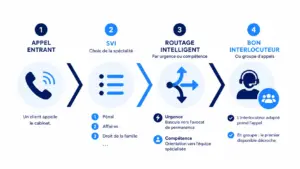
Next comes the automated greeting. With a customized IVR system to guide callers, the caller makes their own choice: press 1 for membership, 2 for volunteering, 3 for general information. An IVR-based phone system for nonprofit organizations sorts requests even before a volunteer answers the phone.
Finally, call groups. You can assign multiple volunteers to a single request. If the first volunteer is busy, the second one takes the call. Centralized call management for organizations relies on this: one number, multiple people, zero missed calls.
And here’s the best part: at Kavkom, these features are included at no extra cost. No modules to unlock.

Boost your sales teams’ productivity with Kavkom, the 100% cloud-based business phone system.
Schedule a demo
How to Choose a VoIP Phone System for Your Nonprofit in 4 Steps
Are you still torn between keeping your current plan and switching to a real solution? Choosing a VoIP phone system for your nonprofit is easy when you follow the right steps.
Four steps are all it takes. We’ll start with your actual needs and finish with your budget.
Step 1: Assess Your Actual Calling Needs
Start by listing your incoming and outgoing calls. How many incoming calls do you receive during office hours? How many outgoing calls do you make to follow up with members or confirm a volunteer?
Also note any emergency situations. A social services organization receives requests at any time of day, whereas a sports club’s calls are concentrated around September registration.
And this is where it gets useful: anticipate peaks. An annual event, a membership drive, a general meeting. If you know that October causes call volume to skyrocket, you can scale your resources accordingly. Managing incoming and outgoing call volumes starts with this simple assessment.
Step 2: Estimate Your Monthly Call Volume
Once you’ve listed your needs, take a look at the time spent on the phone. That’s what determines your usage profile—and therefore your plan.
At Kavkom, there are two distinct scenarios. An organization with moderate usage (customer calls, some volunteer outreach) starts with the Standard plan at €30 per month, which includes unlimited incoming and outgoing calls to landlines and cell phones in France, with no long-term commitment. An organization that makes calls all day long—up to 500 minutes per user—can switch to the Call Center plan at €50 per month.
Watch out for a pitfall. The €8 entry-level plan is annual and covers only incoming calls. If your volunteers also need to call people back, this plan won’t be enough. It’s better to get it right from the start to keep your phone bill under control.
Step 3: Define Your Call Routing and Greeting Rules
Now it’s time to set up your call handling system. The goal is to ensure that no call goes unanswered.
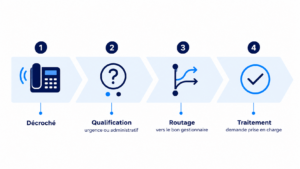
Set up your call-forwarding scenarios. When an incoming call comes in, the system searches for an available volunteer in the group. If no one picks up after a few rings, the call is forwarded to another group or to voicemail with a clear message.
Also keep the schedule in mind. Outside of business hours, the IVR plays an out-of-office message that reminds callers of the business hours. You only need to set up these routing rules once, and the phone system runs on its own from there. Your callers always know what to do.
Step 4: Ensure Budget Flexibility and No Long-Term Commitment
The final step—and by no means the least important for a nonprofit—is flexibility. A nonprofit’s cash flow fluctuates with the seasons, so your subscription plan needs to adapt accordingly.
That’s the whole point of prorated billing. You disconnect a line in August, when the office is closed, and you only pay for what you use. Compare that to a provider that, at best, offers a 25% discount during the summer: here, you’re actually suspending the service.
Add to that the lack of a commitment. No 12- or 24-month contracts, no minimum number of lines, and instant cancellation. While traditional carriers lock you in, Kavkom lets you adjust your plan month by month.
👉 Kavkom is compatible with all your sales team’s tools. Check out Kavkom’s pricing with no obligation.
Deployment Guide: Setting Up Your Hardware-Free Cloud Phone System
Are you worried about the technical aspects, the wiring, or the technician who never shows up? Good news: none of that is necessary. A cloud-based phone system for organizations can be set up through a web interface in just a few minutes, without installing anything on-site.
Let’s do it together, in three steps.
Step 1: Get Your Virtual Numbers and Manage Number Portability
The first building block: your number. With Kavkom, you can order a virtual number for your nonprofit in just a few clicks—either a local number (with your area code) or a national number, depending on the image you want to project.
Already attached to your old number? You don’t have to give it up. Number portability transfers it to Kavkom, usually within 7 to 15 days. Your members will continue to call the same landline number without even noticing the change.
Simply submit the line transfer request through the interface, and the rest of the process handles itself.
Step 2: Set up the automated greeting and IVR
Is your number active? Time to set up the greeting. From the admin interface, you can build the association’s voice menu tree without any technical expertise.
Start with the welcome message. Record one greeting for when the office is open (“Hello, you’ve reached the association…”) and another for when it’s closed. Call forwarding automatically switches between the two depending on the time of day.
Next, you map the keyboard keys to the services. Press 1 for memberships, 2 for volunteering, 3 for information. Configuring the IVR involves assigning each key to a group of volunteers. The IVR sorts the calls before anyone picks up.
Step 3: Connect your devices without any physical setup
All that’s left is to equip your volunteers. And here, everyone uses whatever they already have on hand.
On a computer, the webphone works directly in the browser, without requiring any installation. When on the go, the mobile app takes over: a volunteer answers the call from their smartphone using the organization’s number, not their own. A softphone on a PC also works for those who prefer it.
What if a volunteer prefers a traditional handset for the hotline? You simply plug in a physical VoIP-compatible IP phone at no additional subscription cost. You configure your Kavkom line on it, and you’re all set. With some competing solutions, these VoIP handsets are billed as an optional extra. Here, they’re included.
There you have it: a fully operational phone system for your nonprofit, with no mandatory hardware and no on-site installation. Everything is managed through a single interface, and you can adjust settings whenever you want.
Boost your sales teams’ productivity with Kavkom, the 100% cloud-based business phone system.
Schedule a demo
Eligibility and Sign-Up: How to Get a Phone Number in Your Association’s Name
Worried about the paperwork when signing up? Good news: setting up a line for a non-profit organization under the 1901 law requires very few documents, and you likely already have most of them.
Here’s what’s generally required to sign up for an association phone plan:
- The association’s current bylaws.
- Proof of official existence: RNA number, publication in the Official Journal, or SIRET number, as applicable.
- Identification document of the legal representative signing the documents.
- A bank account number (RIB or IBAN) in the association’s name for the direct debit.
If the person signing is not the president, a simple power of attorney is sufficient to prove that they can bind the organization.
Now, here’s the pitfall to avoid. Traditional providers often lock you into a 12- or 24-month contract with steep cancellation fees. With a virtual number for organizations from Kavkom, it’s the opposite: no commitment, prorated billing, and instant cancellation.
A quick note on terminology, since this can be confusing. You’re not setting up a physical landline with wiring. You’re getting a virtual landline number, accessible via the Internet. The phone service for organizations is therefore 100% digital, with no required installation.
👉 Learn how virtual numbers work with Kavkom.
Security and GDPR Compliance: Best Practices for Nonprofit Calls
Do you record your nonprofit’s calls to train volunteers? That’s a good idea, but the CNIL has set some rules. Nothing to be afraid of—just common sense within a framework.
The basic principle is data minimization. Don’t record everything by default. Keep only what truly serves your purpose (training, quality of service), and announce that the call is being recorded right at the start of the call.
Three simple steps are all it takes to stay compliant:
- Inform the caller that the call is being recorded, explain the purpose of the recording, and inform the caller of their right to object.
- Limit the retention period (often a maximum of 6 months for training purposes, unless otherwise specified).
- Restrict access to the recordings to authorized personnel only.
Speaking of access rights, Kavkom manages permissions by role. A volunteer has access only to the call histories related to their assignment. A manager, on the other hand, can listen to calls again for coaching purposes. With encrypted calls and GDPR compliance, your sensitive data remains protected. For more information, the CNIL fact sheet on call recording covers the essentials.
Boost your sales teams’ productivity with Kavkom, the 100% cloud-based business phone system.
Schedule a demo
Key Takeaways for Your Organization
- Centralize your communication channels: a single number shared by your volunteers is a great alternative to managing multiple mobile plans.
- Automate call handling: Smart call routing based on your staffing schedules ensures that no important calls are missed, even outside of business hours.
- Prioritize flexibility: Choose a 100% cloud-based solution with no long-term commitment, featuring prorated billing that accommodates your organization’s seasonal budget fluctuations.
- Deploy with ease: Switching to VoIP requires no physical installation, allowing your teams to be up and running in minutes on their existing devices.
Switching to cloud-based phone service means professionalizing your organization’s customer service without adding to your daily workload. By adopting a flexible phone system, you free up time for your volunteers while ensuring a more responsive experience for your members and partners. If you’d like to take your interaction management a step further, you can explore the benefits of integrated CRM software to better track your relationship history.
Are you ready to take the plunge? Schedule a personalized demo to learn how to set up your reception area in just a few clicks—with no obligation and no required equipment.