You’re coming out of a meeting. Your phone shows a missed call. And your prospect has already called someone else.
This is the situation that small and medium-sized businesses, independent contractors, and sales teams face every day—they can’t answer the phone every time it rings. The problem isn’t the missed call itself. It’s the lack of an automatic response sent to the caller right away.
Except that many people confuse two very different things: the notification you receive after a missed call, and the automated text message sent to the caller to maintain contact. These are two opposite concepts. One keeps you informed. The other saves the lead.
Here’s how to choose the right method based on your call volume, your organization, and your reliability needs—whether you opt for native settings, a third-party app, or business VoIP.
I recommend without hesitation
With Kavkom, I was able to easily resolve the issue of communication costs to my regular customers. My agents, too, were no longer restricted in their mobility, because even when on the move, communications are managed.

How about you?
Request a demo nowOperator notification or true automated response: What are we talking about?
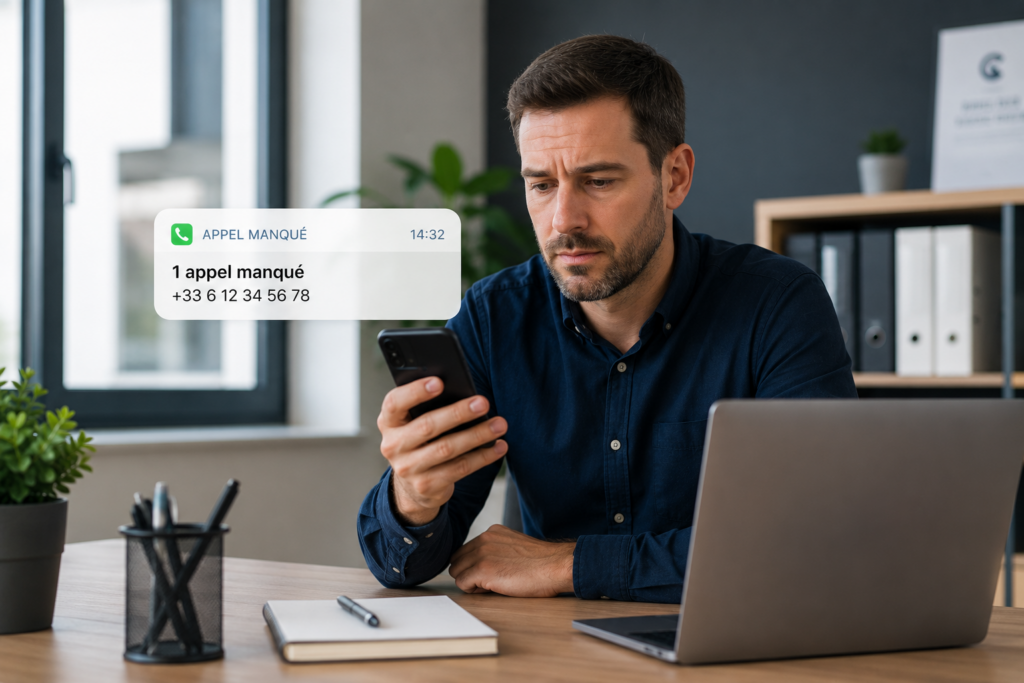
You’ve just left a meeting. Your phone shows “1 missed call,” and a text message from your carrier alerts you that a number tried to reach you at 2:32 p.m.
That’s a notification. You’ve been notified. But what about the person who called you? They didn’t receive anything. They hung up and looked for another service provider.
This is the most common misconception about missed call text messages: many executives believe that the carrier notification (the short message they receive on their phone) is the same as a reply sent to the caller. But these are two completely different things. The notification simply informs you. The automatic reply after a missed call informs your prospect, your customer, or the person who needs you right now.
And “now” isn’t just a figure of speech.
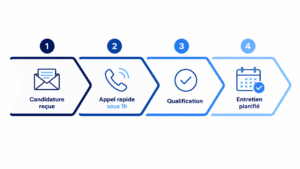
According to an analysis reported by FrenchWeb, making contact within the first five minutes after a request results in 8 times more conversions. After one hour, the chances of qualifying a lead drop sharply. For an SME or a small business owner, every unanswered incoming call represents a prospect at the peak of their interest—interest that wanes with every passing second if the call goes unanswered.
Here’s the point: an automated text message sent to the caller (such as “We’ve received your call and will get back to you within 10 minutes”) maintains that connection. It reassures the caller. It prevents them from dialing the next number on their list.
This is what’s known as “speed-to-lead” as it applies to cloud-based business phone systems. And that’s where the difference between a smartphone trick and a true SMS-sending solution integrated into your calling system makes all the difference.
In the following sections, you’ll see exactly how to set this up, whether you’re using a simple iPhone, a third-party app, or a professional VoIP system like Kavkom.
Smartphone, app, or VoIP calling: Which option should you choose?
You now know that the real value of a ” missed call” text message lies in the message sent to the caller, not in the notification you receive. That leaves one practical question: How do you set this up?
There are three options. And they are not at all equal.
| Criteria | Smartphone (native) | Third-party application | Professional VoIP telephony |
|---|---|---|---|
| Automatic sending without manual intervention | Rarely (often semi-manual) | Yes, according to the app | Yes, native and configurable |
| Multiple contributors | No (1 phone = 1 person) | Limited | Yes, centralized for the entire team |
| Customization by schedule or number | No | Partial | Complete (schedule scenarios, routing) |
| Reliability in the Background | Depends on the OS and updates | Variable (frequent interruptions) | Terminal-independent |
| Traceability and Activity Log | No | Basic | Complete (contact form, CRM) |
Let’s start with what you already have at your fingertips. On iPhone, the “Reply via Text” feature exists, but it requires you to see the incoming call and type manually. On Android, some manufacturers offer predefined quick replies. Now, let’s be clear: this isn’t automation. It’s a shortcut that depends on your availability and a single device. If you’re in a meeting, no one will send a message for you.
Third-party apps (such as Missed Call Text Back or automations via Tasker) take it a step further. They can trigger an automatic text message after a missed call without any action on your part. The thing is, though, these apps run in the background on your personal phone. An Android update or a slightly aggressive battery-saving mode, and the trigger stops working. Not to mention that it only covers a single number on a single device.
For a freelancer who receives five calls a day, that might be enough. For a team of three salespeople or a firm with several employees, it’s unmanageable.
And that’s where cloud-based business telephony changes the game. With a professional VoIP system like Kavkom, the SMS trigger no longer depends on a smartphone. It’s configured on the server side, on your virtual landline number. Whether your employees use a webphone, a softphone, or a physical IP phone, the process works the same way. Every unanswered call generates a personalized text message for the caller, with full traceability in the activity log and contact record.
You can even tailor the message based on business hours or the specific call group. In the evening, a different message than the one sent during the day. On Saturdays, a link to your appointment scheduling form.
In practical terms, the most reliable professional missed-call SMS solution is one that does not rely on your employees’ devices.
👉 Kavkom is compatible with all your sales team’s tools. Discover business VoIP with 100% cloud-based enterprise phone software.
How to Set Up an Automatic Missed Call SMS in 5 Steps
Now you know which method is right for your situation. All that’s left is to take action.
Setting up an automatic text message after a missed call on a business system isn’t rocket science. But the order of the steps matters. If you set up the message before defining the trigger rules, you’ll end up sending text messages at the wrong time to the wrong people.
Here is the logical sequence, which can be applied to a cloud-based PBX such as Kavkom.

Step 1: Set the landline number and the trigger rules
First thing: On which number do you want to activate the scenario?
If you use a virtual landline number through Kavkom, you can select specific numbers from your admin interface. One number for sales, another for customer service. Each can have its own rules.
Next, define the triggers. Three situations cover the majority of cases:
- The call comes in outside of business hours (evenings, weekends, and holidays)
- The queue is full, and no one is picking up within the configured time limit
- All members of the call group are either busy or unavailable
The idea is to cover every possible scenario where there is no response. A prospect who calls on a Saturday morning is not treated the same way as a customer who encounters a full queue on a Tuesday at 10 a.m. The time-based scenario allows you to tailor the automated response to each specific situation, without manual intervention.
In practice, on Kavkom, you configure these rules directly within the interactive voice response system. No technical skills are required: you choose the time slots and the trigger conditions, and the system takes care of the rest.
Step 2: Choose the routing and automation tool
You have your numbers and your triggers. Now you need to link the event (the missed call) to the action (sending the text message).
There are two approaches.
The first: use the native features of your cloud PBX. With a cloud PBX like Kavkom’s, call routing and post-call actions are handled on the server side. A missed call automatically triggers the message without requiring a third-party tool. This is the most reliable method because it doesn’t depend on a smartphone or an app running in the background.
The second option: set up a webhook that sends the information to an external automation tool (Zapier, Make) or directly to your CRM. Let’s say you use HubSpot. The missed call is reported via Kavkom’sCRM integration, and a HubSpot workflow triggers the text message. This approach is useful if you want to coordinate sending the text message with other actions (creating a follow-up task, notifying a manager, updating the lead’s status).
For most small and medium-sized businesses, the first option is sufficient. All you need to do is enable the scenario in your Kavkom interface. More structured teams, with a central CRM and complex qualification workflows, will prefer the webhook.
Step 3: Write the message and insert the variables
This is the step where many people cut corners. A generic text message like “We missed your call” doesn’t convert. A personalized message does.
Here’s what makes the difference:
- Identify your company right from the first line. The caller may have contacted three service providers. They need to know immediately who is answering.
- Provide an estimated callback time. “We’ll get back to you within 15 minutes” is far more reassuring than “We’ll call you back as soon as possible.”
- Add a call to action: a booking link to your online calendar, or a contact form so the caller can specify their request.
A practical example for an architecture firm: “Hello, this is Durand Architects. We’ve received your call. A staff member will call you back within 30 minutes. Need urgent assistance? Book a time slot here: [link].”
Customization variables (company name, phone number, time frame) are inserted directly into the template. The text message sent on Saturday morning might say, “We’re closed this weekend; your request will be processed on Monday at 9 a.m.,” while the one sent on weekdays promises a prompt callback.
This level of customization transforms a simple confirmation email into a powerful tool for converting incoming leads.

Boost the productivity of your sales teams with Kavkom, the 100% cloud-based business telephony software.
Schedule a demo
Step 4: Ensure GDPR Compliance
You’re probably wondering if you’re allowed to send a text message to someone who called you without giving their explicit consent.
Good news: The answer is yes—under certain conditions.
A text message sent after a missed call is considered a transactional (or “service”) communication, not a sales solicitation. The person initiated contact by calling you. You are responding to their inquiry. This is not a sales solicitation.
That said, there are three non-negotiable rules for GDPR compliance:
- Clearly identify your company in the message. No hidden numbers, no anonymous text messages.
- Stick to the scope of the request. Your text message confirms that the call has been handled. It does not offer a promotional deal on an unrelated product.
- Include an opt-out option. A simple “Text STOP to stop receiving messages” is sufficient. This is required.
As a GDPR-compliant solution, Kavkom provides traceability for every SMS sent. Each message is time-stamped, linked to the contact record, and archived. If a caller disputes the message, you have proof that the SMS was a response to their incoming call.
Let’s be clear: as long as you stick to the purpose of the service message, you’re protected. The risk begins when you turn this channel into a tool for unsolicited sales outreach.
Step 5: Test the campaign and track conversion metrics
Your script is set up. Before you run it, test it in a real-world environment.
Call your landline from an external cell phone at different times: during business hours (when all employees are busy), outside of business hours, and when the queue is full. Verify that the correct text message is sent in each case, with the correct content.
Next, move on to tracking. Three KPIs are all you need to measure the recall rate and return on investment:
- Callback rate: How many callers who received the text message contact you again or click on the link you sent?
- Average callback time: How long does it take between a missed call and the first actual interaction with your team?
- Leads captured: How many prospects that would have been lost were ultimately qualified thanks to text messages?
The Kavkom activity log provides you with this data without any additional configuration. Every missed call, every text message sent, and every callback made appears in the history, linked to the contact record. You can see at a glance whether your workflow is working or if you need to adjust the message, the timing, or the trigger rules.
In our experience, the first adjustments often involve the content of the text message. A booking link that converts better than a simple “we’ll call you back,” or an estimated wait time of 15 minutes instead of 30, which increases the response rate. Test, measure, and refine.
👉 Kavkom is compatible with all your sales team’s tools. Find out how to manage your on-call schedules with this 100% cloud-based business phone system.
6 Professional Text Message Templates for Responding to a Missed Call
You’ve set up your scenario, your triggers are in place, and compliance is all set. Now for the crux of the matter: what do you write in that text message?
An automated message sent after a missed call that converts isn’t a generic message. It’s a message tailored to your business, your context, and what your caller expects at that exact moment.
Here are six ready-to-use templates. Copy them, customize the name and link, and add them to your Kavkom scenario.
1. On-site Technician
“Hello, this is [Company Name]. I am currently on a call and cannot answer the phone. I will call you back as soon as I am available, within an hour at the latest. For urgent matters, please describe your request here: [form link].”
The caller knows that you exist, that you’re active, and that they’ll be contacted again. For a plumber or electrician, this text message makes the difference between a patient customer and one who calls the next competitor.
2. Doctor’s office
“[Name]’s Office. We were unable to answer your call. To schedule an appointment, please book directly online: [Doctolib link]. In case of a medical emergency, call 15.”
Here, the booking link is essential. The patient doesn’t need to call back. They click and book. The practice reduces the number of incoming calls while maintaining patient care.
3. Real Estate Agency
“Hello, this is [Agency Name]. Thank you for your call. An agent will get back to you within 15 minutes. Are you looking for a property? View our listings here: [website link].”
A real estate prospect who calls is a hot lead. Fifteen minutes is the time frame that keeps the lead active. The link to the listings gives them something to keep them engaged without looking elsewhere.
4. Sales Department
“[Company Name]: We’ve received your call. A sales representative will call you back within the next 10 minutes. Would you prefer a specific time slot? Book it here: [calendar link].”
This model works best for automatically responding to missed calls in a B2B context. The contact form or calendar link qualifies the prospect even before the callback. Your sales representative already knows what the caller wants when they answer the phone.
5. Customer Support
“[Company Name] Support: Your call has been logged. A ticket has been created. Reference: #[auto-generated number]. We will get back to you within 2 hours. Track your request here: [customer portal link].”
The ticket number provides immediate reassurance. The customer knows that their request hasn’t fallen through the cracks. It’s a follow-up text message sent after a missed call that turns frustration into a structured service experience.
6. Restaurant
“[Restaurant Name]: Sorry we missed you. To reserve a table, click here: [reservation link]. See you soon!”
Short, to the point, effective. Customers who call a restaurant want to make a reservation, not chat. The link does all the work.
What makes these templates stand out is the combination of three elements: immediate identification, a specific timeframe (or an alternative action), and a clickable link. A text message sent after a missed business call without a call-to-action link is simply an acknowledgment of receipt. With a link, it becomes a tool for converting incoming leads.
On Kavkom, each template is configured in your interface and linked to a specific business number. You can assign a different template by number, time slot, or team. The text message sent on Saturday by your real estate agency is not the same as the one sent on Tuesday morning by your sales department.
Set up your automated SMS templates with Kavkom, the 100% cloud-based business telephony software.
Schedule a demo
Streamline the management of your incoming calls with a professional solution
You have the templates, the steps, and compliance. But let’s be honest: none of that matters unless your phone system can keep up.
A “missed call” text message triggered by an app that crashes as soon as battery-saving mode kicks in—that’s not a system. It’s a hack. And hacks always fail at the worst possible moment.
The game-changer is centralizing customer interactions on a true professional VoIP system. When your phone numbers, no-answer scenarios, automated text messages, and activity log are all managed in one place (on the server side, not on the smartphone), you’re no longer dependent on a single device, a battery, or a finicky Android update.
Kavkom was designed for that.
In practice, your team can work using the platform of their choice—a webphone in a browser, a softphone on a computer, or a virtual landline number set up on a physical IP phone—at no extra cost. The automatic response scenario after a missed call runs regardless of the device your employees use. No one needs to “remember” to activate anything.
And reachability doesn’t stop at text messages. Simultaneous call routing distributes each incoming call to multiple employees at the same time. If no one answers, a text message is sent. If someone answers, the prospect is assisted immediately. You’re covered for both scenarios without any additional configuration.
When it comes to pricing, Kavkom operates on a no-commitment basis with prorated billing. You can suspend your lines in August and pay only for the days you use them. All monitoring, recording, and incoming request management features are included from the very first euro. There are no premium modules to unlock to access statistics or coaching.
Are you wondering if it’s worth it given your call volume?
Let’s say you miss three calls a week because you’re unavailable. Over the course of a month, that adds up to twelve prospects who haven’t heard back from you. With a professional VoIP system that sends a text message whenever a call goes unanswered, those twelve contacts receive a message instantly. Some will call back. Others will click on your booking link. The cost of the solution pays for itself as soon as you secure your first lead.
The real question isn’t “Do I need an automated text message?” It’s “Can I afford to keep missing calls without sending anything in return?”
Boost the productivity of your sales teams with Kavkom, the 100% cloud-based business telephony software.
Book a free demo
Key Takeaways for Improving Your Sales Responsiveness
An automated text message after a missed call isn’t just a mobile gimmick. It’s your safety net to protect your growth.
What makes all the difference is switching from manual management via a smartphone to a centralized system. By automating responses to your business number, you ensure reliable service continuity. The key lies in customizing the message and ensuring the trigger is reliable, regardless of the time of day or which employee is available.
If you handle high call volumes, simultaneous call routing remains the best way to drastically reduce missed calls. To take the next step in organizing your team, our comparison of the best call center software will help you choose the architecture that best suits your needs.
Honestly, technology should simply support your business agility. Just ask yourself this: How many prospects called your competitor today because you weren’t able to answer their call within a minute?