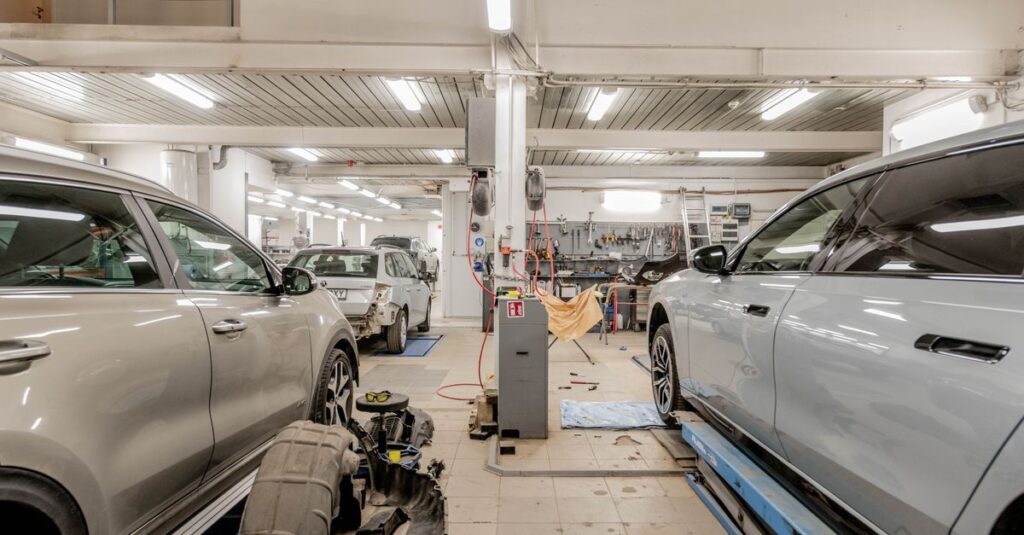
The phone rings. Your mechanics have their hands in the engine. No one answers.
And in the meantime, the customer who wanted an appointment or a quote calls the garage across the street.
You know the drill: every missed call means lost business. Especially on Monday mornings, when the shop is swamped and the phones are ringing off the hook.
Good news: a cloud-based garage phone system takes care of this without a single cable. You’ll see how to route your calls (workshop, appointments, quotes, after-hours) using an IVR and call groups—all without any hardware, no long-term commitment, and with prorated billing.
We’ll start with how it works, then move on to the actual setup.
How does a modern auto shop phone system work?
Let’s be clear: your garage is swamped with calls. Requests for quotes, scheduling appointments, after-sales service follow-ups. And while your mechanics have their hands in the engine, the phone rings unanswered.
You already know this: every missed call means a customer calling the garage next door.
A modern garage phone system solves this without laying a single cable. We’re talking about a cloud PBX, also known as an IP-based Centerx. All the call handling and routing logic runs on the Internet, not in an electrical cabinet at the back of the shop.
How does it differ from a physical PBX? The difference is clear.
| Criterion | Physical PABX | Cloud PBX (VoIP) |
|---|---|---|
| Hardware | Cabinet, cabling, on-site installation | None, 100% cloud |
| Setup time | Several days or even weeks | Activation in a few minutes |
| Scaling (adding workstations) | Technician assistance | With just a few clicks |
With Kavkom, you can manage everything from a cloud-based phone system that works on a webphone, softphone, mobile device, or an IP phone if you already have one. No SIM card, no cell phone plan. Just VoIP.
And that’s where cloud-based phone service is a game-changer for a busy repair shop. When your lines are busy, calls no longer go unanswered. They’re placed in a queue, routed to another available department, or directed to a business VoIP solution that handles the reception for you.
The result: fewer missed calls and consistent customer service—even during peak times. All with no long-term commitment and prorated billing. If you suspend a line in August when business is slow, you only pay for what you use.
Now that we’ve set the stage, let’s see how to organize all of this department by department.
5 call scenarios to automate with a garage phone system
Not all calls coming into your garage are the same. A customer who wants an appointment shouldn’t be placed in the same queue as a call for a quote or an after-sales service follow-up.
The basic principle is the ring group: a set of extensions that ring simultaneously for the same type of request. Combined with an IVR, call routing directs each caller to the right person right from the start.
Here are five real-world scenarios where this approach saves you time and helps you win over customers.
Simplified Workshop Appointment Scheduling
Monday mornings are chaos. Everyone is calling to schedule their service appointment, and meanwhile, the repair shop is already swamped.
The result: your mechanic puts down his wrench to answer the phone, or no one answers at all. Two bad options.
The routing rule is simple: create a dedicated call group for scheduling appointments. When the caller presses the “Appointment” button on the voice menu, the call goes only to the person in charge of scheduling. If that person is already on the phone, the call goes on hold with a message like “We’ll schedule your appointment in a moment.”
The benefit? Zero missed appointments, and your shop can keep its hands on the engine. The shop’s productivity no longer depends on who happens to be away from the phone.
Quick handling of quote requests
It takes time to provide a quote. And as long as your sales representative is on the phone explaining a clutch repair, the main line remains tied up.
As a result, other callers get no answer.
The solution: Route quote requests directly to the sales department or the person who prepares the quotes, without going through the general reception desk. The IVR offers a “Quotes and Rates” option, so the call goes straight to the right place. No random transfers, no callers being shuffled from one extension to another.
For a business leader, this translates to direct revenue. A prospect who receives a quote quickly—without having to wait three minutes listening to hold music—is a sales conversion in the making. And every quote request handled properly improves the quality of your customer service.
After-sales follow-up and customer feedback
“Hello, is my car ready?” How many times a day do you hear that phrase?
These after-sales service calls are legitimate, but they overwhelm the front desk and interrupt your teams’ work. The customer, for their part, just wants reassurance.
The routing rule: direct these calls to the shop manager or the person tracking the vehicles currently in service. That’s the person with real-time information—not the front desk, which will have to call back after checking. With call recording included in Kavkom, you also keep a record of every conversation, which is useful in case of a dispute over a repair.
The benefit is twofold: shorter wait times for customers and after-sales service that puts them at ease. And a customer who’s kept in the loop is a customer who’ll return for their next service appointment.
👉 Kavkom is compatible with all your sales team’s tools. Schedule a personalized Kavkom demo to try out the routing tool.
Automatic call forwarding outside business hours
Your auto shop closes at 6 p.m. and at noon on Saturdays. But customers call at 7 p.m. or on Sundays.
Without a system in place, these after-hours calls go unanswered. No professional voicemail, no message. Just a ringing phone with no answer—and a customer who thinks the garage is poorly organized.
The solution comes down to one rule: set your business hours in the switchboard. As soon as you close, calls are automatically routed to a personalized message (“Our hours are… please call us back starting at 8 a.m.”) or a cloud-based voicemail system that records the request. You’ll retrieve the message the next morning.
Your professional image remains intact even when the garage is closed. The automatic gate does the work while you’re at home. No more calls that make it seem like no one’s running the shop.
Smart call routing by specialty (mechanics vs. bodywork)
In a garage that does both mechanical and bodywork, calls constantly get mixed up. A bodywork customer gets the mechanic, who transfers the call, dials the wrong extension, and then has to transfer it back.
These constant transfers waste everyone’s time. And the caller has to repeat their story three times before reaching the right person.
The IVR menu filters all of that out upfront. “Press 1 for mechanics, 2 for bodywork.” Call routing based on expertise sends the call directly to the appropriate technician, depending on their specialty or availability. No more back-and-forth phone calls between the two shops.
For your technicians, this is a real benefit: they only answer calls that are relevant to them. And with a garage phone system like Kavkom, this skill-based call routing is built right in—no need to pay for an additional module. You can set up your call center without driving up your bill.
How to Set Up Your Cloud-Based Garage Phone System Step by Step
Worried about the technical side of things? Good news: there’s no need to wait for a technician, and no cables to run.
A cloud-based phone system for garages can be set up in four steps via a web interface, in just a few minutes. Here’s how to go from a phone ringing unanswered to a reception system that runs on its own.
Step 1: Choose your virtual numbers and devices
First decision: your number. With Kavkom, you can keep your garage’s existing number thanks to number portability, or choose a new geographic virtual number (a 04 area code for Lyon, a 02 area code for Nantes—no matter the region).
A quick vocabulary note: we refer to landline numbers, not landlines. You can also add a local number in more than 50 countries if you work with clients abroad.
Next, your devices. And here, you have a choice.
- The webphone: You can make calls directly from your browser, without installing anything.
- The softphone: a computer or mobile app, convenient for receptionists or sales reps on the go.
- The physical IP phone: If you prefer a real handset on your desk, just plug it in and set up your Kavkom line on it.
This last point is important: compatibility with a physical IP phone is included at no extra cost. No SIM card, no cell phone plan. Just VoIP over the Internet. You can set up the front desk and the workshop however you like, with no mandated equipment.
Step 2: Set Up the Interactive Voice Response (IVR) System
The IVR is the voice that greets your callers and guides them. Done right, it filters everything upfront. Done wrong, it drives customers away.
The golden rule: keep the menu short. No one wants to listen to eight options before finding the right one.
For an auto repair shop, three or four choices are enough: “Press 1 to schedule an appointment, 2 for a quote, 3 for customer service.” Direct, clear, and effective.
As for the greeting message, pay attention to the tone. A professional recording, including the garage’s name and hours of operation, immediately conveys a professional image. Avoid long-winded sentences: callers want to be guided, not listen to a novel.
Kavkom’s customizable IVR is included in all plans. You set it up yourself via the interface and can adjust the menu with just a few clicks whenever your operations change.
Step 3: Create call groups and scheduling rules
Once the IVR is set up, you need to decide who gets the call and when.
That’s what call groups are for. You group extensions by department: a workshop group, a parts group, a management group. When the caller selects “appointment,” only the relevant extensions ring. No one else is disturbed.
Next, the scheduling rules. You set your business hours, for example, 8 a.m.–12 p.m. and 2 p.m.–6 p.m. on weekdays. Outside of these hours, calls are automatically routed to a recorded message or a cloud-based voicemail system.
And during peak times? That’s where overflow management comes into play.
When all extensions in a group are busy, the call isn’t lost. It’s placed in a queue with a hold message, or it’s routed to another available department. On Monday mornings, when phones are ringing off the hook, this safety net makes all the difference. You can manage your call volume without a single customer falling through the cracks.
Step 4: Enable monitoring and GDPR-compliant recording
Your switchboard is up and running. The question is whether it’s running smoothly. And that’s something you can measure.
The Kavkom dashboard provides you with the metrics that matter most to a repair shop: call drop rate, call abandonment rate, and average wait time. If you see that 20% of Monday morning calls go unanswered, you’ll know where to improve your customer service.
Call recording, which is built right in, is also useful for coaching. You can listen back to a customer service interaction to help a new employee better handle a quote request, or keep a record in case of a dispute over a repair.
Now, a serious note about compliance. Recording a call is not a trivial matter.
The CNIL requires that callers be informed in advance, typically through a message such as “This call may be recorded.” Kavkom is GDPR-compliant: traceability, consent management, and the ability to export and delete data upon request. You can stay compliant without becoming a lawyer, all while ensuring the quality of your customer service.
VoIP Phone Service Rates for Auto Repair Shops: How to Avoid the Pitfalls
Let’s be honest: telecom rate plans are often designed to confuse you. An attractive calling plan, and then when the bill comes, extra charges that nobody told you about.
You just want to know how much your auto repair shop will pay each month—with no unpleasant surprises.
The first pitfall to avoid with VoIP phone service for a garage: confusing the different plans. An entry-level plan for €8 may seem unbeatable, but it’s actually an annual plan and covers only incoming calls. For a garage that receives a lot of calls but also calls its customers back (for quotes, after-sales follow-ups, and repair updates), that’s not enough.
The plan that’s really perfect for a garage is the one for €30 per month. It includes unlimited incoming and outgoing calls to landlines and cell phones in France, with no long-term commitment. And if you’re a heavy call center user (up to 500 minutes per day), the plan goes up to €50 per month.
| Offer | Price | Coverage |
|---|---|---|
| Entry-level | €8/month (billed annually) | Incoming calls only |
| SME Plan | €30/month, no commitment | Unlimited incoming and outgoing calls (France) |
| Call Center | €50/month, no commitment | Unlimited, heavy usage (up to 500 min/day) |
For a typical auto repair shop that calls its customers and provides a few quotes, the €30 Standard plan more than covers its needs. No need to overpay.
And that’s where prorated billing changes everything. Is your garage running at a slower pace in August? Cut a line—you only pay for what you use. Compared to a competitor that offers a 25% summer discount, this approach is still more cost-effective: you don’t pay at all for what you don’t use.
Another key point: zero hidden fees. No setup fees, no cancellation fees, no minimum number of lines. The price listed is the price you pay.
And all features are included. IVR, monitoring, call recording, skill-based routing: no extra charges. While others reserve these options for premium plans, you get them right from the start.

Try Kavkom for free with no obligation to boost your garage’s productivity with Kavkom, the 100% cloud-based business phone system.
Schedule a demo
A Checklist for Optimizing Auto Repair Shop Call Management
You’ve read it all, and you see the value. Now for the final step: make sure that taking action is as simple as it sounds.
Before you get started, ask yourself the right questions about your current call flow. Five minutes of thought can save you from a poor configuration.
- How many calls do you miss each day, especially during the Monday morning rush?
- Which departments deserve their own routing line (workshop, quotes, body shop, after-sales service)?
- What are your actual business hours, and what happens when you close?
- Do you need to keep a record of conversations by recording calls?
Once you have those answers in mind, deployment goes quickly. Really quickly.
No need to wait for a technician, no service interruptions. You activate your account, configure the IVR and your call groups via the web interface, and you’re up and running the very same day. A garage phone system like Kavkom gets up and running in just a few minutes, whereas a traditional provider takes days.
One thing that often puts hesitant customers at ease is number portability. You keep the landline number your customers know by heart—the one printed on your business cards and invoices. There’s no need for your entire customer base to learn a new number.
And since there’s no commitment and billing is prorated, you can try it out risk-free. If it doesn’t work out, you can cancel. No hidden fees, no cancellation fees.
The best way to see if it works for your garage is to try it out for yourself.
Boost your sales teams’ productivity with Kavkom, the 100% cloud-based business phone system.
Schedule a demo
Key Takeaways for Your Garage
- A cloud-based VoIP phone system automates call handling and routing to your various departments (workshop, quotes, appointments) without requiring any on-site hardware.
- Configuration using call groups and IVR helps eliminate missed calls while ensuring your mechanics aren’t bothered by calls that don’t concern them.
- No long-term commitment and prorated billing offer total flexibility, making it ideal for adjusting your costs to the seasonal nature of your business.
- All key features (monitoring, call recording, call routing) are included out of the box at no additional cost.
Switching to a modern phone system is no longer a complex project that takes weeks to set up. It’s a simple process that immediately gives your shop a more professional image while freeing up valuable time for your team. You keep your current number, stay in control of your budget, and finally put an end to calls that go unanswered.
If you’d like to see how to organize your workflows by department, you can schedule a free demo with our team. Together, we’ll look at how to set up your customer service system so you never miss a customer call again—with no obligation and immediate activation.