This guide takes you step by step through the process. You’ll understand what an IVR is, how it works, what it really does for businesses, and how to integrate it into a modern cloud telephony environment. The aim is simple: to help you decide with confidence whether this technology is right for your organization.
Points to remember :
– The telephony IVR enables callers to be greeted and directed in a structured way, immediately improving flow management.
– A well-designed IVR reduces waiting times, minimizes misdirection and standardizes the experience across all services.
– The cloud greatly simplifies the implementation of an IVR, thanks to the absence of hardware, instant updates and multi-team access.
– Integration with business tools and agent groups reinforces the coherence of the workflow and makes life easier for operational teams.


Boostez la productivité de vos équipe commerciales grâce à Kavkom, le logiciel de téléphonie d’entreprise 100% cloud.
Planifier une démo
What is an IVR and why do companies use them today?
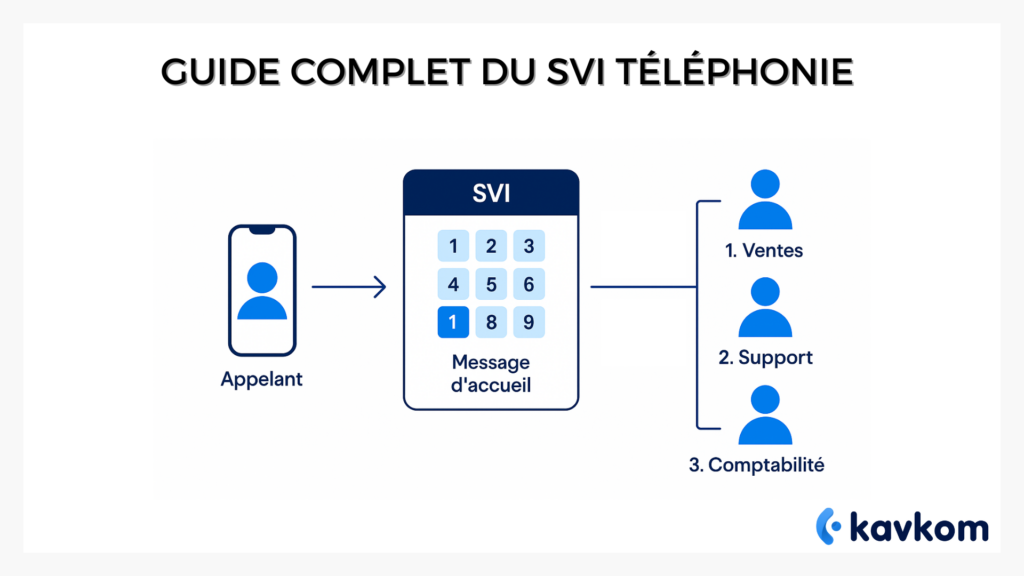
Telephony IVR, better known as Interactive Voice Response, is an automated system that greets callers and directs them to the right person. You’ve been through it a thousand times. “For customer service, press 1. For billing, press 2. Behind this apparent simplicity, a sophisticated mechanism organizes call routing, reduces waiting times and improves the overall experience of callers.
For decision-makers, IVR is not just a guidance tool. It’s an organizational lever. It helps to avoid unnecessary transfers, offer a structured welcome, better manage peaks in activity and absorb growth without overloading teams.
How a telephony IVR works: architecture, menus, caller journey
To understand an IVR, we need to follow the path of a call. The caller dials a landline or geographic number. The phone system identifies the incoming call, then launches the pre-recorded voice menu. The caller uses his or her keypad or voice to select an option. The IVR then applies pre-defined routing rules.
A modern IVS is based on three main building blocks:
Messages and scenarios
This is the part visible to the caller. Greetings, choice of services, announcements about opening times, automatic forwarding in the event of closure. These scenarios must be legible, short and consistent with your image.
The routing engine
He decides where to send each call. This can be based on agent skills, availability, queues or even language. An advanced IVR doesn’t simply redirect to a group. It prioritizes, rebalances and secures the call path.
Integration into your infrastructure
Whether it’s a local switchboard or a complete cloud environment, the IVR communicates with existing rules. It can trigger external forwarding, feed statistics, synchronize calls with your CRM or inform a supervisor in real time.
The main benefits of telephony IVR for businesses
A well-configured IVR doesn’t just dispatch calls. It transforms the way you greet your callers.
Enhanced user experience
Every caller quickly finds the right information. In a call center where pressure is constant, this fluidity changes everything. Teams receive better sorted requests, reducing misdirections and unnecessary transfers.
Reduced waiting time
This is one of the most frequently cited benefits. The telephony IVR filters, identifies and directs calls. Agents no longer spend time transferring calls or apologizing for misdirected calls.
Peak activity management
During certain periods, everyone calls at the same time. IVR messages and scenarios absorb the flow. They can offer a callback, provide information on opening hours or refer the caller to an alternative channel. This prevents bottlenecks that damage customer satisfaction.
More consistent service quality
A structured welcome gives an impression of control. Every caller receives the same introduction and accesses the same pathway. In multi-site structures, it’s a way of standardizing internal procedures.
Key benefits
- Reduced waiting times,
- Smoother organization,
- Uniform experience,
- Time-saving for teams,
- Dynamic routing.
Practical uses of IVR in call centers and sales teams
Call centers use IVRs to filter and direct mass calls. Sales teams use it to divide prospects according to location, language or offer. Support departments use it to prioritize urgent requests, identify technical problems or keep callers informed during busy periods.
Examples of effective scenarios
Customer service: automatic sorting between orders, returns and complaints.
Technical support: orientation by product category.
Sales teams: breakdown by geographical area.
Administration: selection by type of document requested.
Missions with and without IVR
| Situation | Without IVR | With IVR |
|---|---|---|
| Home | Random calls, repeated transfers | Immediate guidance |
| Customer service | Long queues | Prioritization by reason |
| Technical support | Saturated agents | Intelligent distribution |
| Sales | Misdirected prospects | Automatic filtering by profile |
IVR and modern cloud telephony
Migration to the cloud is gathering pace in France. Companies are looking for flexible, hardware-free solutions that can operate anywhere and integrate easily with their existing tools.
Telephony is a natural part of this evolution. It simplifies not only the deployment of an IVR, but also all day-to-day call management operations.
Why the cloud makes everything simpler
A cloud telephony environment reduces technical constraints. There’s no physical installation, no waiting to change menus, no dependence on a single piece of hardware. You can create a scenario, adjust an option, change an agent group or update a message in a matter of minutes. The system remains accessible everywhere, for both office-based and telecommuting teams.
A platform like Kavkom becomes an excellent choice for companies that want to activate or modify an IVR in a matter of minutes. The tool is based on 100% cloud operation, with no imposed hardware, and offers rare flexibility for adapting accounts, managing teams and adjusting access. The logic is simple: everything is commitment-free, with pro rata billingand accessible via computer, mobile or physical IP phone, depending on your preferences.
Kavkom is designed for organizations with high call volumes: sales teams, call centers, customer services or multi-site structures. The aim is to offer an all-in-one telephony environment where IVR, routing, statistics and CRM integrations work together, without adding complexity.
Boostez la productivité de vos équipe commerciales grâce à Kavkom, le logiciel de téléphonie d’entreprise 100% cloud.
Planifier une démoWhat the cloud can do
- Instant scenario creation,
- Continuous updating,
- Real-time call tracking,
- Adapt quickly to unforeseen circumstances,
- Direct integration with business tools.
How to create a high-performance IVR: rules, best practices and common mistakes
An effective IVR is more than just a pretty voice menu. It has to respond to a logic of use. Here are the main principles that telephony managers adopt to build useful and appreciated call paths.
Rule 1: simplify the number of options
A menu of eight choices discourages callers. Most companies limit their menus to a maximum of three or four options. It’s better to offer a progressive path rather than overloading the first level with options.
Rule 2: write concise messages
The speech should be direct. The caller should not wait more than a few seconds before choosing an option. Too long a text creates frustration and lengthens queues.
Rule 3: adapt your IVR to your schedule
A good script doesn’t just say that the service is closed. It offers an alternative: a callback, an email, a referral to another team. The ideal is to maintain a reception path, even if it’s minimal, outside normal business hours.
Rule 4: review scenarios regularly
Companies evolve. Offers change. Teams grow. A static IVR quickly becomes an obstacle. Successful managers revise their scripts every few months.
Common errors
- Too many options on the first level,
- Messages too long,
- Course not updated,
- Lack of alternatives during closures,
- Lack of prioritization logic.
Implementing an IVR in a cloud environment: steps and recommendations
One of the major advantages of cloud IVR is its speed of deployment. But fast doesn’t mean improvised. To avoid pitfalls, you can structure implementation in four stages.
Step 1: Define internal needs
Before creating the menu, list the types of incoming calls. Classify them by volume, complexity and impact. This analysis will help you identify the options to propose and the priorities to respect.
Step 2: Write the script
It must be legible, coherent and logical. Callers must instantly understand where they are and what they can do. A professional voice, clear and consistent with your sound identity, improves the perceived quality of the greeting.
Step 3: Connect IVR to your agent groups
Each choice shouldn’t just refer to one group. It must reflect the reality of your teams. If volumes change frequently, create alternative paths. If certain agents master several tasks, exploit this flexibility.
Step 4: Test, correct, measure
The IVR should be tested by several profiles: administrators, agents, supervisors, new employees and in-house staff unfamiliar with your services. Once the system is up and running, look at the pick-up rate, abandonment rates and average time in queue.
How to measure telephony IVR performance
A high-performance IVR shows its worth in the statistics. Managers often analyze the following indicators:
Drop-out rate
It reflects the ability of our teams to respond. IVR improves this rate by filtering and structuring calls.
Drop-out rate
A high abandonment rate indicates that messages, queues or schedules are poorly configured.
Average waiting time
The aim of IVR is to reduce this time. A sharp drop indicates that the routes are effective.
Breakdown of calls by department
This vision is essential for adjusting staffing levels.
IVR indicator table
| Indicator | What it measures | Impact of IVR |
|---|---|---|
| Drop-out rate | Team responsiveness | Faster orientation |
| Drop-out rate | Waiting experience | More relevant routes |
| Waiting time | Load and flow | Improved distribution |
| Breakdown by department | Reality on the ground | Better organizational alignment |
FAQ IVR telephony
Does an IVR replace a switchboard?
No. The IVR connects to the switchboard or cloud system. It does not handle calls itself. It structures the greeting.
How long does it take to set up an IVR?
No. A cloud IVR can be set up quickly if the scenarios are ready.
Can IVR use voice recognition?
Yes, some systems offer voice commands in addition to the keyboard.
Is IVR right for small businesses?
Yes, if there are several departments or a high volume of calls. Very simple VSEs don’t always feel the need.
Can a scenario be modified after it has been launched?
Yes, all stages can be adjusted according to feedback and statistics.
Conclusion
Today, telephony IVR is one of the most useful building blocks in reception environments. It structures flows, improves the experience, reduces pressure on teams and enhances service quality. In a landscape where cloud telephony is on the rise, IVR is becoming a management tool. It helps organizations manage growth, absorb peaks in activity and deliver a consistent experience, even when volumes change by the hour.
The aim of this guide was to give you a comprehensive, accessible and in-depth view of how an IVR works and how to implement it. You now have a solid foundation on which to analyze your company’s needs and prepare for the integration of an automated greeting system into your telephony infrastructure.
And if you’d like to go one step further and see what a cloud-based IVR can do in a modern, flexible environment, you can discover Kavkom in real-life conditions.